CourseForge Review 2026: Features, Pricing, Pros & Cons (Worth It?)
Ever had a course idea you were genuinely excited about, then lost three weekends to outlines, scripts and slides before giving up? This CourseForge review is for you. CourseForge is a browser-based tool that takes one topic and turns it into a complete mini-course package: a 7-day curriculum, video scripts, slide decks, worksheets and a sales letter, all exported as a ZIP file. The launch price is $9, one time.
If you’ve ever tried building a course from scratch, you know where it gets painful. The idea is the easy part. The grind is breaking the topic into lessons, writing the narration, building the slides, designing the worksheets and then writing a sales page that doesn’t sound desperate. Most people stall somewhere in the middle, and the half-finished folder sits on the desktop for months.
So I read the entire sales page, including the fine print, the guarantee wording and the disclaimers. I haven’t used the software myself, so this review is based on what the vendor publishes. I’ll point out what looks genuinely useful, and I’ll flag a few claims I’d test before trusting. By the end you’ll know what’s inside, what it costs, who it fits and whether it deserves $9 of your money.
CourseForge Review: Quick Overview
| Product | CourseForge (Front-End Edition) |
| Creator | Duy Vo, under the CourseForge Studio name |
| What it is | Browser-based tool that builds a mini-course package from one seed topic |
| What you get | 7-day curriculum, CapCut video scripts, slide decks, worksheets, sales letter, ZIP export |
| Price | $9 one-time launch price (page says it will increase later) |
| Subscription? | No, no monthly fees stated |
| License | Lifetime commercial license included |
| Refund | 30-day money-back guarantee |
| Sold through | WarriorPlus |
| Best for | Aspiring course creators, coaches, freelancers, content creators |
Short version: it’s a very cheap way to get a structured first draft of a short course and its supporting materials. It’s not a course hosting platform, and it won’t find students for you.
What Is CourseForge?
CourseForge is a course-creation assistant. You enter a seed topic and who it’s for, pick a tone and a language, and it generates a connected set of materials for a 7-day mini-course. Everything is designed to work together, so the lessons, scripts, slides and worksheets line up instead of feeling like five separate documents.
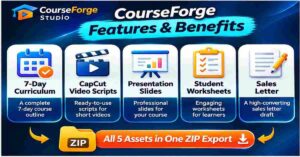
The page lists seven things in the package. A 7-day action-focused curriculum with daily lessons and assignments. Timestamped narration scripts for CapCut with visual and B-roll cues. A slide deck studio that outputs Markdown and HTML decks with a built-in web presenter. Printable student worksheets and daily checklists. A sales copy generator that follows a hook, story and offer structure. A one-click ZIP exporter. And a lifetime commercial license.
The vendor says you don’t need prompt skills, coding, API keys or design software. It also says there are no AI subscriptions to pay for on the side. That last point is the main selling angle: instead of paying monthly for AI tools and stitching the results together yourself, you pay once and get a ready-made workflow.
One thing I want to be fair about. The page claims everything generates in under a second with “no extra AI costs.” That’s very fast, and it suggests the content may be built from structured templates and logic rather than a live, open-ended AI model. The page doesn’t explain how it works, so I can’t say for sure. It matters because template-driven drafts can be solid and well organized, but they may feel more standard than something a chat-style AI writes for you. I’d test it on your own topic and judge the quality yourself, which is easy to do with the refund window.
How Does CourseForge Work?
The process is short, and the page boils it down to three moves.

Step 1: Getting Started
You buy through WarriorPlus, receive your login details by email and open the tool in your browser. There’s nothing to install, and the page says no technical skills are needed. A member portal, a user guide in video and text, a support ticket desk and a public changelog are all listed, which is a good sign for a $9 product.
Step 2: Setting Up the Product
Here you enter your seed topic and choose your audience level, video tone and language. The page says this takes under 30 seconds. Be specific. “Budgeting for freelancers” will give you a more useful course than “money.” Think of it as briefing a helper: the clearer the brief, the less editing you’ll do later.
Step 3: Using the Main Features
Click the “Forge Course and Deliverables” button and the tool produces the full package. You then move into a tabbed editor where you can read and change each piece: the curriculum, scripts, slides, worksheets and sales letter. When you’re happy, you download everything as a ZIP, organized into folders as Markdown, HTML, plain text and scripts.
That editing step is where you add your voice, your examples and your expertise. A generated draft is a starting point. The courses that actually sell tend to have a real person’s stories and opinions in them, and that part is still your job.
CourseForge Features and Benefits
Feature 1: The 7-Day Curriculum and Student Worksheets
This is the backbone. You get seven daily lessons, each with action steps and an assignment, plus printable worksheets and daily checklists. A short, action-based format is smart for a few reasons. It’s easy to finish, which matters because students who finish give better feedback. It’s easy to sell at a low price point. And it works well as a lead magnet or companion mini-course for an audience you already have.
The worksheets and checklists are underrated. Plenty of course creators skip them because they’re tedious to design, yet they’re what makes a course feel like a real product instead of a long blog post.
Feature 2: CapCut Scripts and Slide Decks
If you plan to record video lessons, the scripts are the time saver. They include narration with timing and cues for B-roll and visuals, built to drop into CapCut. For people who dread staring at a camera with no script, that structure helps a lot.
The slide deck studio gives you seven-day decks in Markdown and HTML, with a built-in web presenter, so you can present straight from the browser. These aren’t designed PowerPoint files, so if you want heavy branding you may need to restyle them. But for a clean, fast deck, it covers the basics.
Feature 3: Sales Letter Generator, ZIP Export and Commercial License
The sales copy generator writes a letter using a hook, story and offer structure, for use on WarriorPlus, Gumroad or your own website. A sales page is often what stops a finished course from ever being sold, so having a draft ready is a real head start.
The one-click ZIP exporter bundles everything in an organized folder structure, which makes handing files to a client or uploading to a platform much easier. And the lifetime commercial license is the part that matters if you want to sell what you make. The page says you keep 100 percent of the profits and can invoice private clients. As always, read the license wording before relying on it, since the details are in the separate terms.
👉 Want a look at what the output actually looks like? You can check the CourseForge screenshots and current launch price here.
Who Is CourseForge Best For?
Aspiring course creators. If you’ve got a topic you know but no idea how to structure it, this gets you past the blank page. You’ll have something concrete to react to, edit and improve.
Content creators with an audience. A companion mini-course, a free challenge or a paid starter product is a natural next step for anyone who already posts helpful content. This makes the build far faster.
Freelancers and agencies. The page says you can use the commercial license to deliver training materials to clients. If you create onboarding guides, workshops or client training, a fast first draft saves billable hours.
Coaches and consultants. Reusable training materials like worksheets, slides and a structured week-long program are bread and butter for coaches, and this speeds up making them.
Who it’s not for: the vendor is clear about this, and so am I. It isn’t for people expecting passive income with no effort. It isn’t an enterprise learning system, so don’t expect grading, live streaming or multi-instructor features. And it doesn’t host or sell your course for you. You’ll still need a place to deliver it and a way to find buyers.
CourseForge Pros and Cons
Pros
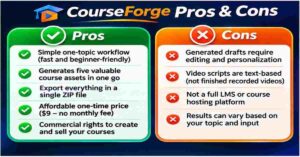
- Very low one-time price, with no monthly fees
- Produces five connected deliverables from a single topic
- Beginner-friendly, no prompt skills or API keys needed
- Video scripts with timing and B-roll cues for CapCut
- Worksheets, checklists and slide decks included
- Sales letter draft saves a big time sink
- ZIP export in several formats
- Lifetime commercial license mentioned
- Editable in a tabbed editor
- 30-day money-back guarantee, plus a user guide and support options
Cons
- The “under one second” and “no AI cost” claims raise questions about how the content is generated
- Output is a draft, and it needs your own expertise and editing
- No video demo or free trial mentioned, just screenshots
- No testimonials on the page
- Many statistics, like “$1,500 in freelancer fees” and “95% give up,” have no sources
- The price is expected to rise, but no new price is stated
- The refund wording is tied to a “30 hours saved” condition that isn’t clearly defined
- It doesn’t host courses or find students for you
At $9, most of these are small risks. They’re mainly reasons to test it on a real topic soon after buying.
CourseForge Pricing and OTOs
Front-end price: $9 one-time. The page calls it a launch special and says the price will go up after the introductory window, without giving a new amount or end date. That’s the kind of line you see on lots of launches, so I wouldn’t panic about it, but if the price is $9 when you read this, it’s a small enough amount that waiting rarely helps.
For that, you get the full seven-item package described above: the curriculum, scripts, slides, worksheets, sales copy generator, ZIP exporter and the commercial license. The page lists “$0 monthly fees” and no recurring charges.
OTOs and upsells. The sales page doesn’t list any upsells. Since it’s sold through WarriorPlus, extra offers sometimes appear during checkout, so read every screen before clicking. The page does call this the “Front-End Edition,” which hints that other editions may exist. If an upgrade appears, check exactly what it adds before paying.
For perspective, the page says that hiring a freelancer for this kind of material can run $1,500 or more, and that AI subscriptions cost around $20 a month. Those numbers aren’t sourced, but the basic point holds up: $9 is tiny compared with the time or money most people spend on course materials.
CourseForge Bonuses
The sales page doesn’t list separate bonuses. What it does list is a bundle of seven included items, and the vendor puts a combined value of $179 on them. I’d treat that figure as marketing, but the items themselves are the real bonuses in the sense that matter: the worksheets, the sales letter generator, the ZIP exporter and the commercial license come with the base purchase.
If you’re deciding whether it’s worth it, don’t focus on the dollar values. Ask a simpler question: would having a structured curriculum, scripts, slides, worksheets and a sales letter draft for one topic save you real time? For most people building a first mini-course, the answer is yes, even if you rewrite half of it.
My CourseForge Evaluation
I’m scoring this on what’s published and what I could verify, so these are informed estimates and not test results.
- Ease of use: 4.5 / 5. Enter a topic, click once, edit and export. Very simple.
- Value for money: 4.5 / 5. $9 for a full course package is hard to beat on price alone.
- Features: 4 / 5. The five connected deliverables cover most of what a mini-course needs.
- Transparency: 3 / 5. The disclaimers are clear, but there are unsourced stats, no testimonials and little explanation of how the content is generated.
- Output quality (unverified): 3.5 / 5. I can’t judge this without hands-on use, so I’m staying cautious until it’s been tested on a real topic.
Overall: 3.9 / 5.
Here’s a real-world way to picture it. Say you’re a fitness coach who wants a seven-day “beginner kettlebell” mini-course. Normally you’d spend a weekend on the outline alone. With a tool like this, you’d have a full structure, daily lessons, a script for each video and worksheets in a few minutes. Then you’d spend your time adding your own cues, your real client stories and the technique tips only you know. That’s a much better use of a weekend.
The sales page says creation time drops from 40-plus hours to under a second. I’d read that as “the first draft takes a second,” not “the whole course takes a second.” Your editing and recording time doesn’t go away, and it shouldn’t, because that’s where the quality comes from.
CourseForge vs. Alternatives
| CourseForge | Doing it yourself | General AI chat tools | Hiring a freelancer | |
|---|---|---|---|---|
| Cost | $9 one-time | Free, but many hours | Free or monthly plans | Often hundreds to thousands |
| Speed to first draft | Minutes | Days or weeks | Fast, with effort | Days to weeks |
| Connected set of materials | Yes, built in | You build each piece | You manage the structure | Depends on the brief |
| Scripts, slides, worksheets, sales letter | Included | Separate tools | Possible, one prompt at a time | Usually extra cost |
| Personal voice and originality | You add it in editing | Fully yours | Depends on your prompts | Depends on the writer |
| Best for | Quick, structured starts | Full creative control | Flexible brainstorming | Polished custom work |
👉 Curious how it handles your own topic? Take a look at CourseForge here and see if the output fits what you teach. The 30-day guarantee is there if it doesn’t.
Chat-style AI tools like ChatGPT or Claude can absolutely help you outline a course and write scripts. They’re flexible, and they can adapt to a unique angle better than a fixed workflow might. The trade-off is that you manage the process: writing each prompt, keeping lessons consistent, formatting worksheets and assembling the files. CourseForge packs that into one repeatable flow.
It’s also worth being clear about what it isn’t. Platforms like Teachable, Kajabi or Thinkific host and sell courses. CourseForge creates the materials. Many people will use a tool like this to build the course and a platform like those to deliver it.
A skilled freelancer can still give you something more polished and personal. But for a first draft at this price, it’s hard to argue with the math.
Is CourseForge Legit?
Based on the sales page, it looks like a genuine, focused product from a named creator, Duy Vo, with real support channels. There’s a member portal, a user guide, a changelog, a support ticket desk and a refund policy page. Payments run through WarriorPlus, Stripe and PayPal with SSL security, and the page includes the usual WarriorPlus, FTC and trademark disclaimers. It also says plainly that earnings are illustrative and that results vary, and it lists who the tool isn’t for. That honesty counts for something.
Now the things I’d watch. There’s no video demo, and no testimonials. The statistics about freelancer costs and course creators giving up aren’t sourced. The “under one second” speed and “no AI costs” claims aren’t explained, so I’d test the output quality on a real topic. And the FAQ on the page lists questions, such as the rights you get to the content, but the answers weren’t visible in what I read, so read the license and refund policy before relying on commercial use.
One more note: WarriorPlus only processes the payment. The page says product, support and refund questions go to the vendor directly. That’s normal, but keep your receipt.
My practical advice: buy it, generate a full course on a topic you know well, and judge it honestly. If the quality isn’t there, use the guarantee. Also read: EtsyDynasty AI Review 2026: Features, Pricing, Pros & Cons (Worth It?)
CourseForge Refund Policy
CourseForge comes with a 30-day money-back guarantee. The page says you can email the support desk or submit a ticket within 30 days, and that the refund covers the full $9 with no interrogation.
There’s one thing worth noticing. The guarantee is described as applying if you’re not completely convinced the software saves you at least 30 hours per course launch. The page doesn’t say how that’s measured, so I’d read the full refund policy before buying. In practice, a vendor who offers a refund at all on a $9 product is not likely to argue about it, but it’s good to know the exact wording.
Tips if you want to test it properly: do it in the first week, use a topic you actually know, and save your receipt and order details. If you ask for a refund, do it in writing so there’s a record.
Frequently Asked Questions
Does CourseForge require an OpenAI API key or a monthly AI subscription?
No. The page says there are no API keys, no monthly fees and no recurring subscriptions for the Front-End Edition.
Does it work on Mac and Windows?
It’s a browser-based tool with no installation, so it should work on both. The page lists the question but I didn’t see the answer, so confirm with support if it matters to you.
What rights do I have to the content it produces?
The page says a lifetime commercial license is included, that you keep 100 percent of profits and that you can invoice private clients. Read the license terms for the exact details.
How does the 1-Click ZIP Exporter work?
It packages your finished materials into organized folders, in formats like Markdown, HTML, plain text and scripts, so you can download everything at once.
Can a beginner use it?
Yes. It’s positioned for aspiring course creators, with no prompt skills, coding or design software needed. You’ll still want to review and edit the output.
Is there an ongoing subscription fee?
No. It’s a one-time payment, and the page lists $0 in monthly fees.
Does it host my course or find students?
No. It creates the materials. You’ll need a platform to deliver the course and your own marketing to find buyers.
Will the price go up?
The page says the launch price will increase, but it doesn’t give a new amount or date.
Final Verdict: Is CourseForge Worth Buying?
Let’s return to the folder of half-finished course files we started with. The reason most course ideas die isn’t a lack of knowledge. It’s the sheer amount of grunt work between “I know this topic” and “I have something I can teach and sell.”
CourseForge goes straight at that gap. For $9, you get a structured 7-day curriculum, video scripts, slides, worksheets and a sales letter draft, bundled and exportable, with a commercial license and a 30-day guarantee. For coaches, freelancers, creators and beginners, that’s a very low-risk way to get unstuck and start with something real.
It’s not perfect, and it’s not magic. The speed and no-AI-cost claims deserve a quick test on a real topic. There’s no demo video and no testimonials. You’ll still need to add your own expertise, record your lessons and find buyers, because nothing here promises sales. And it doesn’t replace a course platform.
My take: if you’ve been sitting on a course idea and the setup work is what’s holding you back, CourseForge is worth trying at this price. If you want fully custom, highly polished materials, treat it as a head start and not the finish line.
👉 If the blank page is what’s been stopping you, the easiest way to find out is to try it. Get CourseForge here, build one mini-course on a topic you know and see how much time it saves. If it doesn’t earn its place, you have 30 days to ask for your money back.
Affiliate disclosure: Some links in this post are affiliate links. If you buy through them, I may earn a small commission at no extra cost to you. I only recommend products I’ve looked into carefully, and my opinions are my own. Please read the vendor’s terms and refund policy before you buy.