ProfitMaps AI Review 2026: Can a Google Maps Scan Really Help You Land Local Clients?
Cold outreach to local businesses has a reputation for being awkward and ineffective, and honestly, most of the time it deserves that reputation. So when I came across a tool that says you should show a business owner a visual map of where they rank on Google before you ever pitch them, I was curious. That’s the idea behind ProfitMaps AI, and it’s why I’m writing this ProfitMaps AI Review.
I went through the registration page for the launch webinar and noted everything it says the tool does. I also noted what it doesn’t say, because there are some gaps you should know about before you get excited. This is an early look, so I’ll be clear throughout about what’s confirmed and what isn’t.
Why Pitching Local Businesses Is So Hard
If you’ve ever tried to sell marketing services to local businesses, you know how the usual conversation goes.
You find a plumber, a dentist, a restaurant or a roofer. You send an email that says something like “I can help you get more customers.” They get ten of those a week. Most go straight to the trash, and the ones that get read blend into each other.
The problem isn’t that local business owners don’t need help. Plenty of them do. The problem is that your message sounds exactly like everyone else’s. You’re asking for their time and attention without giving them anything first.
And when you do get on a call, you’re often selling something they can’t see. “Local SEO.” “Better visibility.” “More map presence.” Those phrases mean something to you, but they’re vague to a person who’s busy running a shop. They nod politely, say they’ll think about it, and you never hear back.
On top of that, if you’re a freelancer or small agency, you’ve got a time problem. Researching each prospect by hand is slow. You check their rankings, look at competitors, check reviews, try to figure out what’s wrong, and write it all up. By the time you’ve done that for one business, you could have lost an afternoon, and you still don’t know if they’ll reply.
That’s the cycle. Lots of effort up front, no proof for the prospect, and a very low reply rate.
So the real question is: how do you start a conversation with a local business owner that feels useful instead of pushy?
That’s the gap ProfitMaps AI is aiming at.
What ProfitMaps AI Is (Based on What’s Public Right Now)
Here’s the important thing to know first. The page I looked at is a free webinar registration page, not a full sales page. So what follows is based on how the tool is described there, and I’ll point out what’s missing as we go.
ProfitMaps AI is a local visibility tool built around Google Maps. It’s aimed at freelancers, marketers, consultants and agencies who want to find clients among local businesses.
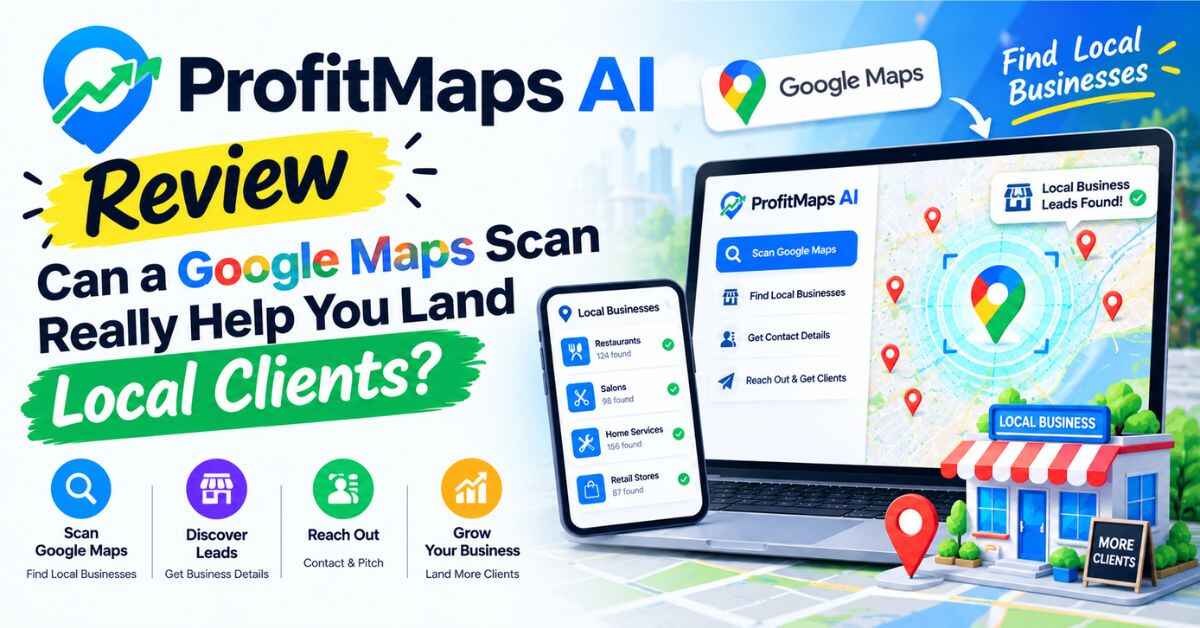
Here’s the basic idea. You pick a local business and a keyword, like “emergency plumber” or “dentist near me.” The tool scans how that business ranks for that keyword across a grid of spots around it. The page describes a 5×5 grid, so 25 locations. Then it turns the results into a visual report that shows where the business appears near the top of the map and where it doesn’t.
The page calls the approach “map first, pitch second.” In other words, you show the business owner the picture first, so the conversation starts with something real they can see, instead of a sales line.
From there, the tool says it can generate an AI action plan, show which competitors are winning in the map results, and let you put your own name and logo on the report so it looks like your work.
That’s the core. There’s more, which I’ll get into below.
Curious what one of these map reports actually looks like? The creators are running a free live webinar where they walk through the tool. You can save your spot on the official ProfitMaps AI page here and see it for yourself before you decide anything.
ProfitMaps AI Review: A Closer Look at the Features
Let me go through the features as the page describes them, in the order you’d probably use them.
Local Map Scanning
This is the main feature. You choose a business, a keyword, a grid and a search radius, and the tool checks how that business ranks in each spot of the grid. One screenshot on the page also shows a credit cost before you run a scan.
Why does a grid matter? Because local search results change depending on where the searcher is standing. A business might show up in the top three when someone searches from right outside its door, but vanish a few streets away. A single ranking number hides that. A map makes it obvious.
The page shows sample results, such as “top 3 in just 2 of 25 spots” and “8% of the map in the top 3.” These are labeled as sample data, so don’t read them as real results. But they show the kind of picture you’d get: a quick, visual way to say “here’s where you’re showing up and here’s where you’re missing.”
Competitor Analysis
The tool shows which competitors hold the top spots on the map. For a business owner, this is often more persuasive than any explanation. Seeing the rival down the road sitting at number one across most of the grid tends to get attention.
AI Action Plans
Based on the scan, the tool generates next steps. The page gives examples like improving review volume, fixing the primary business category and building local service pages. In plain words, it tries to turn “here’s the problem” into “here’s what to do about it.”
I’d treat this as a starting point. Any AI-written plan should be read with a critical eye and adjusted to the business in front of you. But having a draft ready saves time.
Branded, Shareable Reports
Reports can carry your name and logo, and a screenshot mentions an action plan, a link expiry and a call to action. So you can send a business owner a report that looks like it came from your agency.
This matters because the report is your pitch. A clean, branded page with your name on it does the talking before you get on a call.
Business Finder
This one searches for prospects by niche and town, so you can build a list of local businesses to reach out to. The page says it’s available only in the Gold and Platinum options. I couldn’t find what those are, or what they cost, which I’ll cover in the honest section.
Website Creation and Local Content
The tool also lists a site builder for local business websites, plus content generation for Google Business Profile posts and local pages. If you offer those services, it could let you handle more of the work in one place. The page doesn’t give details on how powerful the builder is or what its limits are.
The Workflow in Six Steps
The page lays it out simply:
- Add a local business and choose keywords.
- Run a map scan and review the results.
- Look at competitors and visibility gaps.
- Generate a report and an AI action plan.
- Explore the website and content features.
- Use what you found to start a conversation with the client.
That last step is the whole point. The tool isn’t promising to close deals for you. It’s promising to give you a better reason to start talking. Also read: ViralDashboard Review 2026: One Dashboard to Find, Schedule and Track Your Social Media Content
The Free Webinar and the Free Bonuses
Since this is a registration page, the free webinar is the main offer right now. According to the page, there are two sessions, and both cover the same content:
- Tuesday, October 20, 2026 at 8:00 PM ET
- Wednesday, October 21, 2026 at 10:00 AM ET
(Converted into your time zone, those will land at different hours, so check before you pick one.)
The page also says that registering gets you two free bonuses. They’re PDFs, and I want to be clear that they’re described as free for webinar registrants, not as purchase bonuses.
Bonus 1: Local Prospect Qualification Scorecard. A 25-point checklist for deciding whether a business is worth pursuing, plus niche and town selection sheets, a red-flag list and a prospect tracker. The page puts a stated value of $147 on it. I’d ignore that number. What matters is whether it saves you from chasing the wrong prospects, and a checklist like this probably could.
Bonus 2: Map-First Outreach Script Pack. Email, DM and phone scripts, answers to common objections, a five-touch follow-up plan, an outreach log and a compliance checklist. Stated value $127. Again, ignore the number, but scripts and a follow-up plan are useful if outreach is the part you struggle with. The page mentions the compliance checklist without saying what’s in it, so read it carefully before you rely on it.
For a free registration, that’s a decent amount of material. Even if you decide the tool isn’t for you, the PDFs might still be worth having.
Who Might Actually Benefit From ProfitMaps AI
Here are the situations where I can see this making sense.
The freelancer who wants local clients. You’ve got marketing skills, but your outreach isn’t getting replies. A visual report gives you something concrete to send, which is a much warmer way to say hello than a generic pitch.
The consultant adding a service. If you already advise small businesses on other things, a map report could become a simple, visible entry point to talk about local visibility.
The small agency. If you serve local clients, branded reports and action plans could help with both winning new clients and showing ongoing progress to the ones you have. The page suggests offering one-time visibility projects, ongoing monthly work or recurring reports, though it doesn’t give pricing guidance.
The marketer starting from scratch. The prospect scorecard and the outreach scripts are aimed at exactly this person. If you don’t know who to contact or what to say, the bonus materials give you a structure.
The person curious about local SEO. Even if you don’t plan to sell anything yet, watching the webinar is a free way to see how this kind of work gets done.
If one of those sounds like you, the easiest way to find out whether it fits is to watch it in action. Here’s the official page where you can register for the free ProfitMaps AI webinar. While you’re there, take a look at the two bonus PDFs and ask yourself whether the “map first, pitch second” approach would work in your market.
The Honest Part: What We Don’t Know Yet
I’d rather give you the full picture than hype something I can’t verify, so here’s what the page leaves out.
There’s no price. The page doesn’t state what ProfitMaps AI costs. It doesn’t list plans, other than mentioning Gold and Platinum in connection with the Business Finder, and it doesn’t say what those include or what they cost. If the webinar is where the price gets revealed, you’ll want to hear it before deciding. I can’t tell you whether it’s a good deal, because I don’t know the number.
Credits aren’t explained. A screenshot shows a credit cost before you run a scan, which tells me scans use credits. But the page never says how many credits you get, how many a scan costs or what happens when you run out. That matters a lot if you plan to scan dozens of prospects.
There’s no refund policy on the page. There’s a link to one, but I couldn’t see its contents. No money-back guarantee is described. Before you buy anything, read it.
There are no testimonials or real results. The sample numbers on the page are labeled as illustrations. I didn’t see any case studies or proof that using the tool led to clients. The page itself says it doesn’t guarantee better rankings, clients or income, and that results depend on your market, effort and pricing. That’s honest, and it’s the right way to read it.
We don’t know how the data is collected. The page doesn’t explain how rankings are gathered, how often they update or how accurate they are. For a tool built on rankings, that’s an important detail. I’d want to test a scan on a business I know well and see if the results match what I see on Google.
The Business Finder and website builder lack detail. No information on data sources, limits or how capable the builder is.
The company is hard to identify. I didn’t find company or owner details beyond a support link and a copyright line.
Some of the page looks unfinished. The countdown timers all showed zeros, the sample reports use placeholder text like “Your Agency,” and a few technical leftovers appear in the text. That’s common in launch pages before the full version is up, but it’s another reason to wait for the full details.
It won’t win clients for you. A good report opens a door. You still have to reach out, follow up, explain the value and deliver results. No tool does that part.
None of this makes ProfitMaps AI a bad idea. It means this is an early look at a tool whose price and terms haven’t been shown yet.
A Sensible Way to Approach It
If I were looking at this tool, here’s what I’d do.
First, I’d register for the free webinar. It costs nothing, and it’s the only way to see the real product and the price. I’d pick whichever session fits my schedule.
During the webinar, I’d listen for the things the page doesn’t say. What does it cost? What do the plans include? How do credits work? How are rankings collected? What’s the refund policy? If those questions don’t get clear answers, that tells me something too.
I’d download the two free PDFs and use them regardless of whether I buy. A prospect scorecard and outreach scripts are useful on their own.
If I did decide to try the tool, I’d test it on a few local businesses I already know, and check whether the maps match what I find when I search myself. Real checks beat any sample screenshot.
And I’d make sure I knew exactly how to ask for a refund before paying anything.
Picture two people who see this page on the same day. One registers, watches the webinar and takes notes. The other thinks “I’ll check it out later” and forgets. A week later, one of them has the free materials and the full picture. The other has nothing. It costs nothing to be the first person.
Quick Questions
Is ProfitMaps AI free? The webinar and the two bonus PDFs are free. The page doesn’t say what the tool itself costs.
What does it do? It scans a local business’s Google Maps rankings across a 25-spot grid and turns the results into a visual report, with competitor info and AI-written action plans.
Who is it for? Freelancers, marketers, consultants and agencies who want to find and pitch local business clients.
When is the webinar? Tuesday, October 20, 2026 at 8:00 PM ET, or Wednesday, October 21, 2026 at 10:00 AM ET. Both cover the same content.
Is there a money-back guarantee? None is described on the page. A refund policy link exists, so read it before buying.
Can I put my own branding on reports? Yes, the page says reports can carry your name and logo.
Will it get me clients? The page says it doesn’t guarantee better rankings, clients or income. It’s a tool for starting conversations.
Final Verdict: Is ProfitMaps AI Worth Checking Out?
For the right person, yes, it’s worth a look, and the free webinar makes that easy.
The idea is smart. Showing a business owner a map of where they rank, and where their competitors rank, is a much better way to open a conversation than another generic email. The branded reports, the action plans and the bonus scorecard and scripts all point at a clear workflow for freelancers and small agencies.
What I can’t tell you yet is whether it’s worth the price, because the page doesn’t give one. I also can’t verify how the rankings are collected, how credits work or what the refund terms are. Those are the questions to ask before you spend any money.
If you do any kind of local marketing, or you want to, registering for the webinar costs nothing and gets you two useful PDFs. If you’re expecting a button that brings in clients on its own, that’s not what this is, and the page doesn’t claim it is.
If you’ve read this far, you’re probably curious enough to see it for yourself. Go grab a spot in the free webinar, get the two bonus PDFs and hear the price and details straight from the team. Register on the official ProfitMaps AI page here. The two sessions are on October 20 and 21, so pick the time that works for you.
A quick note: this post has affiliate links. If you click one and buy, I may earn a small commission at no extra cost to you. It helps me keep writing reviews like this. I try to be upfront about the good and the not-so-good, and the opinions here are mine. Please do your own research, read the terms on the official page, and decide what’s right for you. Results vary, and nothing here is a promise of income.