LimitlessAI Review 2026: Features, Pricing, Pros & Cons
If you’ve ever watched a credit counter drop while you were halfway through a project, this LimitlessAI Review is for you. LimitlessAI is a one-time-payment platform that pulls AI video, movies, music, voice, eBooks, images, presentations, graphics and stories into one dashboard, and it promises no credits and no monthly fees. That’s a big promise. So in this review I’ll walk through what you actually get, what it costs, who it suits, where I’d be careful, and whether it’s worth your money.
Here’s the problem it’s trying to fix. You sign up for an AI video tool and it feels like magic for about a week. Then the warning pops up: “You’ve used 80% of your credits.” You need a voiceover, so that’s another subscription. Music? Another one. Thumbnails? Another. Before long you’re paying for five or six tools that don’t talk to each other, and you start making shorter videos and fewer versions just to stretch the allowance. That’s not creative freedom. That’s rationing.
LimitlessAI says it removes the meter. Let’s see how much of that holds up.
LimitlessAI Review: Quick Overview
Here’s the short version before we get into detail.
| Product | LimitlessAI |
| Creator | Seun Ogundele |
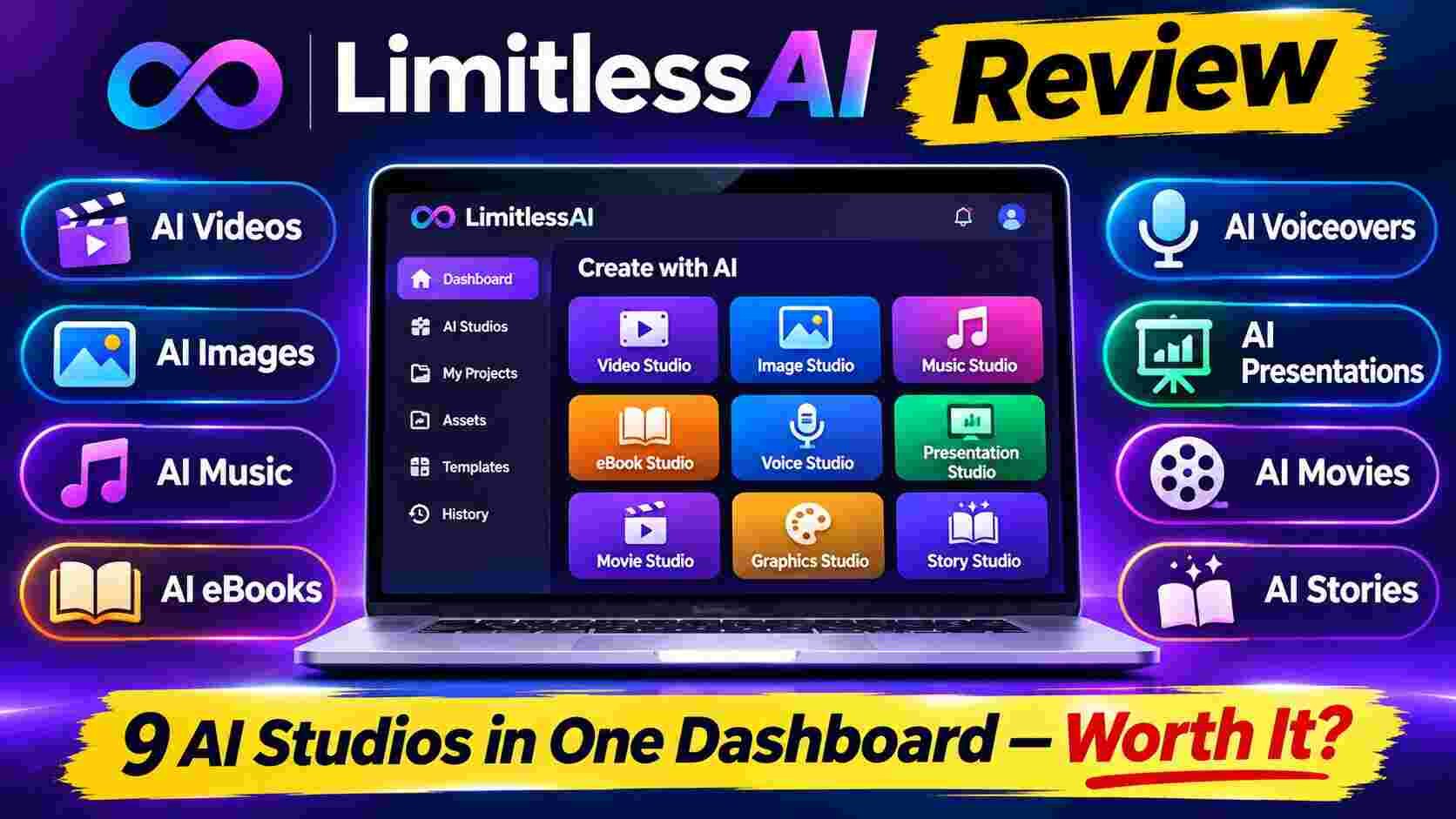
| What it is | Web-based platform with 9 AI creation studios in one dashboard |
| Studios | Video, Movie, Music, Voice, eBook, Image, Presentation, Visuals, Story |
| Pricing model | One-time payment, lifetime access (launch price listed at $17) |
| Exports | 4K, HD, MP3, PDF, PPTX, no watermarks |
| Commercial use | Included, with terms that depend on the plan and underlying AI models |
| Refund | 30-day money-back guarantee |
| Best for | YouTubers, affiliate marketers, freelancers, authors, small business owners, beginners |
My quick take: for the launch price, the idea is strong and the value is hard to ignore. But “unlimited” is a word that deserves a second look, and I’ll show you exactly where.
What Is LimitlessAI?
LimitlessAI is an all-in-one AI creation suite. Instead of opening a video app, a music app, a voice app and a design app separately, you log in once and pick the studio you need. You type what you want in plain English, the platform generates it, and you export the finished file.
The creator, Seun Ogundele, says he built it after scrolling through a year of card statements and counting more than 14 AI subscriptions. What bothered him wasn’t just the money. He noticed he’d been making smaller things on purpose so the credits would last. Shorter videos. One cover instead of three. I think a lot of creators will recognize that feeling.
The platform says it connects to official AI engines through their APIs, rather than wrapping a cheap model in a fancy interface. If that’s accurate, it means the quality you see in the demo should be close to what you get in your own account. I’d still recommend testing a few outputs during the refund window, which I’ll come back to.
How Does LimitlessAI Work?
The process is simple, and honestly that’s one of its biggest strengths. There’s no software to install and no technical setup.
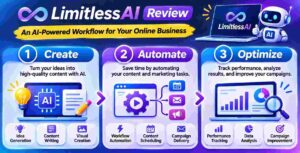
Step 1: Getting Started
You buy access, then log in to your dashboard from a normal web browser. Everything sits behind one login on one screen. There’s nothing to connect, nothing to download and nothing to top up. It also has a mobile edition, so you can work from a phone or tablet.
Step 2: Setting Up the Product
There’s very little setup. You choose the studio you want, such as Video, Music or eBook, and the platform asks for your idea. You can type a sentence, paste a script, upload an image or drop in a URL, depending on the studio. The package also includes step-by-step training videos that walk you from first login to first project, which helps if you’re new to AI tools.
Step 3: Using the Main Features
This is where you describe what you want, review what comes back, and tweak it. When you’re happy, you export in the format you need, like 4K or HD video, MP3 audio, PDF or PPTX. Then you post it, use it in a project, or deliver it to a client, and start the next one.
The page describes one afternoon of work: an explainer video, three alternate versions, an original music track, an illustrated kids’ book, a pitch deck, twenty Instagram graphics and a short film. I’d treat that as a best-case demo, not a promise for every account, but it shows the idea well.
👉 Curious how it looks inside the dashboard? Take a look at the LimitlessAI demo and current offer here.
LimitlessAI Features and Benefits
There are nine studios in total. I’ll focus on the three that I think matter most to the average buyer, then cover the rest in a quick list.

Feature 1: AI Video and Movie Studios
This is the headline feature. You can turn a prompt, script, image or URL into a finished video with narration, music and captions, without a camera or editing software. The Movie Studio goes further, aiming at scenes with characters, dialogue and effects.
Why it matters: faceless YouTube channels, product explainers, TikTok and Reels clips, and social ads all need a steady flow of video. Agencies often charge hundreds or thousands per video. Even if LimitlessAI only gets you 70% of the way there, that’s a big time saver. And you’re not afraid to hit “regenerate,” which is the real benefit of having no credit counter.
Feature 2: Voice and Dubbing Lab
You get hundreds of voices across 30+ languages, plus voice cloning. That means you can narrate a course in English and then produce Spanish or Hindi versions without hiring anyone. One note of caution: the FAQ says cloned voices and some music may need extra rights or consent, so use cloning only with a voice you own or have permission to use.
Feature 3: eBook and Story Engine
Pick a topic and the engine helps with outlines, chapters, formatting and a cover. It also handles kids’ stories, comics, scripts and audiobook narration. If you sell digital products or build lead magnets, this alone can save you days. I’d still read and edit anything before publishing. AI drafts are a starting point, not a finished product, and readers can tell when nobody has touched the text.
The Other Six Studios
- Music Composer: original tracks by mood and genre for videos, podcasts and ads.
- Image and Visual Designer: photoreal images, thumbnails, logos and book cover concepts.
- Visuals Studio: social posts, banners, ad creatives, flyers and infographics.
- Presentation Builder: full slide decks from a topic, exportable as PPTX.
- Unlimited exports: no watermark on what you download.
- Mobile edition: create from your phone or tablet.
Who Is LimitlessAI Best For?
I see it fitting these groups best:
- YouTubers and faceless channel owners who need videos, voiceovers, thumbnails and scripts on a schedule.
- Affiliate marketers who want product videos, ad creatives and promo graphics without paying a designer each time.
- Freelancers and small agencies who sell video, graphics or voiceovers and want one tool instead of six.
- Authors and course creators who want eBooks, workbooks, narration and slides.
- Small business owners who need ads, product visuals and presentations on a tight budget.
- Complete beginners who’d like to try AI creation without learning five different programs.
Who it’s probably not for: professional filmmakers, musicians or designers who need frame-by-frame control. A one-prompt tool will rarely match a specialist’s hands-on work.
LimitlessAI Pros and Cons
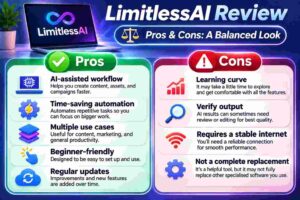
Pros
- One dashboard for nine creation studios, instead of a pile of separate subscriptions
- One-time payment with lifetime access and future updates included
- No credit counter, so you can experiment and regenerate freely
- Exports in 4K, HD, MP3, PDF and PPTX without watermarks
- Beginner-friendly: plain-English prompts, training videos, no installs
- Commercial use is included, which matters for client work
- 30-day money-back guarantee
- Useful bonuses aimed at actually earning from what you create
Cons
- “Unlimited” is a headline, not a contract. The FAQ itself says exact usage entitlements are defined by your plan, so read the terms
- Commercial rights for some outputs, like cloned voices and music, depend on third-party terms
- Some sales-page claims, like “every AI on earth,” are hype. Treat them as marketing
- Income stories on the page are exceptional results, not typical ones
- Refunds cancel your access and remove projects in your dashboard
- One-prompt tools give less fine control than specialist software
LimitlessAI Pricing and OTOs
Pricing is the part everybody wants, so here’s what the page shows at the time of writing:
- Front-end offer: $17 one-time early-bird price for lifetime access. A discount code, LMA3OFF, was shown on the page, and an exit offer listed $14.
- After launch: the page says pricing moves to $497 one-time or $197 per month. That’s the creator’s claim, so I’d treat the $17 as the real opportunity.
- Annual option: a $297 per year plan is also mentioned on the page.
- OTO (upsell): the LimitlessAI Commercial Profit Kit at $9.95 one-time (listed at $97 normally). It includes 100+ commercial project ideas, 250+ ready-made prompts, client templates and pricing guides.
One honest note: a different part of the page mentions $37 for lifetime access, so the numbers aren’t perfectly consistent. Check the checkout page for the price you’ll actually pay before you click buy.
Is the OTO needed? Not to use the software. It’s an add-on for people who want to sell services with their AI creations. If you’re only creating content for your own channels, you can skip it. If you want client-getting templates and pricing guides, $9.95 is a small risk.
👉 Want to see if the launch price is still live? Check the current LimitlessAI price here before it changes.
LimitlessAI Bonuses
Buying through my link doesn’t change what the creator includes, so the bonuses below are the ones listed on the sales page:
- The 1,000 Prompt Playbook: ready-to-paste prompts for videos, songs, books, decks and ads, sorted by niche. Genuinely useful if you hate staring at a blank prompt box.
- The Unlimited Agency Kit: a service menu, pricing sheet, outreach scripts and a proposal template for selling work to local businesses.
- Faceless Channel Factory: episode format, upload rhythm and thumbnail system for a faceless YouTube channel.
- KDP and Audiobook Launch Blueprint: how to take an eBook from the studio to a live listing in print, digital and audio.
- Live “Unlimited Day” Build Session with Seyi: a recorded day of content creation inside LimitlessAI, with Q&A.
There’s also a bonus license for the first 100 buyers that lets you sell book publishing services. Those dollar “values” on the page are inflated, as they usually are. Judge the bonuses by whether you’ll use them. The prompt playbook and faceless channel system are the two I’d open first.
My LimitlessAI Evaluation
Here’s how I’d score it, based on the product as presented and what I’d expect from this kind of platform:
- Ease of use: 9/10. Plain-English prompts, one dashboard, training included.
- Value for money: 9/10 at the launch price. Hard to find nine creation tools for $17 anywhere else.
- Output quality: 7.5/10 (expected). It relies on official APIs, which is a good sign, but results will vary by prompt and studio.
- Flexibility: 7/10. Great for fast production, less so for detailed manual control.
- Trust and transparency: 7.5/10. The refund and licensing terms are there, though some claims are inflated.
- Overall: 8/10.
What I like most is the shift in mindset. When you’re not paying per generation, you try more ideas. You test three thumbnail styles instead of one. You make the longer video. Over time, that freedom probably matters more than any single feature.
LimitlessAI vs. Alternatives
The page compares itself to specialist tools like Runway for video, ElevenLabs for voice and Midjourney for images. Those are strong products in their own corners, and they tend to run on subscriptions or credits.
| LimitlessAI | Single-purpose AI tools | |
|---|---|---|
| Coverage | 9 studios, one login | Usually one job each |
| Payment | One-time (launch offer) | Monthly or credit-based |
| Credits | None advertised | Common |
| Depth and control | Prompt-driven, simpler | Often deeper controls |
| Learning curve | Low | Varies, often higher |
If you need a specialist for one task, a dedicated tool may give you finer control. If you need to create lots of different content types without a growing bill, an all-in-one platform like this makes more sense. Plenty of people will end up using both. Also read: Afripay AI Sales Funnel Review 2026: The Funnel Builder That Skips the Drag-and-Drop
Is LimitlessAI Legit?
Based on what I can see, yes, it looks like a real product with a real offer. It’s sold through the LaunchpadJV marketplace, it has a named creator, a clear refund policy, training, support and a described dashboard. It isn’t a get-rich-quick scheme, and the page itself says income isn’t guaranteed.
That said, being legit doesn’t mean every claim is literally true. “Every AI that exists on earth” is marketing language. The testimonials, including the big income numbers, are described as exceptional results that don’t represent the average buyer. I’d go in expecting a useful creation toolkit, not an automatic money machine. If you hold that expectation, you’re unlikely to be disappointed.
LimitlessAI Refund Policy
You get a 30-day money-back guarantee. The page says that if you don’t like it, you can ask for a full refund. Two details are worth knowing before you buy:
- Refunding cancels your software access, and projects in your dashboard are voided right away. So download anything you want to keep before you decide.
- The guarantee terms say you should show you’ve done the work and asked support for help if something didn’t work.
My advice: use the first few days properly. Make a video, a voiceover, a short eBook and a few images. If the results fit your needs, keep it. If not, ask for your refund while you’re well inside the window.
Frequently Asked Questions
Is LimitlessAI really a one-time payment? Yes, the offer is built around a single payment for lifetime access, not a subscription. The FAQ notes that exact entitlements depend on the plan you buy.
Do I need technical skills? No. You choose a studio, describe what you want in plain English and follow the steps.
Can I use what I create for clients? Commercial use is included, but the terms depend on your plan and the underlying AI models. Check the license for each type of output, especially voices and music.
Can I download my work without watermarks? Yes. The page lists unlimited exports in 4K, HD, MP3, PDF and PPTX with no watermarks.
Does it work on my phone? It’s web-based and runs in a modern browser, and there’s a mobile edition for Android, iPhone and tablets.
Will I make money with it? No tool can promise that. LimitlessAI can help you produce content and services faster, but results depend on your effort, niche and consistency.
Is the OTO required? No. The Commercial Profit Kit is optional and mainly useful if you plan to sell services.
Final Verdict: Is LimitlessAI Worth Buying?
If you create content regularly and you’re tired of subscription clutter, LimitlessAI is easy to recommend at the launch price. You get nine creation studios, a clean dashboard, commercial use, useful bonuses and a 30-day refund window for the cost of a coffee or two. Even if you only use the video, voice and image studios, it can pay for itself quickly.
Just go in with clear eyes. “Unlimited” has fine print, some rights depend on third-party terms, and one-prompt tools won’t replace a skilled editor or designer. Treat it as a fast, flexible production assistant and it’s excellent value. Treat it as magic and you’ll be let down.
My suggestion is simple. Grab it while the launch price is live, test the studios you care about in the first week, and keep what works. Since the one-time price is described as a limited launch offer, it makes sense not to wait too long.
👉 Ready to try it yourself? Get LimitlessAI at the launch price and start creating today.
Affiliate disclaimer: This post contains affiliate links, which means I may earn a small commission if you buy through them, at no extra cost to you. I only share products I think are worth a look, and my opinions are my own. Results vary from person to person, so please read the full terms on the official sales page before you buy.