ElevenLabs Review 2026: The AI Voice Tool That Finally Made Voiceovers Feel Easy
If you’re reading an ElevenLabs review, I’m guessing you’ve hit the same wall I did. You either hate how your own recordings turn out, or you’ve tried a text-to-speech tool and it sounded like a train station announcement. I was skeptical when I first tried ElevenLabs, because I’d been let down by “game-changing” tools before. But this one genuinely surprised me, and I want to walk you through why.
The Voiceover Problem Nobody Warns You About
You know the feeling.
You’ve spent hours on a video. The script is solid, the visuals look great, and you’re finally close to done. Then it’s time to record the voiceover.
You sit down, press record, and your voice sounds okay for about ten seconds. Then you trip over a word. You start again. Then a dog barks next door, or a motorbike goes past, or your throat gets scratchy. An hour later you have three usable sentences and a mild headache.
So you try the shortcut instead. You paste your script into a free text-to-speech tool and hit play. Within five seconds you wince. Every sentence ends on the same flat note. The pauses are in the wrong places. It sounds like a GPS from 2009, and you know nobody will stay past the first fifteen seconds.
That’s the trap. You either lose hours to recording and re-recording, or you publish something that sounds cheap.
And it’s not just YouTube. Maybe you run a blog and want audio versions of your posts. Maybe you sell an online course with hours of lessons. Maybe you want to start a podcast or turn your book into an audiobook. In all of these, the voice is half the product. Bad audio doesn’t just sound bad. It quietly makes people trust you less, and they never tell you. They just leave.
Hiring a voice actor solves the quality problem, but it brings new ones. Good voice talent costs real money, and every script change means another invoice or another week of waiting. Fix one sentence and you may have to rebook the whole session.
So most people end up stuck in the middle. The affordable options sound fake, and the good ones are too expensive or too slow.
Why This Gets Worse Over Time
I’ll be honest about something that took me a while to accept.
The pressure to publish keeps growing. Short videos, faceless YouTube channels, podcasts, audio articles, online courses, content in multiple languages. It’s everywhere, and the people who win aren’t always the most talented. Often they’re just the ones who can publish consistently without burning out.
If every piece of content costs you three extra hours of voice work, you’ll publish less. If you publish less, you grow slower. And if you grow slower, you start asking yourself whether any of this is worth the effort.
That’s how a lot of good projects quietly die. Not because the ideas were bad, but because one tedious step wore people down.
What I wanted was simple. A natural, believable voice, without a studio, without a fancy microphone, and without doing twenty takes of the same paragraph.
That’s what led me to ElevenLabs.
So, What Is ElevenLabs?
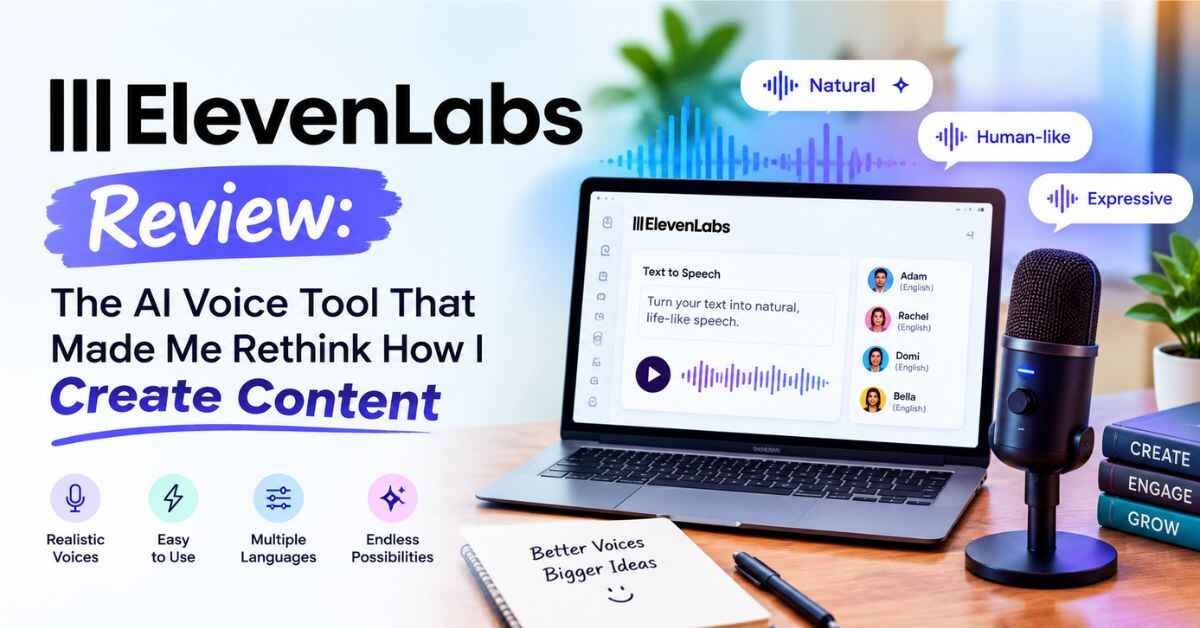
ElevenLabs is an AI voice platform. The easiest way to explain it is this: you type or paste your text, pick a voice, and it reads your words back in a voice that sounds surprisingly human.
I don’t mean “good for a robot.” I mean the kind of audio where you play it for a friend and they ask who recorded it.
The difference is in the delivery. Older tools read words one after another. ElevenLabs seems to understand the sentence. A question sounds like a question. A pause lands where a real person would take a breath. When your script is excited, the voice lifts a little. When it’s serious, it settles down. That’s the gap between audio people put up with and audio people actually listen to.
But text-to-speech is just the front door. Once you start poking around, you realize there’s a lot more behind it.
👉 Want to hear it before you read the rest? Try ElevenLabs free here and paste in a few lines of your own.
What You Can Actually Do With It
I’ll walk through the main features the way I’d explain them over coffee, focusing on what matters in real life.
Text to Speech That Doesn’t Sound Like a Robot
This is the core of the platform. You paste in your script, choose a voice, and generate. A few seconds later you have audio you can download and drop straight into your video editor, podcast, or course platform.
You can also tweak how the voice behaves. Want a calm, steady narrator for a documentary-style video? You can dial it that way. Want something livelier for a short social clip? Loosen it up. It takes a few minutes of experimenting to get the feel of it, and after that it’s second nature.
What I like most is how painless editing is. Changed your mind about a line? Edit the text and regenerate just that part. No microphone, no setup, no clearing your throat and trying again.
A Big Library of Voices
Not every project needs the same voice. A meditation app needs something warm and slow. A tech explainer needs something crisp and clear. A kids’ story needs someone playful.
ElevenLabs has a large collection of voices with different accents, ages, tones, and styles. You can browse, preview, and pick one that suits your brand. There’s also a community library with voices shared by other users, which gives you even more to choose from.
This matters more than it sounds. Think about the creators you follow. You’d probably recognize their voice before their face. When you use one consistent voice across your content, it slowly becomes part of your identity.
Voice Cloning: Your Voice Without the Recording Sessions
This was the feature that really got my attention.
Voice cloning lets you create a digital version of your own voice. You give it audio samples, it learns how you sound, and after that you can type new scripts and have them read in your voice.
Think about what that means in practice. If you’re a course creator who dreads recording, your own voice can still teach your students. If you’re a YouTuber, you can fix a mistake by typing the corrected line instead of recording the whole thing again. If you’re a busy founder, you can produce audio content from a laptop on a train.
One quick note on ethics, because it matters. Only clone your own voice, or someone else’s with their clear permission. ElevenLabs has safeguards around this, and it’s simply the right way to do it.
Dubbing and Multilingual Content
If you care about growth, this is where things get exciting.
ElevenLabs supports dozens of languages. That means you can take your English content and create versions in Spanish, Hindi, French, German, Portuguese, and more, often keeping the same voice character.
Picture what that does for your reach. A video that only works in English speaks to a small slice of the world. The same video in Spanish or Hindi opens doors that most of your competitors haven’t even noticed. Translation and dubbing used to cost a fortune. Now small creators can actually afford to do it.
Speech to Text, Sound Effects, and More
The platform has grown well beyond basic voice generation. There’s transcription for turning audio into text, tools for creating sound effects from a short description, and options for building voice agents that can hold real-time conversations.
You won’t need all of this on day one. But it’s reassuring to know your projects can grow without forcing you to switch tools halfway through.
An API for Builders
If you make apps, games, learning platforms, or automated workflows, ElevenLabs also offers an API so you can plug the voices straight into your own product. If that’s not your thing, just skip this part. If it is, it’s a big deal.
ElevenLabs Review: Who Is It Really For?
Most reviews skip this part, which is strange, because a great tool can still be wrong for you. Here’s my honest take on who benefits most.
YouTubers and faceless channel creators. If you make explainers, stories, tutorials, or documentary-style videos without showing your face, the voice is everything. This is probably the most obvious fit. What used to take an afternoon now takes minutes.
Bloggers and writers. Turning your best posts into audio gives readers another way to enjoy your work. People listen while commuting, cooking, or walking. It can keep visitors on your site longer and give you a whole new content channel.
Course creators and teachers. Narrating hours of lessons is exhausting. With AI narration, updating a lesson means editing a script, not re-recording an entire module. If you sell courses, that flexibility is a quiet superpower.
Podcasters and audiobook authors. Self-published authors used to face a painful choice: pay thousands for narration or skip the audiobook entirely. AI narration has opened that door for people who never could have afforded it.
Small business owners. Product demos, ad voiceovers, phone greetings, training videos. You can get a professional voice for all of it without booking anyone.
Developers and product teams. Voice interfaces, in-app narration, accessibility features, and AI assistants all work better when the voice doesn’t make users cringe.
Anyone who hates the sound of their own voice. You’d be amazed how many people are in this group. If hearing yourself on a recording makes you uncomfortable, this takes that problem away completely.
A Few Real-Life Examples
Let me paint some pictures, so this doesn’t feel like theory.
The weekend blogger. Imagine someone who writes a travel blog on weekends. She has fifty solid articles and a small but loyal audience. She starts turning her best posts into audio and adds a player at the top of each one. Readers who never had time to sit and read can now listen on the go. Some stay longer, and some join her newsletter. She didn’t write anything new. She just gave her old work a second life.
The course creator with outdated lessons. A guy records his whole course in his own voice. Three months later, the software he teaches changes its interface, and half his lessons look outdated. Re-recording would take weeks. If he had used AI narration from the start, he could edit the script and regenerate the audio in an afternoon.
The shop owner who wants to sound professional. A local business owner wants clean voiceovers for her product videos and a polished phone greeting, but the studio quote is way beyond her budget. With a good AI voice, she gets everything done in one evening and suddenly sounds like a much bigger company.
The creator going global. A tech YouTuber with a decent English audience takes his top five videos and makes Spanish and Portuguese versions. Same content, new audience, no extra filming. A small channel gets a second wind.
None of these wins need a big team or a big budget. They just need a better way to produce audio.
What I Like Most About It
A few things stand out to me.
It sounds real. Plenty of tools claim to sound natural. Very few actually do. The pacing, emotion, and pronunciation here are noticeably ahead of the usual AI voice.
It gives you time back. Once you’re comfortable with it, a voiceover that used to eat a whole afternoon takes minutes. Over a month of regular content, that adds up to days.
Revisions stop being stressful. A human can’t re-record a line at midnight on request. An AI voice can. Script changes just stop being a big deal.
It’s easy to start. You don’t need technical skills. If you can type and click, you can use it.
It grows with you. Whether you’re making one video a week or building a full product, the same platform handles it.
Let’s Talk About the Downsides
A review that’s all praise isn’t worth trusting, so here’s the other side.
AI voices still need a little care. Unusual names, acronyms, and technical terms sometimes need a tweak, like spelling a word the way it sounds or adjusting punctuation to fix the rhythm. It’s usually a quick fix, but it won’t always be perfect on the first try.
Some projects also still deserve a human performer. If you’re making a high-stakes brand film or something that depends on deep emotional acting, a professional voice actor may be the better call. For everyday content, though, AI voice is more than good enough.
And like any credit-based tool, longer projects use more of your allowance. So it’s smart to match your plan to how much audio you really produce. Start with the free option, then upgrade only when your workload justifies it.
None of this is a dealbreaker. These are just the things I’d want to know before jumping in.
Plans, Pricing, and Where to Start
ElevenLabs has a free tier, so you can hear the voices and judge the quality before spending anything. Paid plans give you more usage, higher-quality options, and commercial rights, which matters if you earn money from your content. Prices and plan details change from time to time, so check the official site for the current numbers.
My advice is simple. Don’t overthink it. Sign up, paste in a paragraph from something you’ve already written, and press play. That one test will tell you more than any review, including this one. If the result sounds like something you’d be proud to publish, you’ll know within a minute.
👉 Curious how your own words sound in a natural AI voice? Try ElevenLabs with a free account and hear it yourself.
Is ElevenLabs Worth It? My Honest Verdict
So, back to the question that brought you here.
If you create content regularly and audio is part of it, then yes, I think ElevenLabs is worth a serious look. It solves a real, annoying problem. You get a professional-sounding voice without a studio, a big budget, or endless retakes. And it’s flexible enough to stay useful as your projects get bigger.
Is it perfect? No. You still need a good script, and you’ll need a little patience to learn how the settings behave. But what you get compared with what you’d pay in time or money elsewhere is a big gap.
For me, the biggest change wasn’t technical. It was mental. I stopped dreading the voiceover step. When the part of the process that used to drain your energy becomes the easy part, you finish more projects and you actually hit publish. That’s what changes results.
If you’ve been putting off a video, a course, an audiobook, or an audio version of your blog because the voice part feels like a mountain, this might be what finally makes it doable.
Final Thoughts
Tools don’t build businesses. But the good ones remove the friction that stops people from starting or finishing, and they quietly give you your time back.
ElevenLabs is one of those. It won’t write your script or find your audience for you. What it does is take one of the most tedious parts of content creation off your plate, and do it well enough that your audience will probably just notice your content sounds good.
If that sounds useful, give it a shot. Worst case, you spend a few minutes and find out what AI voices can do today. Best case, you find a shortcut that saves you hundreds of hours over the next year.
👉 Ready to hear the difference? Start exploring ElevenLabs here and see how good your content can sound.
Quick FAQ
Is ElevenLabs free to try?
Yes. There’s a free plan that lets you test the voices and features before you pay anything.
Can I use the audio commercially?
Commercial use is generally tied to paid plans, so check the current terms on the official site before you monetize.
Does it work in languages other than English?
Yes. It supports many languages, which is great for reaching an international audience.
Do I need technical skills?
Not at all. If you can paste text into a box and click a button, you’re set.
Can I clone my own voice?
Yes, voice cloning is available. Use it only with your own voice or with clear permission from the person.
Affiliate Disclaimer
Quick heads-up: some links in this post are affiliate links. If you click one and decide to sign up, I may earn a small commission at no extra cost to you. It helps me keep this blog running. I only recommend tools I believe are actually useful, and my opinions are my own. Do your own research and pick what fits you best.