Commission Pilot AI Review 2026: Features, Pricing, Pros & Cons (Worth It?)
Somebody on Pinterest is typing “gift for dad who has everything” right now. They aren’t browsing for fun. They’re about to buy something, and whoever’s pin shows up first gets the click. This Commission Pilot AI review is about a tool that tries to put your pins in that spot, without you designing, writing or posting a single one.
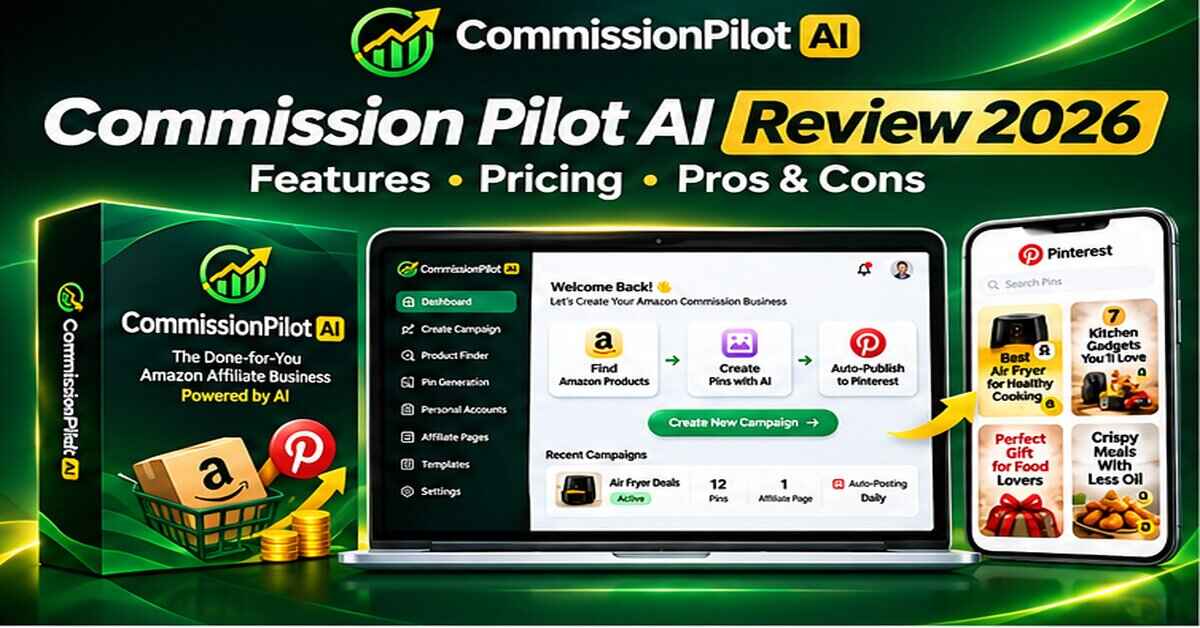
Commission Pilot AI (styled “CommissionPilot AI” on its sales page) is an app that finds best-selling Amazon products, builds Pinterest pins and video pins for them, creates a hosted affiliate page for each product, and posts to your Pinterest account every day. Pinterest brings the visitors, Amazon handles the sale, and you earn a commission through your affiliate link.
It sounds almost too neat, so I’ll be careful here. In this review I’ll cover what the app does, how it works, what it costs, what the sales page’s income math really means, and who it suits. I went through the full page line by line, including the fine print, so you get the useful parts and the honest caveats.
Commission Pilot AI Review: Quick Overview
- Product: Commission Pilot AI (CommissionPilot AI)
- Team: Team BizOmart (the page is signed by Pranshu Gupta and Ram Malav)
- Type: Cloud-based AI app for Amazon affiliate marketing through Pinterest
- Personal plan: $17 one-time (10 campaigns and 150 pins a month)
- Commercial plan: $27 one-time (20 campaigns and 250 pins a month, plus a commercial license)
- Regular price: $197/month for Personal and $297/month for Commercial, according to the page
- Bonuses: 2 (setup training and a list of 50 Pinterest niches)
- Guarantee: 30-day money-back
- Skill level: Beginner-friendly, with no followers, store, API keys or design skills needed
- You’ll need: A free Pinterest account and a free Amazon Associates account
What Is Commission Pilot AI?
Commission Pilot AI is a done-for-you affiliate business in an app. It’s built around a simple chain: Pinterest brings the buyers, Amazon makes the sale, and you collect the commission. You don’t hold stock, ship anything, handle customers or build a website.
Here’s what it handles for you. It finds best-selling Amazon products and shows what you could earn per sale. It designs pins in six styles and makes a real video pin. It writes titles, descriptions and keywords. It builds a hosted affiliate page for every product. And it posts about five pins a day to your Pinterest account through Pinterest’s own connection.
The page makes a fair point about why this works. Pinterest behaves like a search engine, not a social feed. People type what they want to buy, find a pin, and click through. The sales page cites Pinterest’s Q3 2026 results at 661 million monthly users and says pins can keep getting found for months after you post them. That’s very different from a TikTok video that disappears after a day.
It’s also not just another pin maker. The page compares it to simply asking ChatGPT to write pin text, which covers maybe 10% of the work. The rest is product research, design, keywords, pages, hosting, daily posting and tracking. That’s the 90% this app says it takes care of.
How Does Commission Pilot AI Work?
The sales page describes three steps. Here’s how I’d explain each.
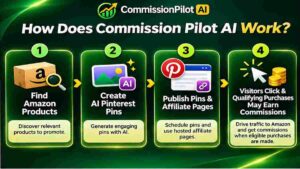
Step 1: Getting Started
You’ll need two free accounts: Pinterest (a Business account) and Amazon Associates, which is Amazon’s affiliate program. Bonus #1 is a video walkthrough that shows you how to set both up click by click, which is useful if you’ve never done it.
Then you connect Pinterest to the app with one click through the official connection. The page says there are no API keys, no passwords to share and no bots or browser tricks. For beginners, avoiding technical setup is a big deal.
Step 2: Setting Up the Product
Next you pick a niche, such as kitchen, pets, gifts, home or beauty. You choose a best-selling Amazon product from the app’s list, or paste in any Amazon link you like. The app shows what you could earn per sale before you start.
Then you click once and wait about a minute. The AI builds a full campaign for that product: image pins in different styles, a video pin, and a ready-made affiliate page with your Amazon link and the required Amazon disclosure built in.
Step 3: Using the Main Features
Now you switch on auto-posting. The app publishes fresh pins to your Pinterest every day, spaced a few hours apart. When you run low, a one-click refill generates five more pins.
You can track pin views, saves, clicks and page visits in the dashboard, plus a tracker for Amazon’s three-sales rule (more on that below). Buyers find your pins, click to your page, go through to Amazon, and you earn a commission on what they buy.
👉 Curious how the pins and pages actually look?
The sales page includes sample pins in six styles and several affiliate page templates. Take a look at the Commission Pilot AI examples here and see whether the designs match the quality you’d want on your own Pinterest account.
Commission Pilot AI Features and Benefits
The app lists 15 features. These are the three that matter most to me.
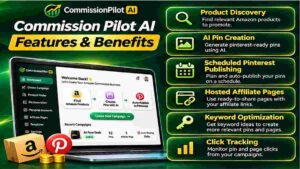
Feature 1: Product Finder With Earnings Per Sale
The biggest beginner mistake in affiliate marketing is promoting something that nobody buys. The Product Finder shows best-selling Amazon products and what each one pays per sale, so you aren’t guessing. On the page’s examples, an air fryer pays around $3.90 per sale and a grill tool set around $1.90.
I like that it shows the earning figure up front. It’s honest. Typical Amazon commission rates for gift, home and kitchen items are small, so seeing the real number helps you choose bigger-ticket products wisely.
Feature 2: One-Click Campaign Builder (Pins, Video Pins and Pages)
This is the heart of the app. One product becomes four or more pins in different styles (gift idea, lifestyle, top-picks list, holiday special), a video pin and a hosted page. Titles, descriptions and keywords are written for you, so each pin is ready to be found in Pinterest search.
The benefit is time. Designing a single decent pin by hand can take 20 to 30 minutes, and Pinterest rewards posting every day. Getting a whole campaign in about a minute removes the main reason most people quit in their first month.
Feature 3: Daily Auto-Posting Through Pinterest’s Official Connection
Consistency is where Pinterest pays off, and it’s also where people burn out. The app posts around five pins a day, safely spaced, through Pinterest’s own connection instead of bots or scripts.
The page describes this as “officially approved by Pinterest,” and the fine print adds an important detail. It says that approval to use Pinterest’s official connection doesn’t mean Pinterest sponsors or endorses the app. That’s a fair and honest clarification, and I’d repeat it to readers. It’s still a good sign that the posting method is the one Pinterest provides.
Other features worth a mention include AI profile and board setup, Pinterest and page stats, CSV backup of your pins and data, quick-start training, and paste-any-Amazon-link support.
Who Is Commission Pilot AI Best For?
I think it’s a good fit for:
- Complete beginners who want a simple, low-cost way to try affiliate marketing
- Camera-shy people who don’t want to show their face or record anything
- Busy parents and 9-to-5 workers who can set it up once and check in occasionally
- Retirees looking for a modest side income without learning tech
- Affiliate marketers who want free, search-driven buyer traffic
- Freelancers and small agencies who want to offer Pinterest services (Commercial plan)
- Bloggers and store owners who want more visitors from Pinterest
It’s probably not for you if you want fast money, if you’re not willing to wait a few months for pins to build up, or if you don’t want to deal with Amazon’s affiliate rules. This is a slow-build channel, and the page says so itself.
Commission Pilot AI Pros and Cons
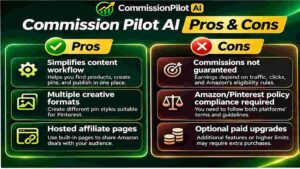
Pros
- Very low one-time price ($17 Personal, $27 Commercial)
- Covers the whole chain: product research, pins, video pins, pages, hosting, posting and tracking
- No followers, store, inventory, shipping or API keys needed
- Hosted affiliate pages with Amazon disclosure built in
- Uses Pinterest’s own connection for posting, not bots
- Pins can keep working for months after you post them
- Commercial plan includes a license to sell Pinterest services to clients
- 30-day money-back guarantee
Cons
- The income examples ($400 to $800 a month) are illustrations, not typical results
- Amazon commission rates are low for most categories (around 3% to 4.5% for gift, home and kitchen items), and Amazon can change them at any time
- Results take months, not days
- Amazon Associates can close an account that doesn’t make three qualifying sales within 180 days, so you need to drive some early traffic
- Monthly pin limits apply (150 on Personal, 250 on Commercial)
- The proof screenshots on the page may not come from Commission Pilot AI users, as the page itself states
- You still need to follow Amazon’s and Pinterest’s rules
Commission Pilot AI Pricing and OTOs
The sales page shows two plans, both with one-time payments:
Personal plan: $17 one-time. You get 10 campaigns and 150 pins a month, the Product Finder, the campaign builder, real AI video pins, daily auto-publishing and one-click refill, the official Pinterest connection, hosted affiliate pages, stats and the three-sales tracker, AI profile and boards setup, lifetime access and both bonuses. The page shows a regular price of $197 a month and a “total value” of $4,764. I’d read those numbers as marketing, not real-world prices.
Commercial plan: $27 one-time. This gives you everything in Personal, plus 20 campaigns and 250 pins a month, a commercial license, support for 2 Pinterest accounts, and the right to sell Pinterest services to clients on Fiverr, Upwork or locally, keeping 100% of what you charge. The page shows a regular price of $297 a month.
OTOs: The sales page doesn’t list any separate upsells, so I won’t invent any. The upgrade here is the $10 difference between the two plans. If you see other offers at checkout, read each one carefully before adding it.
My view: at $17, Personal is an easy way to test the idea. Pay the extra $10 for Commercial only if you really plan to run Pinterest for other people or want a second Pinterest account.
🔥 Wondering if the launch price is still open?
The page shows a countdown timer and says the price rises soon. Check the current Commission Pilot AI price and plans before it changes.
Commission Pilot AI Bonuses
The sales page lists two free bonuses, worth $294 in total by the seller’s own numbers:
- Bonus #1, Quick-Start Setup Training: Step-by-step videos for creating your Amazon Associates and Pinterest Business accounts, connecting both, and getting your first pins live
- Bonus #2, Top 50 Pinterest Niches That Sell On Amazon: 50 ready-made niches with example Amazon products for each, so you can pick one and start
These two bonuses fit the product well. The setup training matters most, because the two accounts and the Amazon rules are where beginners tend to get stuck. The niche list helps with another common problem: staring at a blank screen wondering what to promote.
As always, the dollar values are the seller’s estimates. I’d think of the bonuses as helpful extras, not as part of the price.
My Commission Pilot AI Evaluation
Here’s my honest scorecard:
- Ease of use: 9/10. Pick a product, click build, switch on posting.
- Value for money: 9/10. One payment of $17 for the whole workflow is very low.
- Beginner friendliness: 9/10. No followers, no tech setup and a training for the account steps.
- Income potential: 6/10. The channel is real, but commissions are small and results build slowly.
- Transparency: 8/10. The page carries clear disclaimers on earnings, Amazon rates and Pinterest endorsement.
Overall, I’d give it 7.5 out of 10.
Let me explain the score, because I want to be fair about the income math. The sales page shows an example: 35 pins a week, about 140 clicks, around 10 sales at roughly $10 each, so about $100 a week. That assumes a $250 product and a fairly high buying rate of 7 in 100 clicks. It also notes this is how things might look “once your pins add up,” meaning after months of posting. So treat the $400 to $800 a month as a best-case scenario for a mature account.
What I like is that the page admits this. The footnotes say the figures are examples and not a promise, that results build over months, and that Amazon’s rates are small and can change. That honesty is rare in this space, and it’s why I’m comfortable recommending it as a low-cost experiment.
If I were using it, I’d pick higher-priced products, because a 3% to 4.5% commission on a $20 item is pennies. I’d focus on seasonal gift niches, post consistently and check my stats after a few weeks. I’d also drive a little early traffic myself, to make sure I hit Amazon’s three-sales requirement in time.
Commission Pilot AI vs. Alternatives
Doing it all by hand. Finding products, designing pins, writing keywords, building pages and posting daily is possible, but slow. That’s the daily grind that makes most people give up.
Using ChatGPT or another AI chatbot. A chatbot can write pin text, but you’d still need product research, designs, video pins, hosting, scheduling and tracking. The sales page puts it at about 10% of the job.
Other pin-making tools. Many Pinterest tools help you design or schedule, but they often stop there. You may need your own AI keys, pay per image or add a separate page builder. The page notes these tools cover only part of the job.
Hiring a Pinterest manager. A freelancer can do great work, but the page mentions rates of $200 to $600 a month per client. That’s costly for a beginner testing the idea.
If you’d like to compare options, browse our independent software reviews and our Affiliate Marketing section. Related reads include our PinMyListings review for another Pinterest-focused tool, our AzonFlow review for Amazon affiliates, our FreeTraffic AI review and our Freedom Blueprint review for beginner affiliate systems. You can also browse our AI Tools category.
Is Commission Pilot AI Legit?
From what I can see, yes. It’s a real app from a named team, the posting method uses Pinterest’s own connection, the pages carry Amazon disclosures, and the sales page is unusually careful about its disclaimers. It states plainly that it isn’t affiliated with Amazon, Pinterest or OpenAI, that users must join Amazon Associates themselves, and that income figures are examples, not promises.
What “legit” doesn’t mean is guaranteed commissions. The channel depends on Pinterest traffic, your niche, your product choices and Amazon’s commission rates. The page itself notes that the proof screenshots are real but “may not be CommissionPilot AI users,” so treat them as evidence that Pinterest-to-Amazon affiliate income exists, not proof of this specific app’s results.
One practical point: you’re responsible for following Amazon Associates’ operating agreement and Pinterest’s policies. That includes disclosing affiliate links and keeping your content useful. Read both before you start.
Commission Pilot AI Refund Policy
Commission Pilot AI comes with a 30-day money-back guarantee. If it doesn’t meet your expectations, you contact the support team within 30 days and the page says they’ll refund your money.
The only catch is timing. Pinterest results take months, so you won’t know whether the traffic works within 30 days. What you can judge in that window is the app itself: the quality of the pins and pages, how easy the workflow is, and whether posting works smoothly. Test those thoroughly while the refund window is open.
Frequently Asked Questions
What accounts do I need?
A free Pinterest Business account and a free Amazon Associates account. Bonus #1 shows you how to set up both.
Do I need followers on Pinterest?
No. The page says Pinterest shows pins to people who are searching, so you don’t need an audience to start.
Do I need design or tech skills?
No. The AI designs the pins and builds the pages, and there are no API keys to set up.
Is it safe for my Pinterest account?
It posts through Pinterest’s official connection, with no bots or password sharing. You should still follow Pinterest’s policies and avoid spammy content.
What is Amazon’s three-sales rule?
Amazon Associates generally expects new accounts to make three qualifying sales within 180 days. The app includes a tracker, but check Amazon’s current rules yourself.
How long before I see results?
Pinterest builds slowly. The page says results grow over months as pins accumulate.
Will I definitely earn money?
No. The page says it can’t guarantee income, and results depend on your niche, products and traffic.
How many pins can I make?
Personal gives you 150 pins a month (about five a day), and Commercial gives you 250.
What’s the difference between the $17 and $27 plans?
The $27 plan adds more pins and campaigns, a commercial license to sell services to clients, and 2 Pinterest accounts.
Are there monthly fees?
No. Both plans are one-time payments with lifetime access, per the page.
What if I don’t like it?
You have 30 days to ask for a full refund.
Final Verdict: Is Commission Pilot AI Worth Buying?
If you’ve been curious about affiliate marketing but put off by the daily grind of designing and posting content, Commission Pilot AI is worth a look. For $17 one-time you get product research, six pin styles, video pins, hosted affiliate pages, daily auto-posting and tracking in one app. That’s a lot of work taken off your plate for the price of a lunch.
It’s not a get-rich-quick tool. Amazon commissions are small, Pinterest takes months to build, and you still have to choose good products and follow both platforms’ rules. The page is refreshingly honest about that, and I’d go in with the same expectations.
My recommendation is to start with the Personal plan, pick one or two gift-friendly niches, let it post for a few months, and judge the results with real numbers. With a 30-day refund window and a one-time price, the downside is small.
🚀 Ready to let AI do the daily pinning for you?
The launch price is the lowest this will be. Get Commission Pilot AI at the launch price here and get your first pins live today.
Affiliate disclaimer: This post contains affiliate links. If you buy through them, I may earn a small commission at no extra cost to you. It doesn’t change my opinion, and I only recommend tools I think are worth a look. Please do your own research before you buy, because results vary from person to person and nothing here is a promise of income.