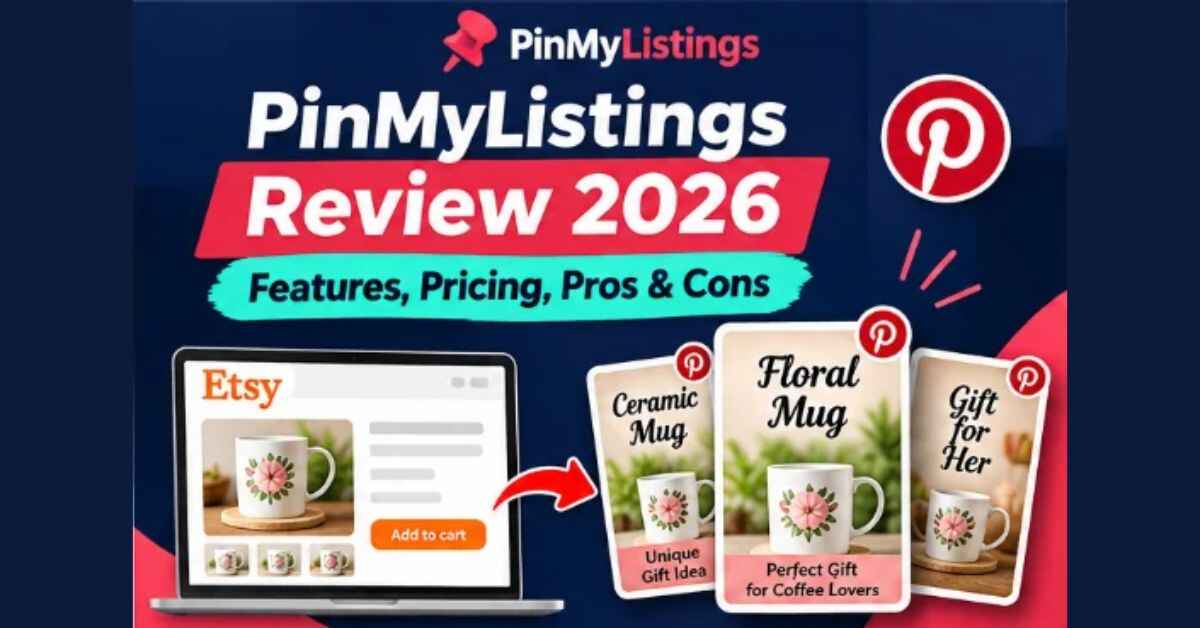
PinMyListings Review 2026: Features, Pricing, Pros & Cons – Worth It?
You’ve got a good Etsy shop, great photos, and listings you worked hard on. So why does your Stats page look so quiet every morning? This PinMyListings Review is about one possible answer: your listings are fine, but shoppers just aren’t seeing them. PinMyListings is a $17 web app that takes an Etsy listing link and turns it into 5 to 10 different Pinterest pins, written, designed and ready to schedule, in about five minutes.
I read through the sales page and the feature list in detail, and in this review I’ll walk you through what it does, how it works, what it costs, where it falls short, and who it suits. Let’s get into it.
The Problem: Great Listings, Zero Eyes
Here’s a picture you might recognize. Two Etsy shops sell similar products at similar prices. Both have been open a year.
The first owner waits for Etsy search. Some days there are a handful of views, some days nothing. When it gets quiet, they top up Etsy Ads, and the ad spend quietly eats the margin.
The second owner doesn’t spend more on ads. But every week, people arrive from Pinterest, from pins posted weeks or months earlier that are still being found by people planning birthdays, weddings and Christmas.
The product isn’t the difference. The second shop simply shows up on Pinterest a little every week.
So why doesn’t everyone do it? Because making pins is a grind. You open a design tool, crop photos, write a title, write a description, export, upload, and repeat for every product. That’s easily 45 to 60 minutes per listing, and most sellers give up around week two.
And meanwhile, Etsy has around 100 million items for sale, with new ones landing on top of yours every minute. The paid ways to stand out cost you either per click or 12 to 15% of an attributed sale through Offsite Ads. You’re building on rented land, and the landlord sets the rules.
PinMyListings is built to take the grind out of the Pinterest side.
PinMyListings Review: Quick Overview
- Product name: PinMyListings
- Creator: SunMesa Labs
- What it is: A web app that turns Etsy listings into Pinterest pins
- Output: 5 to 10 different pins per listing, with titles, descriptions, keywords, board names and alt text
- Price: $17 one-time (launch price), no subscription
- Included AI usage: 50 AI-written pins per month, or unlimited with your own OpenRouter key
- Works on: Any modern browser, nothing to install
- Guarantee: 30-day money-back
- Best for: Etsy sellers of printables, print on demand, and handmade products
What Is PinMyListings?
PinMyListings is a cloud-based tool made for one specific job: getting your existing Etsy listings in front of Pinterest shoppers.
You paste in a listing link. The app reads the title, description, price, tags and photos through the official Etsy API, and then generates a batch of pins from that listing. Each pin has its own selling angle, its own words, and its own design, built on your real product photos.
You review each pin, edit anything you like, approve the ones you want, and schedule them. Then you upload a single file to Pinterest using Pinterest’s own bulk upload tool.
That’s the whole idea, and it’s refreshing how focused it is. It isn’t trying to be a full social media suite. It takes what you’ve already created and stretches it into weeks of Pinterest content.
One thing worth noting: it uses your real product photos. The AI only writes the text, from the facts in your listing. So you’re not getting made-up AI product images that don’t match what you sell.
How Does PinMyListings Work?
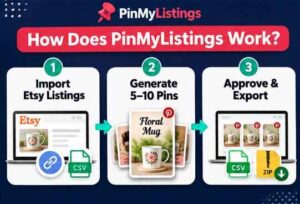
It’s a three-step flow, and it’s pretty easy to follow.
Step 1: Getting Started
You add your Etsy shop once, then bring in your products. There are three ways to do it: paste up to 10 listing links at a time, upload the “Currently for Sale Listings” CSV from Etsy Shop Manager, or add your own photos to any listing.
No Etsy login is needed. The app reads public listing information only, with read-only access through the official Etsy API.
Step 2: Setting Up the Product
Now you aim the batch. You choose one of 14 occasions (or evergreen), who the pins are for, such as “moms of toddlers” or “new homeowners,” and one of five tones, from warm to elegant.
The AI then writes and designs 5 to 10 pins per listing. Each pin gets a keyword-first title up to 40 characters, a 200 to 500 character description, 4 to 6 keywords, a board name, and alt text. The app is told to use only facts from your listing and never invent materials, sizes or prices.
Step 3: Using the Main Features
You review the pins one by one, switch designs or photos with a click if you want, and approve the ones you like. Then you pick how many to post a day (1 to 5) over 7 to 30 days, and the scheduler mixes your products so the same item never posts twice in a row.
Finally, you export a CSV in Pinterest’s bulk upload format (up to 200 pins per file) plus a ZIP of all the images. Upload it to Pinterest, and the pins go live on schedule, each linking straight to its own listing.
According to the page, the whole thing takes about five minutes per listing. That’s a big difference from an hour of design work.
PinMyListings Features and Benefits
There’s a long feature list, so let me pick the three that stood out most.
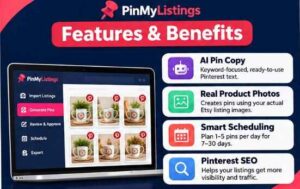
Feature 1: 5 to 10 Different Pins From One Listing
This is the heart of it. Pinterest favors fresh pins with new images and angles, so one pin per product is basically one lottery ticket.
PinMyListings builds pins around eight selling angles: gift idea, seasonal, solves a problem, how to use, personalization, comparison, ideas list, and lifestyle. Each pin has different words, a different design and a different photo, so they don’t look like the same pin repeated.
That matters. Most sellers who “tried Pinterest” posted a few near-identical pins and concluded it doesn’t work. Variety is the fix.
Feature 2: Pinterest SEO Copy Written for You
Pinterest is a search engine, and a pin titled “New in the shop!” doesn’t match anything anyone types. PinMyListings writes keyword-first titles, natural descriptions, keywords, board names and alt text for every pin.
If you hate writing like many sellers do, this alone could save hours. You read, tweak a word, and approve.
Feature 3: Your Own Photos Next to Your Etsy Photos
Here’s one I really liked. The photos that sell on Etsy, like a white background or a size chart, aren’t always the ones that stop the scroll on Pinterest. PinMyListings lets you add up to 10 of your own photos per listing, such as lifestyle shots or close-ups, and use them in your pins.
Big phone photos get resized for you, you can set any photo as the main one, and your Etsy listing never changes. The pins come out as tall 1000×1500 designs across 10 layouts that you can switch with one click.
👉 Want to see what the pins actually look like? Take a look at PinMyListings here and check the real examples built from actual Etsy listings.
Real-Life Examples: How Sellers Could Use It
The sales page shares a few illustrative scenarios (they say clearly these are examples, not customer results). Here’s how I’d picture it.
The printables seller. Say you run a planner and wall art shop with 40 listings and no time for Canva. You paste 10 listing links, choose “Back to school,” and get about six pins per printable: a gift pin, a how-to-use pin, an ideas list. You approve the best ones and schedule three a day for a month.
The print-on-demand seller. You’ve got dozens of T-shirt and mug designs. Before Father’s Day, you create pins for your top 10 with a “funny gift for dad” angle, and spread them over the 30 days before the date so a different product appears each day.
The handmade seller. You make beautiful jewelry but dislike writing. The AI writes from your own listing details without inventing materials or sizes, you adjust a word or two, and each pin links to the exact necklace instead of your shop home page.
In all three cases, the pattern is the same: one listing in, a stack of varied pins out, a steady schedule going.
Who Is PinMyListings Best For?
Based on what I read, it fits:
- Etsy sellers of printables, print on demand products and handmade items
- Shops with plenty of listings and little time
- Sellers who want traffic they own, not traffic they rent from ads
- People who can play a weeks-to-months game
- Sellers who dislike designing or writing pin copy
It’s probably not for you if:
- You expect sales by Friday. Pinterest is a slow channel
- You want a bot to auto-post everything to Pinterest
- You prefer designing every pin by hand
- You don’t have an Etsy shop yet
I appreciate that the page says that last list out loud. It even states plainly that it won’t make you go viral overnight. That kind of honesty is rare.
PinMyListings Pros and Cons
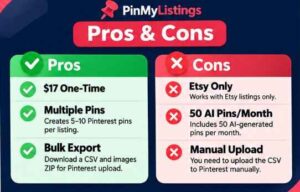
Pros
- Very low price: $17 one time, with no subscription
- Turns one listing into 5 to 10 different pins
- Uses your real product photos, not fake AI product images
- Keyword-first Pinterest copy written for you
- Lets you add your own lifestyle photos
- You approve every pin before it goes anywhere
- Scheduler spreads pins across 7 to 30 days
- Exports in Pinterest’s bulk upload format
- Every pin links to its exact listing, with optional tracking tags
- Works in any browser, nothing to install
- 30-day money-back guarantee
Cons
- Built only for Etsy shops, so it’s no use if you sell elsewhere
- Pinterest is a slow channel, so results take weeks to months
- 50 AI pins a month are included; beyond that you need your own OpenRouter key
- The license covers your own Etsy shop; making pins for client shops is a separate license
- You still upload the exported file to Pinterest yourself (which also keeps your account safer)
- It’s a new tool, so there’s limited independent feedback
None of these are dealbreakers if you go in with the right expectations.
PinMyListings Pricing and OTOs
The price is $17 one time, listed as a launch price. There’s no monthly fee. Here’s what’s included:
- The web app for 1 Etsy shop
- Import by listing link or Etsy CSV, plus your own photos
- AI pin copy: titles, descriptions, keywords, board names and alt text
- 8 selling angles, 14 occasions, audience targeting and 5 tones
- 10 pin designs
- 50 AI-written pins per month
- Approve-and-edit workflow
- Scheduler and Pinterest CSV plus ZIP export with tracking tags
- A step-by-step guide inside the app, updates and email support
If you want unlimited pins, you can add your own OpenRouter key. The page says that usually costs well under a cent per listing, billed directly by OpenRouter.
As for OTOs, the sales page doesn’t mention any upsells. Checkout is through WarriorPlus per the page, and offers can appear in the purchase flow, so read each screen carefully and check what’s actually offered when you buy.
For comparison, here’s how it stacks up on cost: Etsy Ads charge per click, Offsite Ads take 12 to 15% of the sale, design tool subscriptions bill monthly, and a Pinterest manager runs $150 or more a month, according to the sales page. A one-time $17 is a very different category.
PinMyListings Bonuses
I don’t want to invent bonuses I can’t confirm. The sales page doesn’t list a bonus package, so the best move is to check the current offer at checkout. What I can say is that the core purchase already includes the in-app step-by-step guide, updates and email support, which are useful extras on their own.
👉 Wondering if it’s a fit for your shop? See PinMyListings here and read through the examples and FAQ before you decide.
My PinMyListings Evaluation
Here’s my honest scoring.
- Ease of use: 9/10. Paste a link, pick an occasion, approve. Very beginner friendly.
- Value for money: 9/10. $17 once is hard to argue with when the alternatives bill monthly.
- Content quality potential: 8.5/10. Varied angles and keyword-first copy are exactly what most DIY Pinterest attempts lack.
- Safety and control: 9/10. Nothing posts without your approval, and it doesn’t log in to Pinterest for you.
- Proof and track record: 7.5/10. The demo video and real examples are helpful, but independent user results are limited so far.
Overall: about 8.6 out of 10.
What I like is that it fixes a real, specific reason people quit Pinterest: the time it takes to make pins. It doesn’t pretend to fix traffic or sales for you. I haven’t tested it with a live shop myself, so my view is based on the detailed sales page, the feature list and the demo walkthrough description, and I’d encourage you to watch the demo yourself.
If I ran an Etsy shop, I’d test it on my five best listings, schedule a month of pins, and judge the results after a few weeks.
PinMyListings vs. Alternatives
Design tools (like Canva). They give you a blank canvas, so you still design every pin by hand and usually pay monthly. PinMyListings starts from your listing and builds the pins.
Pin schedulers. They post pins you already made, but they don’t make them. PinMyListings creates the pins and exports them in Pinterest’s bulk format. Many sellers could use a scheduler too.
AI image tools. They create pictures that aren’t your actual product. PinMyListings uses your real photos and uses AI only for the text.
Hiring a Pinterest manager. You get human help, but the page lists this at $150+ a month, which adds up quickly.
Etsy Ads and Offsite Ads. They can bring visibility, but you pay per click or give up 12 to 15% of attributed sales. Pins, once live, keep working without that ongoing cost.
The honest trade-off: PinMyListings is narrower than a full design suite, but it’s much faster for this one job.
Is PinMyListings Legit?
It looks legitimate to me. Here’s why:
- The company name and address are listed on the page
- It uses the official Etsy API with read-only access to public listing info, no Etsy login
- Privacy Policy, Terms, Refund Policy, Contact and an Earnings Disclaimer are all linked
- The checkout runs through WarriorPlus
- The page is clear about limitations, including that Pinterest is slow and results aren’t guaranteed
- There’s a clear 30-day guarantee
The page also states that Etsy and Pinterest are trademarks of their owners and that the app isn’t endorsed by either. That’s the right way to handle it.
One reminder: “legit” doesn’t mean “guaranteed sales.” The company itself says it makes no promise of traffic or income. Treat it as a time-saving tool, not a magic button.
PinMyListings Refund Policy
You get a 30-day money-back guarantee. Use the app for 30 days, make pins for your own listings and upload them. If it doesn’t give you better pins than you’d make by hand in a fraction of the time, you can ask for a refund through WarriorPlus or by email. The pins you exported are yours to keep.
My tip: don’t wait until the final week. Make pins for a few real listings in the first few days so you can judge the tool fairly. Keep in mind that Pinterest results take time to show, so judge the tool on pin quality and time saved, since that’s what the guarantee covers. Also read: SaleSeason AI Review 2026: Features, Pricing, Pros & Cons — Is It Worth It?
Frequently Asked Questions
Do I need design or writing skills?
No. You choose an occasion, read what the app wrote, tweak a word if you like, and approve.
Is this AI art?
No. Pins use your real product photos. AI only writes the text from facts in your listing.
Do I have to give it my Etsy password?
No. You add your shop name and paste listing links. It reads public listing info through the official Etsy API.
Will it get my Pinterest account in trouble?
The app doesn’t log in to Pinterest or post on its own. You upload approved pins with Pinterest’s bulk tool, scheduled a few a day.
How long until I see results?
Pinterest is a slow channel. Pins usually need weeks to be picked up, and momentum builds over a few months of steady posting.
Is there a monthly fee?
No. It’s $17 once, with 50 AI pins a month included.
Can I use it for client shops?
The license is for your own Etsy shop. Client work is a separate license.
Does it work on Mac, Windows and tablets?
Yes. It’s a web app that runs in any modern browser.
What if my best photos aren’t on Etsy?
Upload them. You can add up to 10 of your own photos per listing, and your Etsy listing stays unchanged.
Final Verdict: Is PinMyListings Worth Buying?
If you sell on Etsy and your listings deserve more eyes, PinMyListings is worth a serious look. For $17 once, you get a tool that does the most tedious part of Pinterest marketing: turning each listing into a batch of varied, keyword-rich, properly designed pins, with a schedule and a bulk-upload file ready to go.
It won’t make you go viral overnight, and the page says so itself. Pinterest rewards showing up steadily for weeks. What the app removes is the reason most sellers quit before that happens: the hours it takes to make the pins.
With the 30-day guarantee, the risk is small. And with the holiday gift-planning season right around the corner, there’s a good reason to get your pins started sooner rather than later.
👉 Ready to turn your listings into a month of pins? Get PinMyListings here and try it risk-free for 30 days.
Affiliate disclaimer: This post contains affiliate links. If you buy through them, I may earn a small commission at no extra cost to you. I only recommend products I think are genuinely useful, and my opinions are my own. Prices and features can change, so please check the official page before you buy.