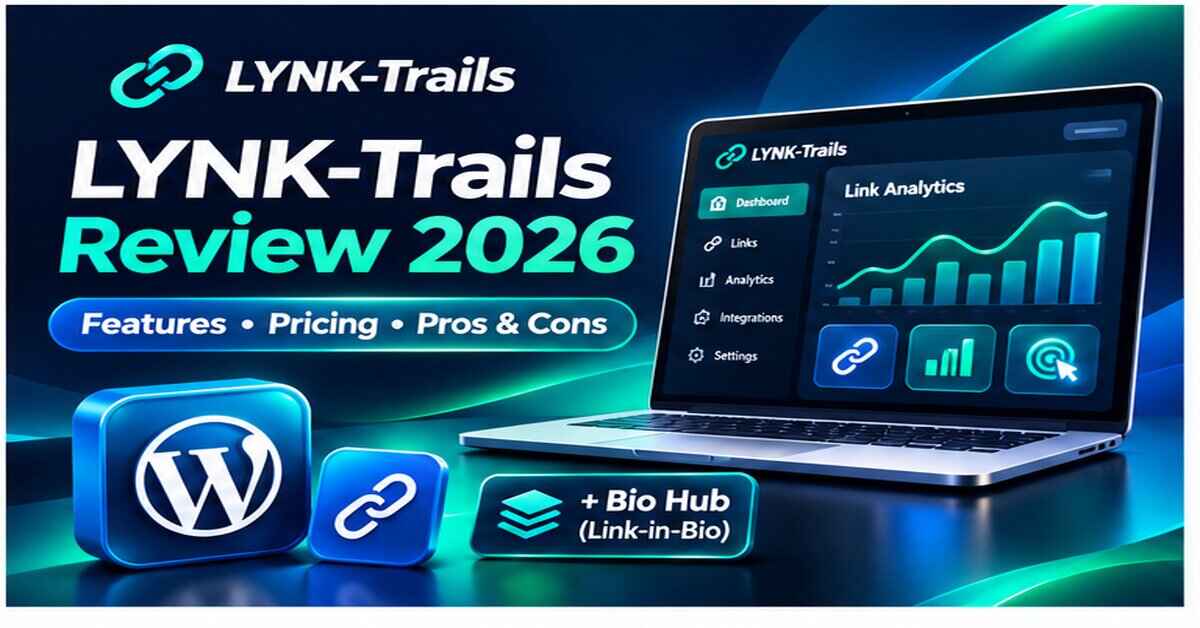
LYNK-Trails Review 2026: Features, Pricing, Pros & Cons (Worth It?)
You send a link in an email, post it in a Facebook group, drop it under a YouTube video, and a sale comes in. Great. But which of those links actually made the sale? If you can’t answer that, you’re basically running your affiliate business on guesswork. That’s the problem this LYNK-Trails review is about.
LYNK-Trails is a platform with two tools: a WordPress plugin that ties every click and every sale back to the exact link that produced it, and Bio Hub, a Linktree-style page builder for creators and marketers. The promise is simple: know what works, stop wasting effort on what doesn’t, and keep your links on your own domain.
In this review I’ll cover how it works, what’s inside, who it fits, the pricing options, and where I think it’s strong and where you should be careful. I’ll keep it honest, because that’s the only kind of review that helps you decide.
LYNK-Trails Review: Quick Overview
| Product | LYNK-Trails (LynkTrails) |
| Company | CYNOSURE Infotech |
| Type | Link tracking WordPress plugin + Bio Hub bio-page builder |
| Best for | Affiliate marketers, creators, bloggers, list builders |
| Platform | Self-hosted WordPress (Link Tracking), web-based (Bio Hub) |
| Sales platforms tracked | JVZoo, ClickBank, WarriorPlus, PayPal, Gumroad |
| Skill level | Beginner to intermediate |
| Status | Early access open |
| Purchase options | Main offer, Mini Bundle, and Bundle |
The one-line takeaway: if you promote offers and want to see which link earns, LYNK-Trails is built for exactly that, and it’s one of the cleaner takes on the idea I’ve looked at.
What Is LYNK-Trails?
LYNK-Trails is two products under one roof. Each works on its own, and you can use one or both.
LynkTrails Link Tracking is a WordPress plugin. You install it on your own site, create short branded links on your own domain, and connect it to your sales platform. After that, each sale shows up next to the link that caused it, with refunds taken off.
Bio Hub is a mobile-first bio page builder. Think of it as the single link you put in your Instagram, TikTok, or YouTube profile, which opens a clean page with your videos, products, social icons, and a sign-up form.
The reason these two belong together is simple. Plenty of people build an audience on social media with a bio page, then sell to that audience through affiliate links. Bio Hub gives them one place to send people. Link Tracking tells them what happened after.
If you’re just getting into affiliate marketing and still working out the basics, I put together beginner-friendly guides on Bright RS that pair well with a tool like this.
How Does LYNK-Trails Work?
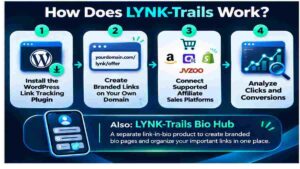
The setup is refreshingly short. Here’s the flow for the Link Tracking plugin, which is the heart of the product.
Step 1: Getting Started
You install the plugin on your WordPress site and activate it with your license key. That’s it for installation. Because it runs on your own site, you need a self-hosted WordPress setup where you can add plugins.
Your links will then live on your own domain, something like yourdomain.com/launch-review, instead of a third-party short-link domain. I like this for two reasons. It looks more trustworthy to the person clicking, and the links stay yours no matter what happens with any outside service.
Step 2: Setting Up the Product
Next you create your links. You make a short branded link for each place you share something: one for an email, one for a post, one for a video, one for an ad.
Then you connect your sales. You paste a single address into your sales platform (JVZoo, ClickBank, WarriorPlus, PayPal, or Gumroad), and LynkTrails starts matching sales to links. This is the step that separates it from a basic URL shortener, which only counts clicks.
Step 3: Using the Main Features
Once data starts flowing, you open the dashboard and look at the numbers: clicks, unique visitors, conversions, and revenue, plus a list of your top links. The dashboard on the sales page uses sample data, so don’t read those numbers as promises, but the layout shows what you’d be looking at.
From there you can filter by source, device, and country, run offer rotators to split traffic, A/B test pages, and generate QR codes. If you’re using Bio Hub too, you can build a page, add your links, and see built-in analytics for how people use it.
👉 Curious what the dashboard looks like and how the plugin handles sales tracking? Take a look at LYNK-Trails here and see the full breakdown.
LYNK-Trails Features and Benefits
These are the features that mattered most to me when I went through the product.
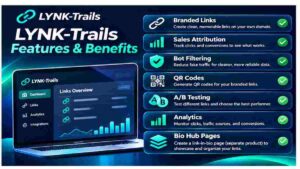
Feature 1: Sales Tracking That Joins Up
This is the big one. Most people can see clicks. Far fewer can see which link led to an actual purchase.
LYNK-Trails matches sales from JVZoo, ClickBank, WarriorPlus, and PayPal to the link that made them, and takes refunds off. So you can look at two emails that got the same number of clicks and see that one produced sales while the other produced nothing. That tells you where to spend your time.
Feature 2: Your Own Domain
Your links run on your WordPress site, using your domain. That means every link you share builds your own brand, and you’re not renting space on someone else’s short-link service.
For a long-term marketer, this matters more than it sounds. If a third-party tool changes its pricing or shuts down, your shared links don’t break.
Feature 3: Bot and Repeat-Click Filtering
Raw click numbers can be misleading. Bots and repeated clicks from the same person inflate the count and make a weak link look strong.
LYNK-Trails filters those out, so your numbers reflect real visitors. When you’re deciding what to promote more of, clean numbers are worth a lot.
Feature 4: Rotators, Routing, and A/B Testing
You can split traffic between offers, test which one converts better, and send visitors to different pages based on country or device. If you promote more than one offer to the same audience, this saves you from guessing.
Feature 5: Bio Hub Pages
Bio Hub gives you mobile-first bio pages with unlimited links, templates, social icons, video embeds, a product showcase, and lead capture forms. You can use custom branding and custom domains, and there’s built-in analytics.
There’s a live demo page you can open to see what a finished page looks like, which is a nice touch because you can judge the design before spending anything.
Feature 6: Extras That Show Real Thought
QR codes, ad conversion APIs, and more platform and ad network support on higher plans round things out. You may not use all of them on day one, but it’s good to know there’s room to grow.
Who Is LYNK-Trails Best For?
I think it’s a strong fit for these people:
- Affiliate marketers who send traffic from several places and want to know which source actually pays.
- Bloggers and email marketers who promote offers and want links on their own domain.
- Social media creators who need one tidy link in their bio for videos, products, and sign-ups.
- People who run both an audience and an offer and want tracking and a bio page in one ecosystem.
- Anyone tired of paying monthly for basic link tracking, as long as the purchase model suits them (check the offer page for current terms).
It’s not for you if you don’t use WordPress and have no plans to, since the Link Tracking plugin needs a self-hosted WordPress site. Bio Hub works on its own, so you could still use that part.
LYNK-Trails Pros and Cons
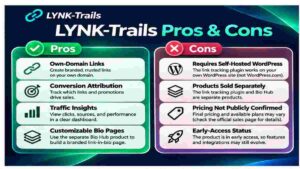
Pros
- Ties each sale to the link that made it, with refunds included
- Links run on your own domain
- Works with JVZoo, ClickBank, WarriorPlus, PayPal, and Gumroad
- Bot and repeat-click filtering for cleaner data
- Rotators, routing, A/B testing, and QR codes in one place
- Bio Hub covers the “link in bio” side with templates, video embeds, and lead capture
- Each product can be used on its own
- Clear, simple three-step setup
Cons
- Link Tracking requires self-hosted WordPress
- It’s in an early-access stage, so features and plans may continue to evolve
- Some platforms, stores, and ad networks are reserved for higher plans
- The dashboard on the sales page uses sample data, so you’ll want to judge real results yourself
- Like any tracking tool, it only helps if you actually check it and act on what you see
LYNK-Trails Pricing and OTOs
LYNK-Trails is offered in a few ways, and which one makes sense depends on what you want to do. I’m using the three options linked below:
- Main offer: the entry point, built around the core product.
- Mini Bundle: a smaller bundled option.
- Bundle: the larger package.
I’m not going to quote exact prices here, because launch pricing can change and I’d rather not give you a number that’s out of date by the time you read this. The checkout page shows current pricing and exactly what each option includes, so look there before choosing.
My advice is to start with whatever matches your immediate need. If you mainly want to track sales, the core offer is the logical place to begin. If you know you’ll use both tools, compare what the bundles include against buying separately. Also, the sales page lists higher plans that add more platforms, stores, and ad networks, so think about whether you need those now or later.
👉 Not sure which option fits? See the LYNK-Trails Bundle and compare what’s included so you can pick the setup that makes sense for you.
LYNK-Trails Bonuses
The product pages I reviewed focus on the tools themselves and don’t list a bonus package. Launch bonuses, when they exist, usually show up on the offer page or checkout, so check there before you buy.
When you compare bonuses on any tracking tool, I’d pay attention to ones that save you setup time, like walkthroughs for connecting your sales platform or templates for your first few links. Flashy extras matter less than anything that helps you start tracking on day one.
My LYNK-Trails Evaluation
I went through the sales page, the feature list, the setup steps, and the FAQ, and looked at it as someone who cares about one question: will this help a real marketer make better decisions?
Usefulness: high. Sales-to-link tracking is the feature most affiliates wish they had earlier. Knowing which email or video produced the money changes how you plan content.
Ease of use: good. Install, create links, paste one address into your sales platform. That’s a short path for a tool in this category.
Ownership: a real plus. Links on your own domain is the kind of detail that looks small today and matters a lot in two years.
Bio Hub: a handy bonus. It’s not trying to reinvent the idea, but it gives you what you’d expect: clean templates, video embeds, lead capture, and analytics. The live demo helps you judge it quickly.
Things to keep in mind. It’s early access, the dashboard screenshots are sample data, and some platforms are reserved for higher plans. The company also states that it doesn’t guarantee any income or results, which is how it should be. A tracking tool shows you what’s working. You still have to do the work.
My overall take: a smart, practical tool with a clear purpose, and a sensible choice for anyone serious about affiliate marketing.
LYNK-Trails vs. Alternatives
You have a few other routes, and they’re worth knowing about.
Basic URL shorteners count clicks and that’s it. They don’t show which link made a sale. LYNK-Trails goes further by matching sales to links, filtering bots, and letting you test and route traffic.
WordPress link plugins like Pretty Links also handle branded links and tracking, and some versions offer a link-in-bio add-on. They’re established and worth a look. LYNK-Trails stands out by putting sales-matching and platform connections front and center.
Linktree-style services are great for bio pages but usually don’t tie your affiliate sales to specific links. Many also run on monthly plans. Bio Hub covers the bio page side and pairs it with tracking.
Doing nothing is the most common choice, and it’s the most expensive one. Without tracking, you keep promoting the same things whether or not they work.
If you want a wider look at tools that help you grow an affiliate site, I’ve collected more guides on Bright RS.
Is LYNK-Trails Legit?
From what I can see, yes. It’s a real product from a named company (CYNOSURE Infotech), with a working site, a live Bio Hub demo, a help center, and published legal pages including a refund policy, terms, and privacy policy. It’s also sold through JVZoo, an established marketplace.
What it isn’t is an income machine. The site says plainly that LynkTrails doesn’t guarantee any income or results, and I respect that. It’s a tool that helps you see and optimize what you’re already doing. If you send traffic with no offers or no plan, tracking won’t fix that.
Because it’s in early access, I’d also treat it as a product that will keep developing. That can be a good thing, since early users often get launch pricing and a say in what gets built, but it means you should check what’s available at the time you buy.
LYNK-Trails Refund Policy
The LynkTrails website has a dedicated refund policy page, and purchases through JVZoo also fall under JVZoo’s buyer protections. I’m not going to guess at the exact number of days or the conditions, because those are the details that matter and they should come straight from the source.
Before you buy, read the refund policy on the LynkTrails site and the terms at checkout, so you know exactly what applies to the option you choose. It’s also a good idea to install the plugin and connect your first sales platform soon after buying. That way, if something doesn’t fit your setup, you find out early.
Frequently Asked Questions
Are Link Tracking and Bio Hub separate products?
Yes. Each one works on its own and is bought separately. You can use one or both together.
What do I need for Link Tracking?
A self-hosted WordPress site where you can install plugins. The plugin runs on your site, so your links use your own domain.
Which sales platforms does it follow?
JVZoo, ClickBank, WarriorPlus, PayPal, and Gumroad from the start, with more platforms, stores, and ad networks on higher plans.
Is it just a URL shortener?
No. Shorteners count clicks. LYNK-Trails also shows which link made each sale, filters out bots, and lets you test and route traffic.
Can I create Linktree-style bio pages?
Yes, with Bio Hub. You can build bio pages with unlimited links, social profiles, embedded videos, products, and sign-up forms.
Can I use my own domain?
Yes. Link Tracking runs on your own WordPress domain, and Bio Hub supports custom domains.
Does it track refunds?
Yes. Sales tracking includes refunds, so your revenue numbers reflect what you actually kept.
Is it beginner friendly?
The setup is three steps, so yes. You’ll just want to be comfortable installing a WordPress plugin.
Will it make me money?
Not by itself. It shows you what’s working so you can do more of it. The company doesn’t guarantee income or results.
Which purchase option should I pick?
It depends on whether you need tracking, bio pages, or both. Compare what each option includes at checkout.
Final Verdict: Is LYNK-Trails Worth Buying?
If you promote offers and you’re tired of guessing which links earn, LYNK-Trails is worth serious consideration. Matching each sale to the link that made it, on your own domain, with bot filtering and refund tracking, solves a real problem. Bio Hub adds a tidy way to gather your audience in one place.
It’s best for people who already have, or are building, some traffic and want to make smarter decisions. The early-access stage and the WordPress requirement are the main things to weigh, and both are easy to check against your own setup before you buy.
For me, the biggest value is clarity. When you can see exactly which email, video, or post produced a sale, you stop spreading your effort thin and start doubling down on what works. That’s a quiet kind of advantage, but it adds up.
👉 Ready to see what’s really working in your links? Get LYNK-Trails here and start tracking every click and sale.
Affiliate disclosure: Just so we’re clear, some links in this post are affiliate links. If you buy through them, I may earn a small commission at no extra cost to you. It helps me keep writing honest reviews. I only recommend things I think are worth a look, and I’d always suggest reading the refund terms and doing your own research before you buy.