
StoryDeck Review 2026: Features, Pricing, Pros & Cons. Is It Worth It?
You wrote a book, or you love one enough to recommend it. You posted the cover with “link in bio” and watched it sink within a day. Maybe you tried ads and found that a single click cost more than the royalty. That’s the wall most authors and book affiliates hit, and it’s why I wanted to write this StoryDeck review.
StoryDeck is a web app that turns one page of a book into a faceless storytime carousel for TikTok Photo Mode. No camera, no voice, no video editing. I went through the full sales page, the examples, and the numbers behind them. This review covers what it does, what it costs, who it fits, and where it falls short, so you can decide without guessing.
StoryDeck Review: Quick Overview
Here’s the short version before we get into detail.
| Product | StoryDeck |
| Creator | Thu Thao |
| What it does | Turns one book page into a 12-slide storytime carousel for TikTok Photo Mode |
| Best for | Authors, and affiliates who promote books on Amazon |
| Starter price | $17 one-time (launch price, rises 10¢ per sale up to $27) |
| All Access | $247 one-time (all upgrades included) |
| Free to start | 50 AI generations included |
| Ongoing AI cost | Your own OpenRouter key, billed by OpenRouter at their price |
| Platform | Web app |
| Refunds | Sales are final, with a narrow technical-problem exception |
What Is StoryDeck?
StoryDeck is built around one idea. People on BookTok don’t buy books because of ads. They buy because a story made them feel understood, and the book at the end felt like the answer.
You’ve probably seen these posts. Ten or twelve slides about someone’s rough week, a wife who stopped sharing things with her husband, a daughter who overheard something she wasn’t meant to hear. Then a slide showing a real book page with one line highlighted, and finally the cover. Nobody feels sold to, and plenty of people go looking for the book.
Making one of those by hand is slow. You need a hook, a believable story, slides short enough to read, a photo of the page, a background with no faces in it, and a caption. The sales page says that’s an evening of work per post. StoryDeck does the slow parts for you, so you add your book once, pick a story frame, and click write.
One honest detail up front: the stories are fiction. The AI writes them in first person, inspired by your book, and StoryDeck adds a note to the caption saying so. I like that, because it keeps you on the right side of platform rules and your readers’ trust.
How Does StoryDeck Work?
It’s four moves in practice, and I’ve grouped them into three steps below.
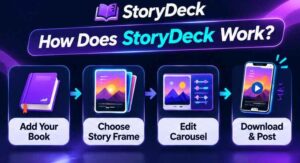
Step 1: Getting Started
After you buy, your login lands in your inbox about a minute later. Check spam if it doesn’t show up. Then you add your book: the title, your Amazon link, a photo of the cover, and a photo of the page with the line you love. You highlight that line right inside the app.
No paperback on hand? StoryDeck can typeset the page and draw a cover from your cover image. Real photos look best, but you’re not stuck without them. You only do this once per book, and the page says it takes about five minutes.
Step 2: Setting Up the Product
Next you choose one of six story frames. Each frame has its own beats and hook ideas. Examples from the demo set include “The careless sentence,” “Overheard the truth,” and “Grief with a deadline.” You click write, and the story, caption, hashtags, and background photos come back together.
The first 50 AI generations are free. After that, you connect your own OpenRouter key and pay OpenRouter directly. StoryDeck adds no markup. On the default model, the page reports test stories costing roughly a tenth of a cent each, which works out to 700 or more stories per dollar of credit. Bigger models cost more, and the app shows the cost after every story.
Step 3: Using the Main Features
Now you read the story and change whatever you want. Swap a line, a font, a background. If a stock photo happens to show a face, you can cover it with a heart sticker. When you’re happy, download the 9:16 slides and a ready-made caption in one ZIP and post them in TikTok Photo Mode yourself. Your Amazon link goes in your bio.
In the timed run on the page, one carousel took under 20 seconds of machine time. Across six stories, writing took 12 to 16 seconds each. You’ll spend a few more minutes reading and tweaking, but a finished post in minutes instead of a whole evening is the real promise here.
👉 Curious what a StoryDeck carousel actually looks like from the inside? Take a look at the live demo and the six sample carousels here.
StoryDeck Features and Benefits

Feature 1: Story Frames Built for BookTok
The six frames are the heart of the product. Each follows a shape that already works on BookTok: a hook that makes people swipe, a short first-person story about a pain most readers recognize, a turning point where someone opens a book, and then the page and the cover.
The benefit is that you skip the blank page. Anyone who has asked a general chatbot for “a story” knows the result is often flat, with slides in the wrong order and lines too long to read on a phone. Frames built for this exact format fix that.
Feature 2: Your Real Page and Your Real Cover
This is the feature I think matters most. Plenty of AI tools would draw a fake book page with invented words on it. StoryDeck uses a photo of your actual page, with your line highlighted, and ends on your actual cover.
That’s what turns a story into a reason to buy. A reader sees themselves in slide four, sees the exact sentence on slide eleven, and knows which book to look for on slide twelve.
Feature 3: Editing, Photos, and Export That Save Time
You aren’t locked into what the AI writes. You can edit any line, change fonts and text styles, search for a new background, upload your own, or use a plain color. Every click on “write” gives you a fresh story, so your feed won’t be a pile of identical posts.
Export is simple too: slides and a caption with hashtags in one ZIP, correctly sized for TikTok. No resizing, no caption writing from scratch. Also read: Local Commerce Agency Studio Review 2026: Features, Pricing, Pros & Cons. Is It Worth It?
Who Is StoryDeck Best For?
StoryDeck fits you if:
- You’ve published a book on Amazon, in fiction, non-fiction, romance, memoir, self-help, or poetry, and you struggle to get it seen
- You promote books you love as an Amazon affiliate and want a format that doesn’t feel like an ad
- You don’t want to dance, talk to a camera, or edit video
- You can commit to posting a few times a week
It’s probably not for you if you want a tool that posts for you on autopilot (there’s no scheduler), if you need guaranteed sales, or if your book is mostly pictures, recipes, or exercises. The page is upfront that picture books, cookbooks, and workbooks “run, but with weaker results,” since there’s rarely a single sentence that carries a story.
A quick example. Imagine a self-help author with a book about quitting people-pleasing. She underlines one sentence about saying no, picks a “flip the point of view” frame, and gets a story about someone who always said yes until one Tuesday. Ten slides later, there’s her page and her cover. That’s a post worth sharing, and she didn’t film anything.
StoryDeck Pros and Cons
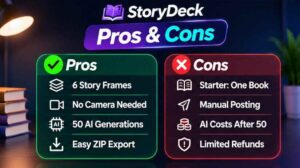
Pros
- Fast: roughly 12 to 16 seconds to write a story in the page’s tests
- Faceless: no camera, voice, or editing needed
- Uses your real book page and cover, not an AI fake
- Low entry price at $17, one-time
- 50 free AI generations to try it properly
- No monthly fee from StoryDeck, and no markup on AI costs
- Clear caption notes for fiction and affiliate disclosure
- Honest about what it can’t do
Cons
- Starter covers only one book, English, and TikTok 9:16 slides
- It doesn’t post for you
- After the free generations, you need your own OpenRouter key
- No promised views or sales, and the page says so plainly
- Sales are final, so read the limits before buying
- Weaker fit for picture books, cookbooks, and workbooks
👉 Not sure yet? Compare the sample carousels with the posts you’re making today and see which one you’d stop scrolling for. See the examples and decide for yourself.
StoryDeck Pricing and OTOs
StoryDeck Starter: $17, one-time. This is the launch price. It goes up 10¢ with every sale, up to a maximum of $27, so the price creeps higher the longer you wait. You get:
- All six story frames and the AI story writer
- Your real book page and cover
- Background photos, a slide editor, and caption with hashtags
- 9:16 slides in one ZIP
- 50 free AI generations
- Limits: one book, English only, TikTok sizes only, no video
Optional upgrades. You can add these after checkout, one at a time. Based on the price breakdown on the sales page, they come to:
- Pro Multi-Market, $47: 15 more languages, versions for other accounts, Instagram, Facebook, and Pinterest sizes, captions for five platforms, and unlimited books
- Video Studio, $37: turns any carousel into a video for Reels, Shorts, and TikTok
- Done-For-You Story Vault, $67: 60 ready-written stories in six themes
- Agency License, $97: client workspaces, review links, and one ZIP per client
StoryDeck All Access, $247, one-time. This bundles Starter and every upgrade above. Bought separately, it adds up to $265, so you save $18. The page says there are no upsell pages after checkout with this option.
My take: if you have one book and want to test the format, Starter is the sensible move. If you already know you’ll promote several books, or want video and other platforms, All Access saves money and hassle. Skip the Agency License unless you actually plan to make carousels for clients.
StoryDeck Bonuses
The core package already includes several things worth counting: 50 free AI generations, six story frames, a slide editor, and caption and hashtag writing with every story. Those aren’t extras, they’re built into the $17.
Bonus offers from affiliates can change, so check the checkout page for anything extra before you buy.
My StoryDeck Evaluation
Here’s how I’d score it, based on everything on the page.
- Ease of use: 9/10. Four steps and a clear path from book to ZIP.
- Value for money: 9/10. $17 one-time is hard to argue with, especially next to the subscriptions it replaces.
- Output quality: 8/10. The format is smart and the real-page-and-cover idea is the strongest part. You’ll still want to read and tweak each story.
- Transparency: 10/10. It says what it can’t do, doesn’t promise income, and labels stories as fiction.
- Flexibility on Starter: 6/10. One book and English only will feel tight if you plan to scale quickly.
What I like most is that the offer doesn’t pretend. The creator shows two small TikTok accounts with millions of views on this kind of carousel, then admits that one of them had 10 of its 16 newest posts under 20,000 views. That’s how this format works: you post often, most posts travel a little, and a few travel far. Honest framing like that makes me trust the rest of the page more.
StoryDeck vs. Alternatives
You can absolutely make these posts without StoryDeck. Here’s how the options compare, using the prices cited on the sales page (checked November 2026).
Amazon ads. The page cites roughly $0.30 to $0.50 per click. On a low-priced book, a handful of clicks can eat the royalty from one sale.
Paying a freelancer. Carousel and BookTok gigs run around $25 to $50 per carousel. The quality can be great, but at three posts a week the bill grows fast, and you wait days for each one.
ChatGPT plus Canva. A chatbot at about $20 a month and a design app at about $144 a year come to roughly $384 a year before your time. Then you still do the work: write the prompt, fix the slide order, shorten lines, find photos without faces, photograph your page, write the caption.
StoryDeck. $17 one-time for Starter, plus a tiny AI cost on your own key after the free generations. The trade-off is that it’s built for one format, TikTok storytime carousels, rather than being a do-everything tool.
If you already love your current workflow, you may not need StoryDeck. If you’ve been putting off posting because each one takes an evening, this is the kind of tool that removes that excuse.
Is StoryDeck Legit?
From what I can see, yes. Checkout runs through WarriorPlus, a well-known marketplace for digital products. The creator is named, there’s a login page and an affiliate page, and the sales page includes plain earnings and non-affiliation disclaimers. It also states that StoryDeck isn’t endorsed by Amazon, TikTok, Meta, or Pinterest.
The page makes no income promises. It says views and sales depend on your book, your account, and how often you post, and it says the example accounts aren’t typical. That’s the opposite of how scam-style offers talk.
Keep one thing in mind. Legit doesn’t mean guaranteed. A good tool still needs you to post consistently and choose a book with a line worth underlining.
StoryDeck Refund Policy
This is the part to read before you pay. All sales are final. StoryDeck refunds only when a technical problem on their side stops the product from working for you and they can’t fix it, and they ask you to contact support first. A refund closes the access that purchase gave you.
Since there’s no general money-back guarantee, the 50 free generations and the live examples matter. Use them to judge the format before you decide it’s for you. If you aren’t sure it suits your kind of book, read the “what it works on and what it doesn’t” section on the sales page first.
Frequently Asked Questions
Do I need to show my face or record anything?
No. The carousels are photos and text, with stock or your own photos in the background and your book page and cover at the end.
Do I need a paperback?
Real photos look best, but no. StoryDeck can typeset the page and draw a cover from your cover image.
Are there monthly fees?
Not from StoryDeck. After the 50 free generations, you pay OpenRouter directly for what you use.
Can I use it for books I promote as an affiliate?
Yes. Mark the book as an affiliate book and the caption will mention it. Keep that disclosure in your posts, since TikTok’s rules and the law expect it.
Can I post on Instagram, Facebook, or Pinterest?
Starter exports TikTok 9:16 slides. Other sizes come with the Pro Multi-Market upgrade.
Will it get me views or sales?
It can’t promise that, and no honest tool can. It gives you a format that holds attention and a fast way to make it.
Does it post for me?
No. You download the slides and post them in the TikTok app yourself.
Final Verdict: Is StoryDeck Worth Buying?
If you sell a book on Amazon, or recommend books with an affiliate link, and you’ve been stuck between ads that cost too much and posts that go nowhere, StoryDeck is worth the $17. The idea is sound, the price is low, and the real page and cover at the end are the right way to turn a story into interest in the book.
It won’t magically make you a BookTok star, and the sales page is honest about that. What it does is take away the slow, annoying part of making each post, so you can actually keep posting. For a format where a handful of breakout posts do most of the work, consistency is the whole game.
Start with Starter, use the free generations on your best line, and see how your first carousel feels. If you already know you’ll want multiple books, video, and other platforms, All Access makes more sense.
👉 Ready to give your best line a story? Get StoryDeck here, and remember the launch price rises 10¢ with every sale.
A quick note: this post contains my affiliate link. If you buy through it, I may earn a commission at no extra cost to you. I only write about products I think are worth your time, and I’ve tried to give you the good and the bad so you can decide for yourself.