Local Commerce Agency Studio Review 2026: Features, Pricing, Pros & Cons. Is It Worth It?
Every local business needs a website, and plenty of them know it. The bakery that takes cake orders by text message, the florist who answers the same delivery questions all day, the flooring dealer sending product photos one at a time. They’d happily pay someone to sort it out. The problem is that building a proper online store for each one, from scratch, eats days you don’t have. That’s the gap this Local Commerce Agency Studio review is about.
Local Commerce Agency Studio is a done-for-you WordPress system for building and selling local store and showroom websites. You install it, pick a niche, personalize the site, and hand it over to the client. I went through the full sales page, including the FAQ and the fine print, so I could tell you what you actually get, what it costs, and where the work still lands on you.
Local Commerce Agency Studio Review: Quick Overview
| Product | Local Commerce Agency Studio |
| Creator | Dawn Vu (DFYFortune) |
| What it does | Lets you create, demo, personalize, and deliver local store and showroom websites |
| Built on | WordPress and WooCommerce |
| Niches included | 10 store and showroom niches |
| Also included | Agency website and ten-site portfolio pack |
| Price | $27 one-time launch price (listed regular price $97) |
| Discount code | COMMERCESTUDIO for $2 off at checkout |
| Rights | Unlimited client sites with commercial delivery rights |
| Guarantee | 30-day money-back guarantee |
| Not included | Domain, hosting, and client acquisition |
What Is Local Commerce Agency Studio?
Think of it as a ready-made starting point for a web design service. Instead of opening a blank WordPress site every time a prospect says yes, you install a plugin, choose a niche, and get a store that’s already designed, organized, and filled with sample pages and products. Then you swap in the merchant’s real branding, products, and details.
The idea is simple and, I think, smart. A florist doesn’t want to imagine how a generic template might look with flowers on it. They want to see a flower shop. This system leans into that. It ships with ten niches: Bakery & Cake Shop, Gift & Gift Basket Shop, Florist & Flower Shop, Pet Supply Store, Candy & Chocolate Shop, Flooring Showroom, Kitchen Cabinet Showroom, Countertop & Stone Supplier, Outdoor Furniture Showroom, and Shed & Portable Building Dealer.
It also comes with a standard agency website and a ten-site portfolio pack, so you’ve got somewhere to show prospects your work from day one. In short, it’s a website production workflow, not just another theme.
How Does Local Commerce Agency Studio Work?
The sales page boils the process down to a handful of steps. Here’s how it plays out in practice.
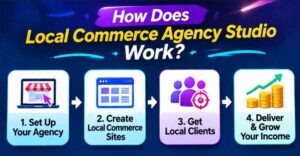
Step 1: Getting Started
You’ll need a WordPress site on compatible hosting, with WooCommerce and the required Local Studio components. You upload and activate the installer plugin, and a guided onboarding walks you through turning that site into your website creation workspace.
One thing to be clear about up front: domain and hosting are not included. Each client store also needs its own domain and hosting setup. If you’ve never touched WordPress, you’ll need to learn the basics of admin. The page says plainly that you don’t need to code or design anything from scratch, but you do need to be comfortable finding your way around WordPress.
Step 2: Setting Up the Product
Next, you choose a niche. Say a prospect runs a bakery. You select the Bakery & Cake Shop pack, and the installer loads the storefront, pages, product presentation, and visuals in one click. The page says a niche store can be deployed in minutes.
You can also decide how the store sells. Options include direct purchases, pickup, local delivery, or showcase-only browsing. That flexibility matters, because not every merchant wants a shopping cart.
Step 3: Using the Main Features
Now comes the part that makes it a service. You show the prospect the matching niche example from your agency portfolio. When they say yes, you replace the sample content with the merchant’s real branding, business details, and products, then configure their payment, shipping, and policies. Finally, you review the mobile layout, check the purchase or inquiry path, and hand over the finished site.
When the next client comes along, you repeat the same path. That repeatability is what the whole system is built around.
👉 Want to see the niche store previews and the video walkthrough before you decide? Check out the official Local Commerce Agency Studio page here and see how each step looks.
Local Commerce Agency Studio Features and Benefits
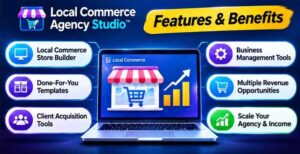
Feature 1: One-Click Niche Store Installer
This is the engine of the whole thing. You upload the installer plugin, pick a niche, and click to install. Pages, product sections, and visuals arrive already coordinated, so you aren’t piecing together a theme, a page builder, and a pile of plugins.
The benefit is time. A blank WordPress site means hours of searching for a template that almost fits, writing pages, and hunting for images. Starting from a finished store and customizing it is a very different job, and a much faster one.
Feature 2: Real Store Features Built In
These aren’t just pretty homepages. The stores run on WooCommerce with search, filters, categories, product detail pages, and product variations built in, and the page says no premium plugins are needed. Merchants can use native cart and checkout, or set up pickup, shipping, or local delivery.
For showroom businesses like flooring, cabinets, and stone, there’s also a product-specific inquiry feature. Visitors pick the products they’re interested in and send an inquiry with that selection attached. For businesses that sell by conversation, that’s a far better starting point than a generic contact form.
Feature 3: Agency Site and Portfolio Included
Before a business trusts you with their website, your own site has to look the part. The package includes a standard Local Studio agency website and a portfolio pack covering all ten niches. Prospects can browse a homepage and a representative product preview for each one.
One honest note here. The portfolio shows the homepage and one product preview per niche, not a fully built store. The full catalog, orders, and fulfillment get set up separately for each real client. That’s reasonable, but go in knowing it.
Who Is Local Commerce Agency Studio Best For?
This kind of system makes the most sense if you are:
- A freelancer or web designer who wants faster starting points without losing the ability to customize
- A small agency owner who needs a repeatable way to produce credible client sites
- A local marketer who already helps businesses get found and wants a stronger website offer to anchor everything else
- A beginner who can spot a weak local website but doesn’t want coding or advanced design to block the opportunity
- A consultant who wants to add websites to a bigger online-presence package
Here’s a quick example. Imagine a freelancer who notices that a local pet supply shop posts products only on social media. She opens her agency site, shows the shop owner the Pet Supply Store demo, agrees on a project, and installs that niche on the client’s WordPress site. A few days of personalizing later, the shop has a real catalog. That’s the whole workflow in a nutshell.
It’s probably not for you if you’re hoping for clients to arrive on their own. The page says it directly: you set your own service scope and pricing, and client acquisition and ongoing services are your responsibility. It also isn’t ideal if you’d rather avoid WordPress entirely. Also read: The FREE AI Niche Finder Review 2026: Features, Pricing, Pros & Cons
Local Commerce Agency Studio Pros and Cons
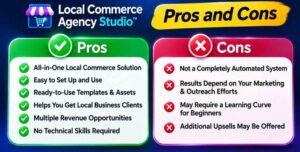
Pros
- Very low entry price at $27 one-time
- One-click installer for niche stores
- 10 store and showroom niches included
- WooCommerce store features, search, filters, and variations built in
- Product-specific inquiries for showroom businesses
- Agency site and ten-site portfolio included
- Unlimited client sites with commercial delivery rights
- Central place for business details, so personalizing the next client is faster
- 30-day money-back guarantee
Cons
- Domain and hosting are not included
- You still need basic WordPress skills
- Portfolio previews show a homepage and one product, not a full store
- You must set up each client’s real products, payments, and fulfillment
- It doesn’t bring you clients, so outreach is on you
- Commercial rights cover finished client sites, not reselling the system itself
- Several upgrades exist, so watch what you add at checkout
👉 Curious which niche would suit the businesses in your area? Browse the ten store previews and decide for yourself. See the Local Commerce Agency Studio niches here.
Local Commerce Agency Studio Pricing and OTOs
The front end is $27, one-time. The sales page lists a regular price of $97, so $27 is a launch discount, and these launch prices don’t usually last. There’s also a coupon code, COMMERCESTUDIO, which the page says takes $2 off at checkout. Codes can change, so check the page when you buy.
For your $27, you get the commerce website foundation, the ten niche packs, the standard agency website, the ten-site portfolio pack, the installer, and commercial rights to deliver unlimited client sites. There’s no monthly fee for the product itself.
On upgrades, the FAQ names several optional OTOs, though it doesn’t list their prices:
- Premium: 20 additional niches
- Pro Commerce: AI assistance for product content
- 30-Niche Expansion Roadmap
- Bright Cloud Fortune: hosting
- Local Alchemist AI Bundle
- Local Template Store Bundle
Each upgrade is separate, and the page says AI isn’t required to install the front-end stores. My advice is to buy the front end, build one real client site, and only then decide if you hit a limit that an upgrade would fix. Never buy extras on day one.
Remember the costs outside the $27, too: domain, hosting, and any third-party operating services are separate.
Local Commerce Agency Studio Bonuses
The sales page I reviewed doesn’t name any separate bonuses beyond what’s inside the package, like the agency site, portfolio pack, and personal email support. Promoters sometimes add their own extras, so check the checkout page to see what’s currently offered.
Treat bonuses as a pleasant extra, not the reason you buy. Decide based on the system itself.
My Local Commerce Agency Studio Evaluation
Here’s how I’d rate it based on what’s described.
- Ease of use: 8/10. Install, choose, personalize, deliver. The WordPress and hosting setup adds some friction for total beginners.
- Value for money: 9/10. $27 for ten niches, an agency site, a portfolio, and commercial rights is a low price for the workload it removes.
- Store features: 8/10. WooCommerce with search, filters, variations, and product inquiries covers what most local shops need.
- Business potential: 6/10. The system gets you ready to sell. Winning clients is still on you.
- Transparency: 9/10. The page says what’s included, what isn’t, and that results aren’t guaranteed.
What I like most is that the page doesn’t hide the unglamorous parts. It tells you hosting and domains cost extra, that you’ll configure each merchant’s real catalog yourself, and that the revenue calculator is only an illustration. There’s even a line saying this isn’t a get-rich-quick scheme. That kind of honesty is what builds trust.
Local Commerce Agency Studio vs. Alternatives
You’ve got a few other routes to selling websites, and each has trade-offs.
Building every site from scratch. You get full control, but each client means hunting for a theme, writing pages, finding images, and fighting with plugins. It works until you have more than one client at a time.
Buying individual themes and plugins. Cheaper at first, but you end up with a shopping list of separate tools that don’t always play nicely together. You’re the one stitching them into a workflow.
Hosted website builders. Quick to launch and easy to learn, but you’re locked into someone else’s platform and monthly fees, and delivery to a client is often awkward.
Hiring a developer. Great results, but the cost per project is high, which squeezes your margin if you’re reselling.
Local Commerce Agency Studio. It sits in the middle. You get ready-made niche stores on WordPress that you fully own and can deliver, with a one-time price. The trade-off is that you handle hosting, setup, and clients yourself.
If you already have a smooth build process you love, you may not need it. If your bottleneck is the production work, it’s worth a close look.
Is Local Commerce Agency Studio Legit?
From what I can see, yes. The page names the creator, lists a support page, a privacy policy, an earnings disclaimer, and a refund policy, and says support is handled by email. The sales page also states what the product is and isn’t, including the commercial rights limits and the extra costs.
It makes no income promises. The revenue calculator on the page is clearly labeled as an illustrative projection, with a note that actual prices, sales, retention, and results vary and no income is guaranteed. The disclaimer goes further and says the product is not a passive income or get-rich-quick scheme.
Keep a few sensible habits in mind:
- Check hosting compatibility first. The system needs compatible WordPress hosting with WooCommerce, so confirm your setup before you buy.
- Test with one niche. Build a single demo store right away so you know how it feels.
- Stay realistic. A good system makes delivery faster. It doesn’t find clients for you.
Local Commerce Agency Studio Refund Policy
The purchase comes with a 30-day money-back guarantee. The creator says that if you have issues with the product that she can’t help you resolve within 30 days, she’ll refund you in full. There’s also a refund policy page linked on the site, so read it before you pay.
To make the most of that window, install the plugin the day you buy, set up a niche store, and try the personalization steps on a real or practice client. If it doesn’t work for you, ask for your refund while you’re still inside the 30 days.
Frequently Asked Questions
Do I need to know WordPress?
You don’t need to code or design from scratch, but you do need basic WordPress administration. You’ll also set up the merchant’s real products, payments, and fulfillment.
Is hosting included?
No. You need compatible WordPress hosting with WooCommerce, and each client store needs its own domain and hosting.
What niches are included?
Bakery & Cake Shop, Gift & Gift Basket Shop, Florist & Flower Shop, Pet Supply Store, Candy & Chocolate Shop, Flooring Showroom, Kitchen Cabinet Showroom, Countertop & Stone Supplier, Outdoor Furniture Showroom, and Shed & Portable Building Dealer.
Can I sell websites to clients?
Yes. The commercial rights cover unlimited finished client websites. They don’t cover reselling or redistributing the studio itself, its source assets, or the niche packs.
Is there a monthly fee?
The front end is a one-time payment. Hosting, domains, and optional upgrades are separate.
Does it include AI?
Not in the front end. Pro Commerce adds AI help for product content as a separate upgrade, and the page says AI isn’t needed to install the stores.
Will it get me clients?
No. The system helps you build, demo, and deliver. Finding and winning clients is up to you.
What if it doesn’t work for me?
There’s a 30-day money-back guarantee. Contact support within that window.
Final Verdict: Is Local Commerce Agency Studio Worth Buying?
If you sell websites, or want to, and the slow part is production, Local Commerce Agency Studio is easy to recommend at $27. You get ten niche stores, an agency site, a portfolio, a one-click installer, and the right to deliver unlimited client sites. That’s a lot of groundwork for the price.
It won’t do everything for you. You still need hosting, some WordPress comfort, and your own way of finding clients. But if what’s been holding you back is the sheer effort of building each store from nothing, this takes a big chunk of that away, and the 30-day guarantee lowers the risk.
My suggestion is simple. Buy the front end, set up one niche, and build a demo for a business you could realistically pitch this week. If it feels like a workflow you could repeat, you’ve found a faster way to deliver. If it doesn’t, you’re covered for 30 days.
👉 Ready to see what a repeatable website service looks like? Get Local Commerce Agency Studio here, and use code COMMERCESTUDIO at checkout while the launch price is live.
A quick note: this post contains my affiliate link. If you buy through it, I may earn a small commission at no extra cost to you. I only recommend things I think are worth your time, and I’ve tried to share both the good and the not-so-good so you can make your own call.