
WhatNot Engine Review 2026: Features, Pricing, Pros & Cons (Worth It?)
You’ve probably got a closet full of clothes you never wear, a drawer of old gadgets, and a garage box you keep promising to sort out. This WhatNot Engine review is for anyone who has looked at that pile and thought, “There must be money in here, but I have no idea where to start.”
Selling online usually means guessing prices, typing listings for hours, and then waiting weeks for a buyer. Live auctions work differently. Buyers show up, watch, and bid against each other in real time. The hard part is the prep, and the thought of talking to a camera. WhatNot Engine is built to take over both.
In this review I’ll cover what it is, how it works, what you get, what it costs (including the upgrades), who it suits, and where it falls short. I went through the full sales page, the launch details and the whole funnel, so you don’t have to dig through it yourself.
A quick note on how I reviewed it: I judged WhatNot Engine on what its own pages show, the real fee structure of the platform it’s built for, and how it compares with the other ways people prep for live selling. Where something is only a claim, I’ll say so.
WhatNot Engine Review: Quick Overview
Here’s the short version before we get into the detail:
- Product: WhatNot Engine
- Creator: Daniel Adetunji
- What it does: An AI tool that values your items from photos, sets starting bids, writes listings, builds your show order and writes a script for every item
- Built for: People who want to sell on Whatnot’s live auction app
- Launch price: $17 one-time (goes to a monthly subscription after launch)
- Order bump: Hot Inventory Vault for $9
- Upgrades: 9 optional upgrades, from $47 to $497
- Refund policy: 30-day money-back guarantee
- Skill level: Beginner-friendly, no audience needed
- Launch window: Opens November 23, 2026, and runs for 7 days
What Is WhatNot Engine?
WhatNot Engine is a web-based AI co-pilot for live selling. It is not the Whatnot app itself, and I want to be clear about that early. Whatnot is the marketplace where sellers go live on video and buyers bid in real time. WhatNot Engine is a separate, independent tool that helps you get ready for those shows.
The creator calls the process The 15-Minute Show Method: Snap, Prep, Go Live. You photograph the stuff you want to sell. The AI identifies each item, estimates what it’s worth, writes the listing and suggests a starting bid. Then it builds a running order for your show and writes what to say about each piece.
The pitch is that you don’t need followers, stock or selling experience. You use what’s already in your home, and the tool handles the thinking.
Why does that matter? Because the platform behind it is big. According to the figures on the sales page, Whatnot sold about $8 billion live in 2025, more than double 2024, and it raised money at a $20 billion valuation in 2026. These are platform numbers, not a promise of what you’ll earn. But they explain why a tool built around Whatnot is getting attention.
How Does WhatNot Engine Work?
The process is simple. There are no complicated dashboards to learn before you get a result.

Step 1: Getting Started
After checkout, your login arrives by email. You log in, pick the categories you want to sell (clothes, sneakers, cards, beauty, electronics and so on) and set a profit target. The creator says the setup takes about three minutes, and there’s a short welcome walkthrough.
One thing to know here: you’ll also need to apply to sell on Whatnot itself. Whatnot reviews applications, so approval timing is out of anyone’s hands. The Seller Approval Fast-Track Kit, one of the bonuses, is designed to help you apply well prepared.
Step 2: Setting Up the Product
This is the “snap” part. Grab a jacket, a pair of sneakers, a stack of trading cards, whatever you’ve got, and take a photo. You can do it one item at a time or work through a whole pile.
The Snap & Value Scanner tells you what each item is, its condition, an estimated resale range and whether it’s worth selling at all. That last bit is useful. Not everything in your closet deserves a spot in a live show.
Step 3: Using the Main Features
Once your items are scanned, the tool does the heavy lifting. It sets a starting bid using the HammerDrop Pricing Engine, writes a full listing from the photo, builds a show order with giveaways placed in sensible spots, and writes a word-for-word script for each item.
On show day you upload your listings to your Whatnot account, open Teleprompter Mode on a laptop or tablet next to your phone, and go live. Buyers bid, items sell, and Whatnot pays you directly.
Important detail: WhatNot Engine doesn’t post to Whatnot for you. It prepares everything, and you upload and go live from your own account.
👉 Curious how the whole thing looks in action?
I’d watch the demo video before deciding anything. It shows a pile of thrift finds turning into a priced, scripted show. Take a look at the WhatNot Engine demo here and see if the workflow makes sense for you.
WhatNot Engine Features and Benefits
The tool has around 20 features, grouped into finding, pricing, listing, running, growing and tracking. I won’t list all of them. These three are the ones I think matter most.

Feature 1: Snap & Value Scanner
This is where most beginners get stuck. You’re standing in a thrift store holding a jacket and you have no idea if it’s worth $5 or $50. The scanner gives you an estimated resale range and a plain verdict on whether it’s worth selling.
The benefit is simple: fewer boxes of stock sitting around because you guessed wrong. There’s also a Profit Checker that shows your estimated profit after fees and shipping, and a Sourcing Shopping List that gives you a budget-based list of what to look for, with walk-away prices.
Feature 2: HammerDrop Pricing and Photo-To-Listing AI
Pricing a live auction is a bit of an art. Start too high and nobody bids. Start too low and a $50 item goes for $3. HammerDrop gives you two modes. “Hype mode” starts low (even at $1) to spark bidding wars. “Protect mode” sets a higher floor so you stay profitable.
Then Photo-To-Listing writes titles, descriptions, sizes and conditions from your photos and packs them into a bulk upload file. If you’ve ever typed fifty listings by hand, you know what a time saver that is. There’s also a Rule-Safe Checker that flags wording and items that could break Whatnot’s seller rules.
Feature 3: Show Builder, Item Scripts and Teleprompter Mode
This is the feature aimed squarely at camera nerves. Show Builder puts together a running order with a strong opener, big pieces spaced out and a high-energy close. Item Scripts tell you exactly what to say about each piece, including the line that gets people bidding. Teleprompter Mode scrolls it all beside your phone.
For anyone who has frozen up in front of a lens, this is the part that could make the difference between never going live and actually doing it. The page also points out that plenty of live sellers just point the camera at their hands and the items, which is a nice option if you’d rather not show your face.
There’s more in the toolbox: Hot Category Radar, Bundle Builder, Giveaway & Hype Engine, buyer follow-up messages, a promo writer for TikTok, Instagram, Facebook and X, a weekly planner, and a Sales & Profit Dashboard. The point is that it covers the whole loop, not just one piece.
Who Is WhatNot Engine Best For?
I think it’s a good fit for:
- Complete beginners who want to sell online but don’t know what to sell or how to price it
- Thrifters and garage sale fans who want to turn finds into profit
- People with stuff to clear out, such as closets, garages and storage units
- Camera-shy sellers who need scripts and a structure to lean on
- Side-hustlers who can go live a few evenings a week around a job
- Existing resellers who are tired of spending whole evenings on prep
It’s probably not for you if you want income with no effort at all, if you have no interest in going live even occasionally, or if Whatnot isn’t available to sellers in your country. Seller availability is set by Whatnot, so check that first.
WhatNot Engine Pros and Cons
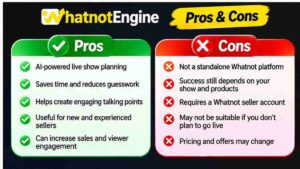
Pros
- Very low entry price during launch ($17 one-time)
- Covers the whole workflow, from valuing to scripting to tracking
- Genuinely beginner-friendly, with no audience or experience needed
- Works from your own closet, so no upfront stock required
- Scripts and Teleprompter Mode help with camera fear
- Works on desktop, laptop, tablet or phone
- 30-day money-back guarantee
- The sales page is fairly honest, with sourced stats and clearly labeled examples
Cons
- It’s not made by Whatnot, so it has no official connection to the platform
- You still have to apply to Whatnot and wait for approval
- You still have to go live and sell. The tool preps, it doesn’t sell for you
- AI value estimates are estimates, not guarantees
- The $17 price is a launch price, after which it moves to a monthly subscription
- There are plenty of optional upgrades, so it’s easy to overspend if you aren’t careful
- Whatnot charges its own fees (up to 8% commission plus 2.9% + $0.30 per order in the US, per the page), so your real profit will be lower than the sale price
WhatNot Engine Pricing and OTOs
Here’s the price breakdown.
Front-end: WhatNot Engine, $17 (one-time launch price). This gets you lifetime access to the core tool. After launch it becomes a monthly subscription, so the one-time payment is the main reason to move early.
Order bump: Hot Inventory Vault, $9. A list of 500 profitable items to source, with typical buy and sell prices, tag phrases to look for and 50 ready-made show themes. If you’re brand new, this is the one add-on I’d think about, because knowing what to buy matters as much as having the tool.
Optional upgrades (OTOs):
- Unlimited, $47: Goes from 4 shows a month to 4 shows a week, plus bulk snapping
- DFY Show Vault, $97: 365 ready-made shows loaded in one click
- Profit Hunter, $67: Helps you spot cheap items that resell for much more
- Crowd Magnet, $67: Helps get your shows in front of more buyers
- Autopilot Suite, $77: Packing, follow-ups, VIP buyers and profit tracking
- Show Producer Agency, $97: Lets you prep shows for other sellers and charge them
- Sell Everywhere, $67: Lists leftovers on eBay, Poshmark, Mercari and Depop in one click
- Reseller Rights, $197: Lets you sell WhatNot Engine accounts and keep the revenue
- White Label, $497: Your own branded version with monthly subscribers
My honest take: start with the $17 front end and see how you get on. Unlimited is the one that makes sense once you’re going live more than four times a month. The rest depend on your goals. The reseller and white-label options are for people building a software business, and they aren’t needed to sell your own stuff.
🔥 Want to lock in the launch price before it changes?
The $17 one-time price is only there during launch, and it moves to monthly after that. Check the current WhatNot Engine price and what’s included while the launch offer is still open.
WhatNot Engine Bonuses
Anyone who buys through my link gets the standard launch bonuses, and the sales page values the pack at $1,079. Here’s what’s in it:
- Seller Approval Fast-Track Kit: A walkthrough of the Whatnot seller application
- Closet Cash-Out Map: 75 household items that sell well, organized room by room
- First Show Survival Kit: Phone setup, the first 10 minutes word for word, and an “empty room” script
- 101 Dead-Air Killers: Lines to keep energy up between items
- Pack-It-Right Shipping System: Packing and shipping basics so orders arrive in good shape
- 5-Star Seller Shield: Replies for disputes, non-payers and bad reviews, plus a simple tracker
- Live Selling Masterclass: A start-to-finish video of a box of finds becoming a sold-out show
There’s also a fast-action bonus for the first 24 hours of launch, a Done-For-You First Show Pack with 30 pre-written item scripts and a full running order.
I’d call the Seller Approval Kit and First Show Survival Kit the most useful for a beginner. Those cover the two scariest moments: getting approved, and the first time the camera goes on.
My WhatNot Engine Evaluation
Here’s how I’d score it based on everything I reviewed:
- Ease of use: 9/10. The Snap, Prep, Go Live flow is easy to follow.
- Value for money: 9/10. $17 for lifetime access is a very low price for this much functionality.
- Beginner friendliness: 9/10. Scripts, bonuses and a clear first-week plan help a lot.
- Income potential: 7/10. This depends almost entirely on you. The tool removes prep work, but you still need to show up and sell.
- Transparency: 8/10. The page labels its examples as illustrations and credits its sources, which I like to see.
Overall, I’d give it 8.5 out of 10.
What stood out to me is the “first week” plan on the sales page. Snap 30 items on Monday, let the AI prep them on Tuesday, apply and upload on Wednesday, go live on Thursday, ship on Friday. Whether or not you follow it to the letter, it shows the creator has thought about the beginner’s real journey, not just the software.
I also want to be straight about the income stories. The sales page shares stories of real Whatnot sellers, like a former finance worker and a UK pharmacist, but those people don’t use WhatNot Engine. They show what the platform can do for the best sellers, not what this tool will do for you. Treat them as inspiration, not a forecast.
WhatNot Engine vs. Alternatives
How does it compare with the other ways to get ready for live selling?
Doing it all yourself. This is free, but it’s slow. Researching sold prices, writing listings and planning a show can take a whole weekend. Most people who try it give up before their first show.
A generic AI chatbot. A chatbot can write a description if you type in every detail. It can’t look at your pile of items, set bidding strategy for a live auction, build a show order, or hand you a script for each item. You’d be stitching it together yourself.
Paying for a reseller course or coach. Courses can run from hundreds to thousands of dollars, and you’d still do all the work yourself every week. A course teaches; WhatNot Engine actually produces the prep for you.
Other selling platforms. eBay, Poshmark and Mercari work differently. You list and wait. If you want that route as a backup, the Sell Everywhere upgrade is meant to help with leftovers, but WhatNot Engine’s main focus is live auctions.
If you like comparing tools before you buy, you can browse our independent software reviews or look at related picks like our PinMyListings review for Etsy sellers and our AzonFlow review for Amazon-focused marketers. If you’re planning around the sales season, our SaleSeason AI review may help too. You’ll find more in our E-commerce and AI Tools sections.
Is WhatNot Engine Legit?
Yes, from what I can see it’s a legitimate product from a real creator who is upfront about what it is. The sales page states that WhatNot Engine is independent and isn’t affiliated with, endorsed by or sponsored by Whatnot Inc. It credits where its statistics come from, labels its examples as illustrations, and says results vary. There’s a support desk, a privacy policy, terms and conditions, and a refund guarantee.
Here’s what “legit” doesn’t mean. It doesn’t mean guaranteed income, and it doesn’t mean Whatnot will approve your seller application. WhatNot Engine is a prep tool. Your results come from what you sell, how often you go live and how much effort you put in.
My advice is to treat it like any other business tool: expect to put in the work, start small, and don’t spend on the bigger upgrades until the front end has proved itself for you.
WhatNot Engine Refund Policy
WhatNot Engine comes with a 30-day money-back guarantee, which the page calls the “Your First Show” Guarantee. If it’s not what you expected, you send one email within 30 days and ask for your money back. That window is long enough to scan a pile of items, build a show and see whether the workflow suits you.
I’d still suggest using that time properly. Run the whole process on a real batch of items, not just one test scan. That’s the only way to know if it works for you.
Frequently Asked Questions
Do I need experience or an audience?
No. Buyers are already on Whatnot browsing live shows. The tool writes your listings and scripts, so you don’t need selling experience to start.
Can I use it if I hate being on camera?
Yes, it’s designed with that in mind. Scripts and Teleprompter Mode help when you want to talk, and many live sellers simply point the camera at their hands and the items.
Does WhatNot Engine post my items to Whatnot?
No. It prepares your listings, show order and scripts. You upload them and go live from your own Whatnot account.
Who pays me when items sell?
Whatnot pays you directly.
Is it made by Whatnot?
No. It’s an independent product and has no official link to Whatnot Inc.
How long does it take to prep a show?
About 15 minutes of your time, according to the creator.
Are there monthly fees?
Not during launch. You pay $17 once for lifetime access. After launch it moves to a monthly subscription.
What can I sell?
Clothes, sneakers, trading cards, collectibles, beauty products, electronics, handbags, toys and games. All items need to follow Whatnot’s terms and seller policies.
Do I need to buy stock first?
No. Most people start with what they already own.
Which countries can I sell from?
That’s set by Whatnot, so check the platform for current availability and fees in your country.
Final Verdict: Is WhatNot Engine Worth Buying?
If you’ve been sitting on a pile of stuff and wondering how to turn it into cash, WhatNot Engine is one of the lowest-risk ways I’ve seen to try live selling. For $17 you get a tool that handles the three things that stop most beginners: not knowing what an item is worth, not wanting to write endless listings, and not knowing what to say on camera.
It won’t make sales for you. You still have to get approved on Whatnot, go live, talk to your buyers and ship the orders. But it takes away the heavy prep work, and with a 30-day guarantee, the risk is small.
My recommendation: grab the front-end offer, take the Hot Inventory Vault if you’re new and unsure what to buy, and hold off on the bigger upgrades until you’ve done a few shows. That’s a sensible, low-cost way to find out if live auctions suit you.
🚀 Ready to turn that pile into your first live show?
The launch price is the lowest this will ever be. Get WhatNot Engine at the launch price here and claim the bonuses while they’re included.
Affiliate disclaimer: This post contains affiliate links. If you buy through them, I may earn a small commission at no extra cost to you. It never changes my opinion. I only recommend tools I believe are worth a look, and you should always do your own research before you buy. Results vary from person to person, and nothing here is a promise of income.