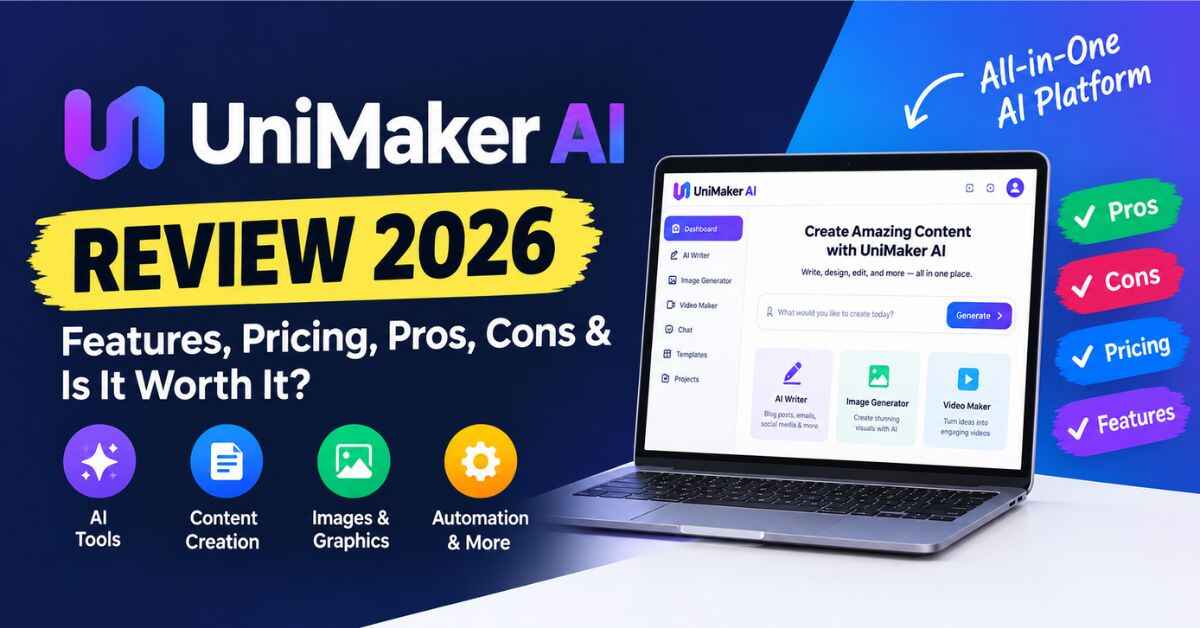
UniMaker AI Review 2026: Features, Pricing, Pros, Cons & Is It Worth It?
Let me guess how you got here. You’ve been thinking about making money online with something that actually matters, maybe teaching, maybe selling courses, maybe building a small education brand. Then you stumbled on a page promising a “live AI university” with 25+ AI professors in three clicks, and your first thought was probably the same as mine: okay, what’s the catch? That’s exactly why I wrote this UniMaker AI Review.
I went through the sales page line by line, checked the price, the license, the bonuses, and the refund terms, and I’m going to tell you what looks genuinely useful, what you should be careful about, and who this tool is really for. No hype, no “this will change your life” nonsense. Just a straight look so you can decide for yourself.
Grab a coffee. This one’s a bit long, but it’ll save you from a bad decision either way.
First, a Quick Snapshot of UniMaker AI
Before I get into the story, here’s the short version so you know what we’re talking about:
- What it is: a cloud-based app that lets you set up your own AI-powered “live university,” with AI professors that teach live online classes.
- What’s included: 25+ done-for-you AI professors and 30+ live class categories.
- Who it’s built for: beginners. The page says no coding, no teaching experience, and no AI expertise is needed.
- Price: the sales page lists a regular price of $97 per month, with a launch offer of $14.97 as a one-time payment and lifetime access.
- License: a commercial license is included, so you can use it for business purposes (always read the exact terms when you buy).
- Guarantee: 30-day money-back guarantee.
- Extras: video training, priority support, and five bonuses.
That’s the overview. Now let’s get into why this even matters.
The Problem Nobody Talks About When They Say “Just Start an Online Course”
You’ve seen the advice a hundred times. “Just record a course and sell it.” “Just start a coaching business.” “Just build an audience.”
Sounds easy. It isn’t.
Here’s what actually happens when a normal person tries it. You pick a topic. Then you second-guess the topic. Then you spend two weeks researching tools, a platform for hosting, something for recording, something for payments, something for email. Then you realize you need to actually plan the lessons, and you open a blank document and stare at it for an hour.
Then there’s the “who’s going to teach this?” question. If you’re an expert, great. But a lot of people have a strong interest in a subject without being a certified professor. And hiring instructors? That’s not realistic when you’re just starting out and watching every dollar.
Let’s be honest about how this usually ends. Most people never launch. Not because they’re lazy, and not because the idea was bad. They just get buried under all the setup. Every decision leads to three more decisions. After a month of “research,” the excitement is gone and the idea goes into a folder called “someday.”
I’ve watched this happen to friends. One of them is a brilliant guy who knows business finance inside out. He wanted to teach it online. Eight months later he still had a half-finished slide deck and a domain name he never used. He didn’t fail at teaching. He failed at setting up.
And that’s the real wall. Not the idea. The pile of work between the idea and the first student.
Meanwhile the demand is real. People are looking for ways to learn math, science, coding, business, marketing, AI, languages, and career skills every single day. Online learning isn’t a fad. The gap isn’t in demand. The gap is in how hard it is for beginners to get started.
So when I see a tool that claims to skip most of that setup, I’m curious. And a little skeptical. Which brings us to UniMaker AI.
So, What Exactly Is UniMaker AI?
UniMaker AI (the sales page also calls it the AI University Creator) is an online app that gives you a head start on building your own AI-powered live university.
The idea is simple. Instead of starting from a blank page, you log in and find a platform that already comes with 25+ AI professors across different subjects and 30+ live class categories. The AI professors are the “teachers.” You’re the one who builds the university around them, picks the direction, and decides how to offer it to people.
The page says you can get it going in three clicks. I’ll be straight with you: “three clicks” is the kind of line every sales page uses, and I’d treat it as “the setup is meant to be quick,” not “you’ll be done before your tea cools.” But the core idea is that the heavy lifting of platform building and instructor sourcing is already handled.
It runs fully in the cloud, so there’s nothing to download or install. You log in through your browser and go from there. And since it’s built for beginners, the design goal is that someone with no technical background can find their way around.
If you’ve ever looked at Udemy, Coursera, or a university website and thought “I wish I could build something like that, but I have no idea where to start,” that’s the gap UniMaker AI is trying to fill.
Want to see what the dashboard and the AI professors actually look like before you read the rest of my thoughts? You can take a quick look at UniMaker AI here and watch the demo video on the page. It’s only a couple of minutes, and it’ll make the next sections a lot easier to picture.
UniMaker AI Review: What You Actually Get Inside
I went through everything listed on the sales page. Here’s the breakdown in plain English, with my honest take on each piece.
25+ Done-For-You AI Professors
This is the heart of the product. Instead of finding and hiring teachers, you get a roster of AI professors already set up across different subjects and disciplines. For someone starting out, that matters a lot. The biggest roadblock for most education projects is the “who teaches this?” question, and this gets you past it on day one.
30+ Live Class Categories
The categories listed on the page cover a wide range: mathematics, science (physics, chemistry, biology), engineering, computer science, coding and programming, artificial intelligence, business, finance, marketing, economics, robotics, data science, cybersecurity, design, communication, career development, and personal growth.
Why does that matter? Because it gives you room to choose. You’re not locked into one narrow topic. If you start with business classes and later want to add coding or career skills, the variety is already there.
Multi-Language, Global Learning
The page mentions learning experiences across multiple languages. If you’re thinking about an audience outside your own country, or you live somewhere where English isn’t the first language for most people, this is a real advantage. Online education is global by nature, and a tool that already thinks that way is worth noticing.
100% Cloud-Based
No software, no installs, no “my laptop can’t run this” problem. You open your browser and you’re in. For beginners, this removes one more thing that can go wrong.
Beginner-Friendly by Design
The page repeatedly says no coding, no teaching experience, and no AI expertise needed. I’d always take claims like this with a small pinch of salt, because “beginner-friendly” means different things to different people. But the video training library included with the purchase tells me they expect people to need some guidance, and that’s a good sign.
One-Time Payment, Lifetime Access
This is probably the part that grabbed me most. The page lists a regular price of $97 per month, and the launch offer is a one-time $14.97 for lifetime access. Whether or not you believe the “regular price” number, the real point is the payment model: you pay once, and there’s no monthly subscription eating into whatever you build.
I’ve paid for plenty of tools over the years that quietly drained $30, $50, $100 a month while I barely used them. A one-time fee at this price level is a much easier bet to make.
Commercial License Included
The page says you can create and sell educational content, online training, and learning-based products to clients and keep 100% of your revenue, subject to the license terms. This is important. A lot of cheap tools are “personal use only,” which makes them useless if you want to earn from your work. Having a commercial license in the package means you’re allowed to build a business with it. (Do read the license terms at checkout so you know exactly what’s covered.)
Video Training and Priority Support
You also get a step-by-step video training library to help you get started, plus priority customer support. When you’re new to something, a tool without help is a tool you quit in the first week. Having training and support included makes a real difference to whether people actually finish setting things up.
How It Works (The Simple Version)
The sales page describes a three-step flow, and here’s how I’d explain it in normal words:
- Log in. Open the app in your browser. No installing anything.
- Pick your direction. Explore the AI professors and class categories, and decide what kind of university or learning offer you want to build. This is where you think about your audience: students, professionals, small business owners, whoever.
- Launch and offer it. Set things up, then present your classes and learning experiences to your audience, and decide how you’ll charge for them.
That’s the idea. The key point is that step two is yours. The tool gives you the professors, the categories, and the platform, but you still decide who it’s for and how you’ll bring people in. That’s not a flaw. It’s just how any business works, and I’ll come back to it in the honest section below.
Who Is UniMaker AI Actually For? (Real-Life Examples)
Rather than throw generic “perfect for everyone!” claims at you, let me walk through some realistic situations where a tool like this could make sense.
The Side-Hustle Beginner
Maybe you work a regular job and you want a small online income stream. You don’t want to learn web design, you don’t want to record hours of video, and you don’t have a personal brand. A tool with ready-made AI professors and a commercial license gives you a starting structure, so your energy goes into finding students instead of building a platform.
The Teacher or Tutor Who Wants to Scale
Say you’re a math tutor who sees six students a week. You’re capped by your own hours. A setup with AI-led live classes could let you offer more learning options to more people without being in the room every time. You’d still guide the direction and the quality, but you wouldn’t be the bottleneck.
The Coach or Consultant Adding a Learning Product
If you’re already helping clients with business, marketing, finance, or career growth, an AI-powered learning space could become a new offer next to your main service. Think of a “career skills academy” or a “small business basics school” that runs alongside your one-on-one work.
The Small Business Owner Training Customers or Staff
Some businesses need to teach people constantly, whether that’s customers learning to use a product or new employees learning the basics. Instead of repeating the same explanation fifty times, an organized set of classes could do the repeating for you.
The Freelancer Looking for a Service to Offer Clients
The commercial license opens another angle. A freelancer could help local businesses, coaches, or small institutes set up their own online learning space, and charge for that service. Whether that works for you depends on your skills and your market, but it’s a legitimate way people use tools like this.
The Curious Learner
Not everyone wants to build a business. The page also pitches the platform as a way to explore topics you haven’t studied before. If you simply love learning and want to poke around subjects like AI, robotics, or data science, there’s value in that too, though honestly, the main appeal here is the business side.
If one of these situations sounds like you, the easiest way to figure out whether the platform fits is to see it running. Here’s the page with the full demo and everything included. Have a look, and ask yourself one question: “Could I picture my students or customers in here?”
Let’s Talk About the Money
I always do the math before I get excited about any tool, so let’s do it.
The page lists the “regular” price as $97 per month. I’d take that figure with a grain of salt, since sales pages love a big anchor number. The number that actually matters is the launch price: $14.97, one time.
Here’s how I think about it. Fifteen dollars is roughly the price of a couple of fast-food meals. For that, you get access to the platform for life, the commercial license, the training videos, priority support, and the bonus package. Even if you only use it lightly, the cost of being wrong is small. And if it turns out not to be for you, there’s a 30-day money-back guarantee. You contact support within 30 days and ask for a refund under the guarantee terms.
Compare that to the usual route. Hiring a developer to build a learning platform can cost thousands. Even a decent online course platform subscription can run a few dozen dollars every month, forever. Against those numbers, a $14.97 one-time payment is a very low-risk experiment.
That doesn’t mean it’s automatically a bargain. A cheap tool you never use is still wasted money. But as far as financial risk goes, this is about as gentle as it gets.
The Bonuses
The page lists five extras that come with your order:
- AI University Business Starter Kit
- AI University Launch Accelerator
- AI University Profit & Growth Blueprint
- AI University Lead Generation Blueprint
- AI University Launch & Growth Checklist
The page attaches big dollar values to these (and to everything else), including a total “value” in the tens of thousands. I wouldn’t pay attention to those figures. Nobody should buy anything because of an imaginary value number. What I would pay attention to is the topic list. The bonuses focus on starting, getting leads, and growing, which are exactly the areas where beginners get stuck after the tool is set up. That’s useful in practice, even if the dollar values aren’t. Also Read Whop Engine Review 2026: Can AI Really Build and Launch a Paid Membership for You?
The Honest Part: What You Should Know Before Buying
This is the section most review posts skip. I’d rather you buy for the right reasons, or not buy at all, than feel misled later.
1. The income claim is not a promise. The sales page mentions the potential to earn up to $278.82 per day. That’s the vendor’s headline, not a typical result. Plenty of people who buy any business tool earn nothing, mostly because they never put in the marketing and selling work. Treat that number as a ceiling someone might aim at, not an expectation. Your results depend on your niche, your effort, your audience, and how well you promote what you build.
2. The tool doesn’t find your students for you. Even with 25+ AI professors ready, you still need people to show up. That means deciding who you’re helping, sharing your offer on social media, in groups, by email, or through a small ad budget. The lead generation bonus may help with ideas, but you still have to do the work.
3. AI-led teaching has limits. AI professors are great for structure and availability, but some people will always prefer a human teacher, especially for complex subjects or personal guidance. If you’re planning to sell serious, high-stakes training, think about how you’ll add your own expertise and quality checks on top.
4. Check the license and the checkout screens carefully. The page says a commercial license is included “subject to the license terms,” so read them before you build a business around it. Also, as with most offers like this, you may see extra add-ons or upgrade offers during checkout. You don’t have to buy any of them to use the main product, so take your time and read each screen before you click.
5. It won’t suit everyone. If you want a fully custom, branded learning platform with total control over every detail, a dedicated platform or a developer will serve you better. UniMaker AI looks like a fast, low-cost starting point, not a replacement for a bespoke system.
Having said that, none of these points are dealbreakers for me. They’re just the reality of any tool in this category. And most of them come down to one thing: the tool gives you a head start, not a finished business.
Why This Might Be Worth Trying (My Honest Take)
Here’s where I land after going through everything.
The biggest barrier to launching an online education project isn’t talent. It’s the mountain of setup. UniMaker AI goes straight at that. It hands you a platform, a roster of AI professors, a spread of subjects, a commercial license, training, and support, all for a one-time payment that’s easy to risk.
If you’re someone who has been sitting on an idea for months because the setup feels overwhelming, this removes a lot of that friction. And the 30-day guarantee means you can test the waters without much to lose.
If you’re expecting it to print money while you sleep, it isn’t that. No tool is. But if you want a fast, low-cost way to start building something in online education, and you’re willing to put in the work to find your audience, it’s a reasonable bet.
Think about it this way. Two people buy the same tool today. One of them logs in, explores the professors, picks a niche, and starts sharing their offer within a week. The other buys it, means to get to it “this weekend,” and never opens it. A year from now, only one of them has any chance of having built something. The tool is the same. The difference is who actually starts.
Quick FAQ
Do I need coding or technical skills? The page says no. The platform is cloud-based, and the included video training is there to walk beginners through it.
Do I have to be a teacher? No. The page says no teaching experience is required, since the AI professors handle the classes.
Is there a monthly fee? According to the page, no. It’s a one-time payment for lifetime access, subject to the terms of your purchase.
Can I use it for business and charge people? A commercial license is included, so you can use it to create and sell educational content and training. Read the license terms to see exactly what’s covered.
What if I don’t like it? There’s a 30-day money-back guarantee. Contact support within that window to request a refund.
Do I need to install anything? No. It runs in your browser.
Final Verdict: Is UniMaker AI Worth It?
In short, yes, for the right person.
If you’re a beginner, a side-hustler, a tutor, a coach, a small business owner, or a freelancer who wants to get into online education without drowning in setup, UniMaker AI gives you a low-cost, low-risk way to begin. The one-time price is small, the license allows business use, the training and support help you get going, and the refund window protects you if it’s not a fit.
If you’re hoping for guaranteed income, a perfectly custom platform, or a tool that skips the marketing step, you’ll probably be disappointed, and I’d rather tell you that now.
For most people reading this, the real question isn’t “is this tool good?” It’s “am I ready to start?” If the answer is yes, this removes a lot of reasons to keep waiting.
If you’ve read this far, you’re clearly curious, and that’s usually a good sign. Take a look at what’s included, check the current launch price, and see if it feels right for you. Visit the official UniMaker AI page here. The launch price may not stay at $14.97 forever, and the 30-day guarantee means you can try it and decide for yourself.
Quick note from me: this post contains affiliate links. If you click one and decide to buy, I may earn a small commission at no extra cost to you. It helps me keep writing honest reviews like this one. I only recommend things I think could genuinely help my readers, and my opinions are my own. Please do your own research, read the terms on the official page, and make the choice that’s right for you. Results vary from person to person, and nothing here is a promise of income.