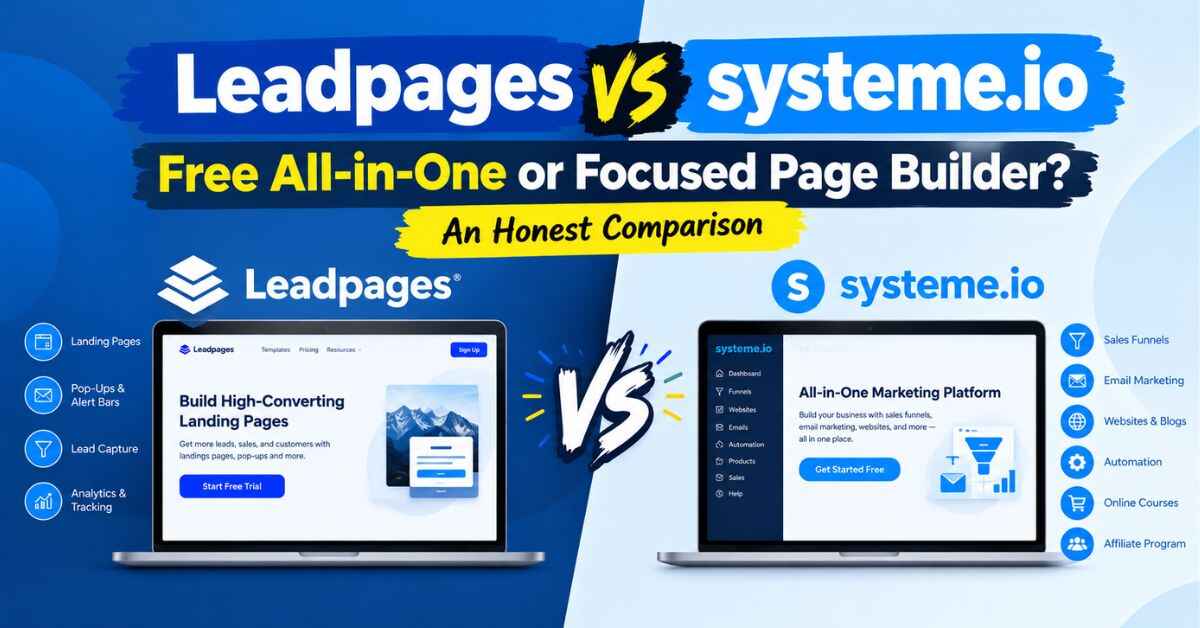
Leadpages vs Systeme.io: Free All-in-One or Focused Page Builder? An Honest Comparison
Let’s get the awkward question out of the way first. One of these tools has a free plan, and the other doesn’t. So if you’re comparing Leadpages vs Systeme.io, it’s completely fair to wonder why anyone would pay for Leadpages at all.
I’m going to answer that honestly, because I think it’s the question that matters. Systeme.io is a genuinely good tool, and for some people it’s the smarter choice. Leadpages is better for other people, and I’ll explain exactly who those people are. I use an affiliate link for Leadpages, which I’ll mention again at the end. But I’d rather you pick the right tool than click my link for the wrong reasons.
By the time you finish reading, you’ll know which one fits the way you work. Let’s start with where most people get stuck.
The Problem: You Need to Start, But the Options Are Overwhelming
Here’s a situation you might know. You’ve got an offer, maybe a free guide, a course, a service, a coaching package, or a product you’re promoting. You know you need a proper page for it, because sending people to a busy homepage isn’t working. Visitors click, look around, feel a bit lost, and leave.
So you go looking for a tool. And right away you hit two very different pitches.
One says: “Here’s everything in one place. Funnels, email, courses, affiliates, all free to start.” The other says: “Here’s a beautiful, conversion-focused page builder that makes your pages as good as they can be.”
Both sound great. Both have happy users. And you’re left wondering which one is smarter for you, especially when one costs nothing to try and the other asks for a card at signup.
Why a Wrong Choice Costs More Than Money
The sticker price isn’t the whole story. Let me explain why.
Say you pick a tool because it’s cheap, or free, and then spend weeks fighting its limits. Pages that don’t look quite the way you imagined. Editing that feels clunky. A learning curve that has nothing to do with your actual business. Your offer sits there, unseen, while you tinker.
Or say you pick a polished tool but you really needed email, courses, and automation in the same place, and now you’re stitching four services together and paying for each.
In both cases, the real cost is time and momentum. And there’s a quieter cost too. Every evening spent stuck on tech, a little voice grows louder: “Maybe I’m just not cut out for this.”
You are. The tool just has to match the job. So let’s look at the two jobs.
What Systeme.io Actually Is
Systeme.io is an all-in-one platform for online businesses. Depending on the plan, it covers sales funnels, landing pages, email marketing, online courses, memberships, affiliate management, and more, all inside one account.
Its biggest selling point is value. It has a free plan that, according to its own materials and several reviews, includes funnels, email sending, and a custom domain, along with low-cost paid plans after that. For solopreneurs launching on a tight budget, that’s a real draw. Comparison sites regularly describe it as one of the best-value options around.
I’ll give it full credit. If you’re starting with almost no budget and you want one tool to do your pages, your emails, and maybe a course, Systeme.io deserves a serious look.
The trade-offs people mention are about depth and polish. Some reviewers say its design flexibility, analytics, and automation can feel limited as your needs grow. Since some of those comparisons are written by competitors, take them with a grain of salt, and judge for yourself by trying it.
What Leadpages Actually Is
Leadpages is a landing page builder made for people who want results without a steep learning curve. You pick a template, swap in your words and images, connect your email service, and publish.
Around that, you get a drag-and-drop editor, a template library sorted by goal, pop-ups and alert bars, forms, integrations with popular email and marketing tools, A/B testing, simple websites, checkout options for selling simple products and services, and even a WordPress plugin so pages can live on your own domain. Based on what Leadpages and several comparison sites say, its plans also don’t cap your visitors.
Here’s the honest part: Leadpages doesn’t include built-in email marketing, courses, or membership areas. It’s not trying to. It’s focused on making your pages as good as they can be, and connecting to the tools you already use for the rest.
If you’d like to see what the editor feels like while you read, here’s a link: “Take a look at the Leadpages editor and see how it feels”
Leadpages vs Systeme.io: A Fair Side-by-Side
Let’s go through what actually affects your daily experience. A note first: both companies have adjusted plans recently, and sources disagree on exact prices. So I’ll describe how they generally compare and tell you what to double-check, instead of quoting numbers that could be stale.
Price
This is Systeme.io’s strongest card. It offers a free plan and low-cost paid tiers, while Leadpages has no free plan and starts higher. If your budget is truly zero, that matters, and I won’t pretend otherwise.
But here’s a way to think about it. The question isn’t only “what does this tool cost?” It’s “what will I pay in total to do the job?” If you already have an email service you like and just need excellent pages, paying for a tool that also replaces your email service doesn’t save you anything. And if you value your time, a tool that gets you to a polished page faster can pay for itself.
Edge for a zero-dollar start: Systeme.io. Edge for focused page quality: Leadpages.
Landing Page Design and Templates
Leadpages leads here, in my view. Its templates are built specifically around conversion: where the headline sits, how the button stands out, where the form goes. You’re borrowing structure that tends to work, not only a nice look.
Systeme.io has templates too, and plenty of people build good pages with it. But some reviewers describe its design options as more limited, and that’s an area where a dedicated page builder usually has the edge.
Edge: Leadpages.
Ease of Use
Leadpages is known for being beginner-friendly. The editor is drag-and-drop, and many people get a first page live in a single sitting. If you’ve ever edited a slide in a presentation, you already have the skills.
Systeme.io is also praised for being simple, especially for an all-in-one. But because it does so much more, there’s more to learn: funnels, automations, email, courses. If you only need pages, Leadpages can feel lighter.
Edge for page-only simplicity: Leadpages. Edge for one-login convenience: Systeme.io.
Email Marketing
Systeme.io includes built-in email marketing, even on its free plan, according to its own materials. That’s a real convenience: one tool, one login, no connecting anything.
Leadpages doesn’t send emails. It connects to many popular email services, so new leads flow straight into whatever you use. If you already love your email tool, that’s a feature. If you don’t have one yet, it means one more thing to set up.
Edge for all-in-one: Systeme.io. Edge for flexibility to use any email service: Leadpages.
Testing and Improving Pages
Leadpages gives you A/B testing so you can build two versions of a page and let real visitors show you which one gets more sign-ups. Depending on the current plan structure, testing sits at certain tiers, so check which plan includes it. It also offers built-in guidance while you edit.
Systeme.io also includes testing, and some comparisons say it’s available across its plans. Reviewers tend to describe its analytics as simpler.
Edge: roughly even, with Leadpages leaning stronger on page optimization.
Pop-Ups and Alert Bars
Leadpages lets you add pop-ups and alert bars to your existing website, using the same editor as your pages. That’s handy if you already have a blog or business site and just want to capture more of your existing traffic.
Edge: Leadpages.
WordPress and Your Own Website
Leadpages offers a WordPress plugin, so pages can publish on your own domain, which some people value for branding and SEO. One comparison I read noted that Systeme.io doesn’t offer one.
Edge for WordPress users: Leadpages.
Courses, Memberships, and Affiliate Management
If you want to host a course, run a membership, or manage your own affiliates in the same place as your pages, Systeme.io covers that. Leadpages doesn’t. You’d pair it with a separate course platform.
Edge: Systeme.io, clearly.
Traffic Limits
According to Leadpages and several comparison sites, Leadpages doesn’t cap visitors on its plans. Systeme.io’s limits relate more to things like contacts and funnels on each plan, so check its current terms.
Edge for predictable traffic costs: Leadpages, according to the sources I found. Also read: Leadpages Review (2026): Is This AI Landing Page Builder Really Worth Your Money?
So Who Should Choose Leadpages?
If these sound like you, Leadpages is probably a strong fit.
You already have an email service you like. You just need great pages that connect to it.
You care how your pages look. You want polished, conversion-focused designs without hiring a designer.
You’re a blogger or content creator. You want to turn readers into subscribers with a free guide, a landing page, and a pop-up.
You’re a coach, consultant, or small business owner. You need a few focused pages, like a discovery call, a workshop sign-up, or a quote request.
You use WordPress. You want landing pages that live on your own site.
You’re an affiliate marketer. You want quick bridge pages that warm up traffic before sending it to an offer, with the ability to test different angles.
You want to grow without traffic worries. You’d like to scale without watching visitor limits.
And Who Might Prefer Systeme.io?
I promised honesty, so here it is.
Your budget is truly zero. A free plan with real features is hard to argue with.
You want everything in one place. Funnels, email, courses, and affiliates under one login.
You’re launching a course or digital product. Built-in course hosting and email make the whole thing simpler.
You don’t mind simpler design options. If clean and functional is enough for you, the savings are real.
I’d rather you choose the right tool than the one I happened to mention.
What a Day With Leadpages Actually Feels Like
Specs only tell you so much, so here’s what using it feels like.
Say you’re offering a free checklist. You log in and click to create a new page. You see templates sorted by purpose, and you pick a lead-generation one. It opens in the editor, and there’s already a headline, a short description, an image, a form, and a button.
You click the headline and type your own. You swap the image. You change the button from “Submit” to “Send Me the Checklist.” You connect your email service so new sign-ups land on your list. You preview it on your phone and fix anything awkward.
Then you hit publish.
That’s really it. Plenty of people go from “I have an idea” to “I have a live page” in one sitting. And that speed matters, because momentum is everything when you’re starting out.
The Benefits That Actually Matter
Feature lists are boring, so here’s what I think makes the real difference.
You Don’t Have to Be a “Design Person”
Templates are built with conversion in mind. The layout, spacing, and structure already follow patterns that tend to work. You’re borrowing good design decisions instead of guessing, which is a big advantage when you don’t yet know what “good” looks like.
Your Pages Work on Phones
Many of your visitors will arrive on their phones, probably while scrolling social media. If the page looks broken, they’re gone in seconds. Leadpages templates adapt to smaller screens, and you can preview them while you edit.
It Plays Nicely With Your Other Tools
When someone fills in your form, the details go straight into your email system. No copying names into a spreadsheet at midnight. No forgetting to send the free download. Before you sign up, check that your email service is on the current integration list.
Testing So You’re Not Guessing Forever
You can build two versions of a page and let real visitors show you which one works better. Small improvements add up, and a page that converts a little better means more leads from the traffic you already earned.
Selling From Your Page
If you offer something simple, like a digital download, a consultation, or a workshop seat, Leadpages has checkout options for taking payments right on the page. According to Leadpages, these depend on your plan, so check which one you need.
Pop-Ups for Your Existing Site
You can add pop-ups and alert bars to a blog or business site you already have, without rebuilding anything.
Help When You’re Stuck
There are help guides, training resources, and a support team. Knowing there’s a real place to ask questions makes experimenting less scary.
Real-Life Examples
The blogger with an email service. She already uses an email tool she loves. She builds a free-guide landing page, adds a pop-up on her best posts, and connects everything. Leadpages is a perfect match, since she doesn’t need a second email system.
The brand-new creator with no budget. He has no list, no tools, and no money to spare. Systeme.io’s free plan lets him build a page, send emails, and start a small course in one place. That’s a smart start, and there’s no shame in it.
The coach with three offers. A discovery call, a workshop, and a paid program. Three pages, each aimed at one audience. She runs a split test on the discovery call page and finds a shorter headline brings in more bookings.
The WordPress site owner. He has an established blog and wants landing pages on his own domain. Leadpages’ WordPress plugin fits right in.
The course creator. She wants hosted lessons, a sales page, and automated emails in one platform. Systeme.io suits her better. Or she might use Leadpages for beautiful sales pages and pair it with a separate course platform.
The affiliate marketer. He builds a few bridge pages with different angles, sends traffic to each, and sees which one warms people up best. Fast building and easy duplication make that practical.
See how that works? There’s no single winner. There’s a winner for each situation.
The Easiest Way to Decide: Try Them Both
Reading comparisons only gets you so far. Here’s a plan that costs you almost nothing.
Open a free Systeme.io account, since there’s no cost to try. Then start a Leadpages trial. Leadpages has offered a free trial, but I’ve seen different lengths quoted, 14 days on some pages and 7 days on more recent ones, so check the signup page for the current terms. According to Leadpages, you won’t be charged if you cancel before the trial ends. A credit card is needed at signup, and the paid plan starts automatically afterward, so set a calendar reminder.
Build the same page in both. A free guide sign-up works well. Connect your email setup, test the form with your own address, and check how each page looks on your phone. Then ask yourself two honest questions. Which one felt easier? And which page am I prouder to share?
That comparison will teach you more than any review, including this one.
If you’re curious about the Leadpages side, you can start here: “Try Leadpages and build the same page side by side to see the difference”
A Quick Checklist Before You Choose
What’s my real goal? Collect emails, book calls, sell something simple, or run a whole business in one tool?
Do I already have an email service? If yes, you may not need an all-in-one.
How much do I care about page design? If it matters a lot, a dedicated page builder has the edge.
Do I need courses or memberships? If yes, consider Systeme.io or a separate course platform.
What’s my budget today, and in six months? A free start is great, but think about where you’ll be.
Does it connect to my tools? Check the current integration list.
Will I enjoy using it? If building feels like a chore, you’ll stop doing it.
Small Tips for Better Pages, Whichever Tool You Pick
One page, one goal. If you ask people to subscribe, follow you, read your blog, and buy something all at once, they’ll usually do none of it.
Write the headline for the reader. “Welcome to My Journey” means nothing to a stranger. “Simple Meal Plans for Busy Weeknights” tells them exactly what’s in it for them.
Make the button specific. “Send Me the Guide” almost always beats “Submit.”
Ask for less. If you only need an email address, don’t ask for a phone number too. Every extra field is a reason to leave.
Use real photos when you can. A genuine picture of you or your work builds trust faster than a stock image.
Test one thing at a time. Change only the headline or only the image, so you know what made the difference.
Come back and tweak. Your first version won’t be your best, and that’s completely normal.
Quick Answers to Common Questions
Is Systeme.io really free?
According to its own materials and several reviews, it has a free plan with real features, plus paid plans. Check its current limits.
Does Leadpages have a free plan?
No, but it has offered a free trial. Check the signup page for the current length.
Does Leadpages include email marketing?
No. It connects to many popular email services instead.
Which is better for landing page design?
Many reviewers favor Leadpages for polished, conversion-focused pages.
Which is better for courses?
Systeme.io, since it includes course hosting.
Can I use Leadpages with WordPress?
Yes, Leadpages offers a WordPress plugin.
Do I need coding or design skills for Leadpages?
No. If you can type, click, and drag things around, you can use the editor.
My Honest Take
So, Leadpages vs Systeme.io. Who wins?
If you want a free, all-in-one platform and you’re comfortable with simpler design options, Systeme.io is a smart choice, and I’d never talk you out of it. But if you care about how your pages look and perform, you already have an email service you like, or you want a focused tool that does one job really well, Leadpages is the one I’d put on your shortlist.
It won’t do your marketing for you. You still have to share your page, write honestly, and keep showing up. But it takes away the technical friction that makes so many people quit before they’ve begun.
And the hardest part of any new project is getting the first thing live. Once there’s a real page out in the world, everything gets easier, because you’re improving something that exists instead of imagining something perfect.
So if you’ve been comparing for days, try one. One page. One offer. One afternoon.
Here’s where you can start and see how it feels: “Start building your first page with Leadpages”
You might be surprised how fast it comes together.
Quick note: this post contains affiliate links. If you click one and decide to sign up, I may earn a small commission, at no extra cost to you. I only share tools I think can genuinely help, and the opinions here are my own. Thanks for reading and for supporting the blog.