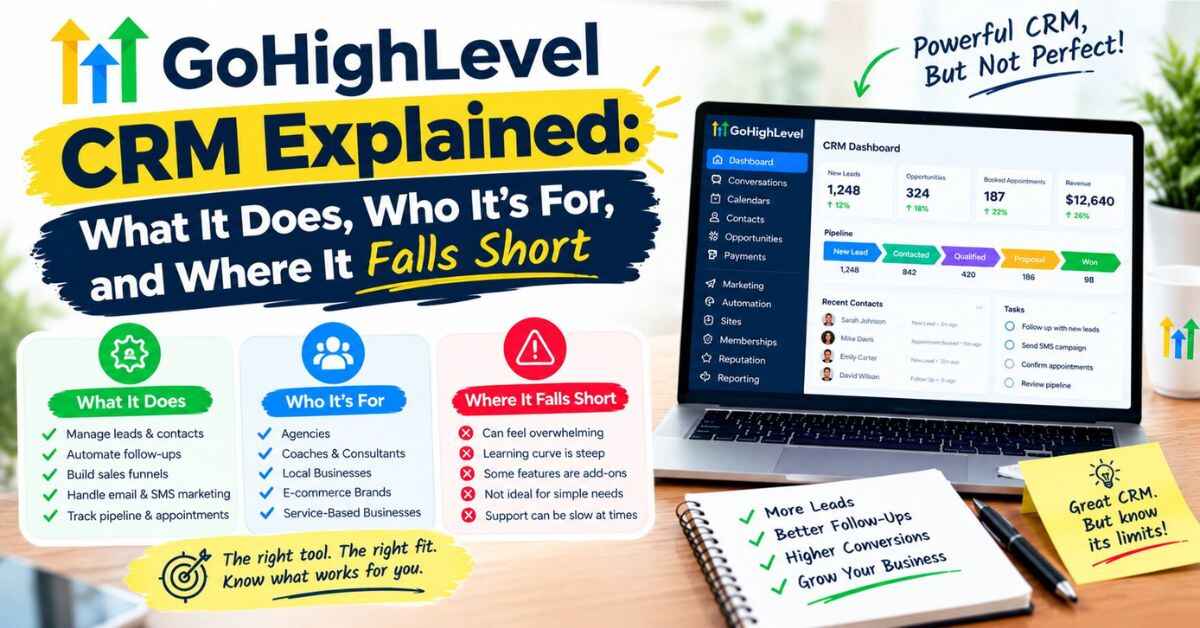
GoHighLevel CRM Explained: What It Does, Who It’s For, and Where It Falls Short
Most people don’t go looking for a CRM because they’re excited about software. They go looking because something went wrong. A lead slipped away, a client message got buried, or they spent twenty minutes digging through old emails just to remember what they promised someone last week. If that sounds familiar, the GoHighLevel CRM is probably what brought you here, and I’d like to give you a straight, practical look at it. What it does well, what it doesn’t, what it costs, and whether it’s a sensible fit for the way you work.
The “Where Did That Lead Go?” Problem
Let me paint a picture you might know too well.
It’s Thursday afternoon. You’re mid-task when you remember that someone asked you about your services last week. You vaguely recall they sent a message. But was it an email? An Instagram DM? A text? A form on your website?
So you start hunting. Inbox first. Nothing. Then Instagram. Maybe. Then your notes app. Then that spreadsheet you started in January and stopped updating in March.
Twenty minutes later you find it, buried under other stuff. You reply. The person writes back politely: “No worries, I went with someone else.”
It stings, because the work wasn’t the problem. Your service was fine. Your price was fine. The conversation just got lost in the mess.
Why Messy Contact Management Quietly Costs You Money
Here’s the thing about disorganized leads: you don’t see the loss on any bill.
No invoice says “you lost three customers this month because you replied a day late.” It just shows up as a slightly smaller month than you expected, and you blame the market, the season, or bad luck.
But think about how most small businesses actually track people. A spreadsheet that’s always a little out of date. Notes scattered across your phone. Email in one place, texts in another, social messages in a third. Follow-ups that depend entirely on you remembering them.
That works when you have five leads. It starts breaking around fifteen. By fifty, you’re losing track of people daily, and you’re the only thing holding the whole system together.
For agencies and freelancers, it’s worse. You’re tracking your own leads and your clients’ leads, across multiple accounts, with different tools for each. One missed follow-up on a client’s behalf isn’t just a lost sale. It’s a conversation you have to explain.
This is exactly the gap a CRM is meant to close. Also read: GoHighLevel Review 2026: Features, Pricing, Pros, Cons & Alternatives
What a CRM Actually Is (No Jargon)
CRM stands for customer relationship management, which sounds fancier than it is.
Think of it as a digital notebook that never forgets. Every person you talk to gets a record. That record holds their details, every message you’ve exchanged, notes you’ve written, where they stand in your sales process, and what needs to happen next.
The magic isn’t in storing the information. A spreadsheet can store information. The magic is in what the CRM lets you do with it: see who needs a follow-up today, send messages automatically, move people through stages, and spot where deals get stuck.
A good CRM turns “I hope I remember to follow up” into “the system already did.”
So What Is the GoHighLevel CRM?
GoHighLevel is an all-in-one platform for marketing, sales, and client management, and the CRM sits at the center of it. Everything else, like funnels, texting, email, booking calendars, and automations, plugs into the same contact records.
That’s the difference between this and a standalone CRM. With a standalone tool, you still need other apps for email, texts, scheduling, and landing pages, then you have to connect them all. Here, those pieces live in the same place and share the same data from the start.
The official site describes it as an AI-powered platform for capturing leads, nurturing prospects, and closing clients. It was originally built with agencies in mind, but local businesses, coaches, consultants, and freelancers use it too.
On GoHighLevel’s own pricing, every plan includes unlimited contacts and unlimited users. So you’re not penalized for growing your list or adding teammates, which is a nice change from CRMs that charge more as your contact count climbs.
Want to see what a contact record and pipeline actually look like? You can open GoHighLevel here and look at the layout alongside this post.
GoHighLevel CRM: What’s Actually Inside
Let’s walk through the pieces that make up the CRM side, in the order you’d likely use them.
Contact records: everyone in one place
Every person gets a profile. It holds their details, their messages across channels, notes, appointments, and where they sit in your process. Open a contact and you see the whole story on one screen.
You can also tag people and sort them into groups, so finding “everyone who asked about pricing last month” takes seconds instead of an afternoon.
Why it matters: when someone replies to you, you don’t have to wonder who they are or what you said last. You just open their record.
Pipelines: a visual board for your deals
A pipeline is a board with stages like “New Inquiry,” “Quote Sent,” “Booked,” and “Won.” Each lead is a card you move along as things progress. Automations can move them for you.
GoHighLevel’s own site describes this as tracking everything from first touch to closed deal in one view, so nothing slips.
Why it matters: at a glance you can see where people are stuck. If eight cards are sitting under “Quote Sent,” you know exactly who needs a nudge today.
The unified inbox: every conversation in one stream
This is the feature that makes a lot of people say “oh, that’s what I needed.” Messages from SMS, email, Instagram, Facebook, WhatsApp, and live chat all land in one stream, according to the official site.
Instead of checking five apps, you reply from one screen. And because it’s tied to the contact record, you see the full history next to the message.
Why it matters: speed. When replying is easy, you reply faster. And the business that answers first often wins.
Workflow automation: follow-up that runs itself
Here’s where the CRM stops being a notebook and starts being a helper.
You build a sequence once, and it runs for every lead. For example:
- Someone submits a form
- They instantly get a text thanking them
- They land in your pipeline as a new lead
- An email goes out with more details
- If they haven’t booked in a day or two, a friendly nudge goes out
- If they book, reminders go out before the call
For agencies, the official site notes you can build automations once and deploy them across every client account.
Why it matters: consistency. Humans forget. Automations don’t.
Calendars and booking
People can book directly from a link, and the system sends confirmations and reminders automatically. Appointments show up on the contact’s record.
Why it matters: it ends the “does Thursday work?” email chain, and reminders help reduce no-shows.
Forms, surveys, and quizzes
You can collect leads through forms, surveys, and quizzes that feed straight into your CRM. No more copying details from a form submission into a spreadsheet.
Lead scoring and smart lists
GoHighLevel lists lead scoring and smart list segmentation among its features. In plain terms, you can sort your contacts by how engaged they are and group them by behavior, so you know who’s hot and who needs a gentle re-engagement.
Why it matters: not every lead deserves the same attention. Sorting them saves you from treating a casual browser like a ready buyer.
Missed-call text back
If someone calls and you can’t answer, the system can text them automatically within seconds. For local service businesses, this one small feature often makes the whole thing feel worth it. A missed call that gets a quick text is a lead you might otherwise lose to the next number on the list.
AI-powered conversations
The platform includes AI tools that can handle calls, texts, chat, and review replies. These are billed by usage on top of your plan, and like any AI feature, they work best when you set them up carefully and keep an eye on them. Test on a small scale before relying on them heavily.
Estimates, invoices, and payments
You can send estimates and proposals, create invoices, and collect payments, all tied to the same contact record. You can see who paid right next to the rest of their history.
Reputation management
You can send automatic review requests after a job and track the responses. Reviews often decide who gets the call, and automating the ask means it actually happens.
The mobile app
GoHighLevel includes a mobile app, so you can check conversations and reply from your phone. Handy when you’re away from your desk.
Sub-accounts for client work
If you work with clients, each one gets a separate sub-account that keeps their data apart. The official site says you can clone funnels, duplicate workflows, and switch between accounts quickly.
Why it matters: instead of rebuilding the same system for every new client, you copy a setup you’ve already perfected.
Which of those pieces would save you the most time? It’s worth seeing how they connect inside GoHighLevel to check whether it fits how you work.
A Day in the Life: How It Looks When It’s Working
Features are easier to picture inside a real day, so here’s a made-up but realistic example. This shows how things can work, not promised results.
Imagine a small home-cleaning business.
At 9:40 p.m., someone fills out a quote request on the website. The owner is asleep. In the old setup, that form would sit in an inbox until morning.
Now, within seconds, the person gets a text: “Thanks for reaching out! Pick a time that works for your quote here.” They tap the link and book a slot for Saturday morning. A contact record is created automatically, tagged as a new lead, and dropped into the pipeline at “Booked.”
When the owner wakes up, there’s a notification and a booked quote visit. Nothing was lost, nothing was forgotten, and the owner didn’t do any of it.
On Friday, an automatic reminder goes out. After Saturday’s visit, the card moves to “Quote Sent.” If there’s no reply in two days, a friendly follow-up text goes out. When the job is done, a review request follows.
The owner’s role? Showing up and doing great work. Everything in between ran quietly in the background.
That’s what a CRM is really for. Not storing names, but making sure the right thing happens at the right time without relying on memory.
Who Gets the Most Out of It
Local service businesses
Think cleaners, plumbers, salons, gyms, clinics, and similar businesses that live on fast replies and repeat customers. Missed-call text back, instant follow-up, booking, reminders, and review requests hit the exact pain points these businesses deal with.
Coaches and consultants
If your business runs on booked calls, the CRM can capture interest, handle scheduling, send reminders, and follow up after each call. Picture a coach who used to lose an hour a day to scheduling emails. That hour goes back into coaching.
Agencies and freelancers
This is where the platform is strongest. You can manage multiple clients in separate sub-accounts, reuse your best workflows, and keep every client’s leads organized in one place. Instead of juggling a different tool stack for each client, you run one system.
People tired of paying for too many tools
The official site says HighLevel can often consolidate things like your CRM, funnel builder, email platform, SMS tool, scheduler, and reputation software into one login. If you’re paying for several of those now, there may be real savings, along with the bigger benefit of having everything connected.
What It Costs (Including the Parts People Overlook)
Honest numbers matter, so here’s the picture based on the official pricing page at the time of writing. Prices change, so confirm on the site before you decide.
- Starter: $97 a month. 3 sub-accounts, unlimited contacts, unlimited users, 24/7 support, and all core features.
- Unlimited: $297 a month. Everything in Starter, plus unlimited sub-accounts, rebilling of phone and email usage at no markup, and basic API access.
- Agency Pro: $497 a month. Everything in Unlimited, plus SaaS mode, rebilling with markup, and advanced API access.
For most solo businesses and small teams, Starter covers the CRM and the rest of the core toolkit. Agencies serving many clients usually look at Unlimited.
Now the part people overlook. Things like text messages, phone calls, email sending, and AI features are billed by usage on top of the plan. For light users it’s a small amount. For heavy senders it’s something to plan for. The official page marks these usage-based features with an asterisk, so it’s not hidden, but it’s easy to miss if you only glance at the price.
Also, the free trial is 14 days, and the official CRM page states that a credit card is required and that you’ll be charged automatically when the trial ends unless you cancel. So if you start a trial, put the end date on your calendar.
The Honest Limits
I’d be a poor guide if I only showed you the shiny side. Here’s where things get less smooth.
There’s a learning curve. The CRM sits inside a big platform with a lot of menus and options. Most people need a few weeks of regular use before it feels natural. Building solid automations takes some trial and error.
Usage costs sit on top of the plan. If you plan to send lots of texts or use AI heavily, estimate your volume before committing.
US text messaging needs registration. Carriers require businesses to register before sending texts, and approval takes time. It’s an industry rule rather than a flaw in the platform, but it can slow down day-one plans.
It’s more than a simple contact list. If all you want is a basic place to store names and numbers, this is a lot of platform for that job. A lighter, cheaper tool might fit better.
Some other features are less deep than specialist tools. The CRM and automation sides are the stars. Things like the page builder or course hosting may feel more basic than tools built only for that purpose. That’s the usual trade-off with all-in-one software: breadth over depth.
You’ll want to build a clean setup. A CRM is only as useful as the habits around it. If you don’t keep your pipeline stages honest and your tags tidy, any system gets messy.
None of this makes it a bad choice. It just means it suits some people better than others.
A Simple Way to Set Up Your First CRM Flow
If you decide to try it, don’t build everything at once. Here’s a manageable starting path.
- Define your pipeline stages. Keep it simple. Four or five stages is plenty, like New Lead, Contacted, Booked, Proposal Sent, and Won.
- Connect one lead source. A single form on your website or landing page is enough to start.
- Build one automation. Instant reply, add to pipeline, one follow-up if no response.
- Set up booking. Let people schedule themselves so you stop playing email tag.
- Test it as a customer. Fill out your own form and check every message that arrives.
- Watch your usage in the first month so costs never surprise you.
- Add one new feature at a time. Reviews, reminders, or lead scoring can come later.
Do it this way and the CRM becomes a handful of small wins instead of a giant project.
Should You Try It?
If you’re losing track of leads, replying too slowly, or juggling several tools that don’t talk to each other, the GoHighLevel CRM is worth a serious look. The strongest case is for service businesses, coaches, and agencies who already get real leads and want to stop dropping them.
If you barely have any leads yet, or you only need a simple contact list, you may want a lighter tool for now. There’s no shame in matching the tool to your stage.
Either way, the sensible move is to test it on one real problem instead of guessing. The trial exists for exactly that. Pick one workflow, like following up with new inquiries, and see whether it actually makes your week easier.
If one simple automation could fix your biggest headache, that’s usually reason enough to look closer. You can see GoHighLevel’s current plans and trial here and decide at your own pace.
Quick Answers to Common Questions
Is the GoHighLevel CRM included in every plan?
Yes. Every plan includes the core features, with unlimited contacts and unlimited users. The plans differ mainly in how many sub-accounts you get and whether you can resell the platform.
Is there a limit on contacts?
According to the official pricing page, all plans include unlimited contacts and users.
Can I manage multiple clients?
Yes. Each client gets a separate sub-account. Starter includes 3, while Unlimited and Agency Pro include unlimited sub-accounts.
Which channels show up in the inbox?
The official site lists SMS, email, Instagram, Facebook, WhatsApp, and live chat.
Is it hard to learn?
There’s a learning curve because there’s a lot inside. Starting with one simple pipeline and one automation makes it far more manageable. The official site also lists 24/7 support, a help center, a community forum, and weekly live training.
Is there a free trial?
Yes, 14 days. The official CRM page says a credit card is required and you’ll be charged automatically when the trial ends unless you cancel.
Are there costs beyond the plan?
Yes. Texts, calls, email sending, and AI features are billed by usage, and there are optional paid add-ons. Check the official pricing guide for current rates.
Can it replace my other tools?
For many people, yes, at least for the core jobs like CRM, funnels, email, texts, and booking. Some people keep a specialist tool for one specific need.
One Last Thing
A CRM isn’t exciting. But the feeling of opening one screen and knowing exactly who needs your attention today is hard to beat, especially if you remember the days of hunting through five apps for one message.
I hope this walkthrough of the GoHighLevel CRM gave you a clearer, calmer picture of what it does and whether it fits your business. If you’d like to explore it yourself, the link is below.
Take a look at GoHighLevel here →
Affiliate disclosure: Just so you know, some links in this post are affiliate links. If you sign up through one, I may earn a small commission, and it won’t cost you anything extra. That helps keep this blog going. I try to be honest about the limits of anything I write about, because I’d rather you make a good decision than a quick one.