Filmoyo Review 2026: Features, Pricing, Pros & Cons (Worth It?)
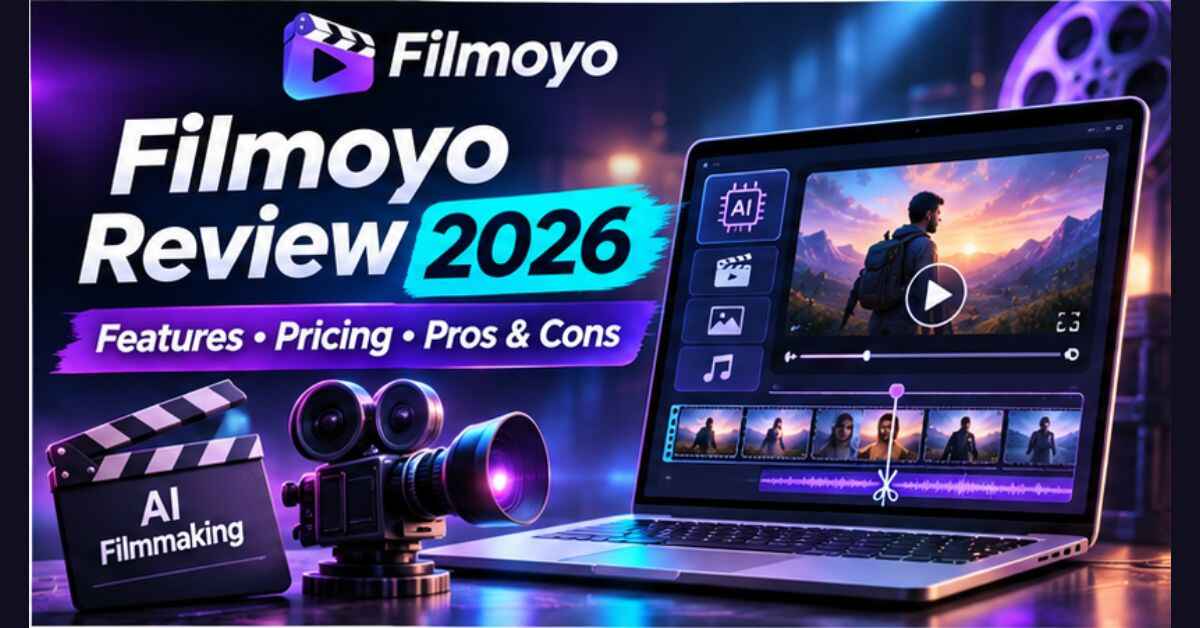
If you’ve ever bought an AI video app, made a few eight-second clips and then wondered who on earth would pay for them, this Filmoyo Review is for you. Filmoyo is an AI film studio you direct by typing. You describe a film, it writes and casts it, keeps the same characters in every shot, makes one of them speak on screen and stitches the finished film without a watermark. Its bigger bundle also tries to find the businesses that need a film. I’ll cover what you really get, what it costs, where the catches are and who it’s right for.
Here’s the situation most people end up in. You try an AI video tool. You type a prompt, wait a minute and get a short clip. The face changes in the next shot, the voice is random and the whole thing looks like an experiment. You post it, maybe get a few likes, and nobody ever offers to pay for it. Meanwhile, every day, bakeries, dentists, podcasters, online stores and musicians need video and most of them can’t make it themselves.
The gap isn’t more clips. It’s a finished, consistent film, and then someone to show it to. That’s the gap Filmoyo is built for.
Filmoyo Review: Quick Overview
Here’s the short version before we get into detail.
| Product | Filmoyo |
| Made by | Explaindio LLC (the team behind Explaindio, sold since 2014) |
| What it is | AI film studio you direct by typing, with an optional client-finding engine (QUARV) |
| Core features | AI Director, Character Lock, talking characters, shot-by-shot directing, watermark-free stitching |
| Pricing | Filmoyo Director $37 one-time; All-Access $297/year; All-Access Studio $497/year |
| Commercial rights | Commercial license included, so you can sell the films you make |
| Credits | 600 Core + 600 PRO in the Director box; far more in All-Access |
| Refund | 30-day money-back guarantee |
| Launch deadline | Cart closes Sunday, November 15 at 11:59 PM EST, per the page |
| Best for | Freelancers, side-hustlers, small agencies, affiliate marketers and creators |
My quick take: the film studio is genuinely interesting, and $37 is a low-risk way in. The part to read carefully is the pricing structure, because the client-finding half only comes with the yearly bundle, not the one-time price.
What Is Filmoyo?
Filmoyo is a web-based AI film studio. You type a brief, like “a 60-second spokesperson film for a neighborhood bakery,” and your AI Director drafts a storyboard, creates the characters and blocks out every shot. You approve each frame, and Filmoyo animates and stitches the finished film.
The main selling point is that it makes films, not clips. The page makes a clear distinction. A clip is eight seconds, one random take with a random voice. A film has the same actors in every shot, shots that look chosen, a character who speaks a line and a consistent look. Filmoyo is designed to deliver that second kind of result.
The second half is a technology called QUARV. According to the page, it finds businesses that might pay for a film, such as local businesses in thousands of cities, Shopify stores, podcasters and independent musicians. It makes each one a short preview film from its own website, helps you pitch it through your own email tool, and shows you when they watched it. That part comes with the All-Access bundle.
One thing I appreciate: the page says plainly that these are AI-generated films, Hollywood-style, not a real film crew on a movie set. That honesty helps with trust.
How Does Filmoyo Work?
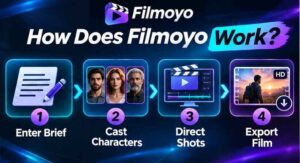
The flow is meant to be simple. Here’s how it breaks down, based on the page’s four steps.
Step 1: Getting Started
You log in to the web app and type your brief. Say what the film is about, the tone and who’s in it. Your AI Director drafts the storyboard with scenes, characters and every shot blocked. You can click “Make my film” and let it do everything, or go through a guided flow of Cast, Shots and Film, one Next button at a time.
Step 2: Setting Up the Product
Next you cast your characters. You can pick from more than 9,500 ready-made character images (1,230 avatars) or describe your own. Character Lock keeps each character looking the same in every shot, including face, build and clothes. Locations stay consistent too, and you can save a cast and reuse it in future films.
Step 3: Using the Main Features
Now you direct. For each shot you choose the angle (wide, medium, close), the shot type and the lighting, such as day, night, golden hour or noir. Filmoyo makes the still frame first, so you see it before anything animates. Then you write a line, and a character speaks it on screen, lip-synced. Choose vertical (9:16) or widescreen (16:9), and one click stitches the finished film, watermark-free.
👉 Curious what the finished films look like? Watch the Filmoyo examples and see the current offer here.
Filmoyo Features and Benefits
There’s a lot inside, so I’ll focus on the three features that matter most.
Feature 1: Character Lock and Consistent Casting
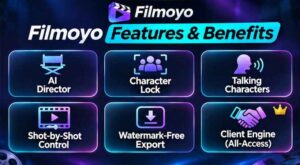
This is probably the most important feature, because it solves the biggest weakness of AI video. In most apps, the face changes from shot to shot. A spokesperson who turns into a stranger kills the deal. Filmoyo locks the character so the same person appears in every shot, and the same cast can be reused next month for the same client.
Why it matters: nobody pays for a film where the owner of the bakery looks like three different people. Consistency is what turns a fun experiment into something you could actually deliver.
Feature 2: Characters That Talk
A character speaks on screen, lip-synced to the line you write, and one voice carries the whole film. That makes spokesperson videos, explainers, podcast trailers and product films possible. The page calls the spokesperson video the one job most AI clip apps have to turn down, and I think that’s a fair point. A business owner wants a friendly face saying their message, not a silent montage.
Feature 3: The AI Director and Shot-by-Shot Control
You don’t have to be a filmmaker. The AI Director drafts the film from a short paragraph, and you can either let it run or take control shot by shot. You see every frame before it costs animation credits, and if a client wants a change, you rewrite one shot’s prompt and redo only that shot. It’s a good balance between automation and control.
What Else Is Inside
- Commercial license: the right to sell the films you make to clients.
- Watermark-free downloads: no badge, and you can deliver them anywhere.
- Vertical or widescreen: pick the format per film.
- Micro-Drama mode: short vertical episodes that end on a cliffhanger.
- Credits: 600 Core and 600 PRO credits included in the Director version.
Who Is Filmoyo Best For?
I think it fits these people best:
- Freelancers who want to take spokesperson and short-film jobs they used to turn down because there was no budget for a shoot.
- Side-hustlers looking for a service they can offer without a camera, crew or editing skills.
- Small agencies that want the same cast across every video for a client.
- Affiliate marketers and creators who want talking-character videos for offers, trailers or their own channels.
- Podcasters, authors and musicians who want trailers and release films without a production team.
It’s probably not for you if you love filming with a real camera, or if you want guaranteed income. The page is clear that it makes no promise of clients or earnings, and that whether anyone hires you depends on your work. If you’d rather not do any outreach at all, even automated, the selling side will still require some effort from you. Also read: VidZonic AI Review 2026: Turn One Sentence Into an Animated 3D Story Video
Filmoyo Pros and Cons
Pros
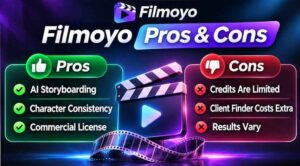
- Character Lock keeps the same cast in every shot
- Characters speak on screen with lip-synced voices
- AI Director drafts the whole film from a short brief
- Watermark-free downloads and a Commercial license included
- Low entry price: $37 one-time for the Director version
- Vertical and widescreen formats, plus Micro-Drama mode
- Optional client-finding engine with preview films and watch tracking
- Stacked bonuses and a 30-day money-back guarantee
- Made by a company that has sold video software since 2014
- Honest about being AI video and about not promising income
Cons
- The $37 version doesn’t find clients. That comes with All-Access, which is $297 per year
- All-Access is a yearly subscription, not a one-time payment
- Credits are limited “fuel,” and extra top-up packs aren’t refundable
- These are AI films, so some clients may prefer traditional production
- You still have to pitch, follow email and privacy laws and handle clients
- Results depend on your effort, your niche and your price
- The launch bonuses disappear when the cart closes
Filmoyo Pricing and OTOs
Here’s what the page shows at the time of writing:
- Filmoyo Director, $37 one-time: the full AI film studio, the Commercial license, the Director bonuses, and 600 Core + 600 PRO credits. It does not include client finding.
- All-Access Bundle, $297 per year: everything in Director plus every upgrade on the page, the Client Engine, all bonuses, the eight bundle-only bonuses, 9,000 Core + 6,450 PRO credits at signup, and 3,600 Core + 850 PRO refilled each anniversary. It renews yearly at the same price and you can cancel anytime.
- All-Access Studio, $497 per year: the same as All-Access with twice the credits and three times the daily client searches, aimed at people running films for several clients.
The upgrades are also sold separately. For example, the Client Engine is $97, Talking Characters $67, Director’s Cut PRO $67, Cinema Engines $127, Series Studio $97 and Agency $297. Bought one by one, the page says the parts total $833, compared with $297 for All-Access.
How I’d approach it: if you’re unsure, the $37 Director version is the low-risk way to see whether you like making these films. If you already know you want to pitch clients and sell regularly, All-Access makes more sense than buying upgrades one by one. Just remember it’s a yearly price, and check the renewal terms at checkout.
👉 Want to see which option fits you? Check the current Filmoyo pricing here before the launch closes.
Filmoyo Bonuses
The page lists launch bonuses for everyone, plus extra bonuses for All-Access buyers.
Launch bonuses (all buyers):
- 100 Cinematic Loglines: ready-to-paste one-sentence film starters across busy niches.
- The Director’s Shot-Book: angle, lighting and shot-type recipes for stronger opening shots.
- Launch Bonus Credits: an extra credit pack loaded at signup.
All-Access-only bonuses (eight of them):
- The Day-One Reel: finished sample films you can post as examples of your studio’s work.
- The First-Film Plan: an hour-by-hour guide for your first 48 hours.
- The Film Studio Business Kit: a one-page offer, pitch slides, a price-sheet guide and a client contract checklist.
- The Preview-Film Reply Pack: fifteen short replies for when a prospect watches, replies or says “not now.”
- The Studio Setup Session: a recorded walk-through from a blank login to a sent preview film.
- The 52-Week Episode Calendar: a year of episode ideas for client channels.
- The Studio Credit Boost: 2,000 Core and 1,000 PRO extra credits.
- The Gig Briefs: 27 niche briefs with the film, logline, character and one-line pitch.
The dollar “values” on the page are inflated, as they usually are. I’d judge the bonuses by whether you’ll use them, and the First-Film Plan, Gig Briefs and Reply Pack look the most practical to me. The page says the launch bonuses leave when the cart closes on Sunday, November 15.
My Filmoyo Evaluation
Here’s how I’d rate it, based on the offer as presented:
- Idea strength: 9/10. Consistent characters plus talking films plus a way to find clients is a smart combination.
- Ease of use: 8.5/10. Type a brief, approve frames, click stitch.
- Value for money: 8.5/10. The $37 entry is hard to argue with; All-Access is fair if you’ll really use the client side.
- Output expectations: 7.5/10. AI films will vary, so test with your own briefs.
- Transparency: 8.5/10. It states plainly that it’s AI video and that income isn’t guaranteed.
- Overall: 8.5/10.
What I like most is that the page doesn’t oversell. It shows the budgets real businesses post for video work on public job boards, then clearly says those are general market information, not a promise of clients or earnings. That honesty is rare in this space.
Filmoyo vs. Alternatives
Here’s how Filmoyo compares in general terms with your other options:
| Filmoyo | Typical AI clip apps | Hiring a production studio | |
|---|---|---|---|
| Output | Multi-shot films with a locked cast | Short single clips | Real filmed video |
| Talking characters | Yes, lip-synced | Often limited | Real actors |
| Consistency | Character Lock | Faces often drift | Naturally consistent |
| Finding clients | Client Engine (All-Access) | Not included | Not included |
| Cost | $37 or $297/year | Often subscriptions | Often hundreds to thousands per video |
| Setup time | Minutes | Minutes | Weeks |
If you want real footage, real actors and a real set, a production studio is still the right choice. If you’d rather skip the shoot and deliver polished AI films quickly, Filmoyo is a much more complete workflow than a simple clip generator.
Is Filmoyo Legit?
From what I can see, yes. It’s made by Explaindio LLC, the company behind Explaindio animation software that has been sold since 2014. The page names the founder, links to its terms, privacy policy, refund policy, earnings disclaimer and DMCA page, and sells through JVZoo, a well-known marketplace. It also includes a clear earnings disclaimer saying there’s no promise of clients or income.
A few honest notes. The films you see on the page were made by the Filmoyo team, using fictional businesses, so your own results will depend on your briefs and your editing choices. The outreach side also comes with responsibility: you’re expected to follow email and privacy laws and each platform’s rules on disclosing AI use. Think of Filmoyo as a powerful toolkit, not a guaranteed paycheck.
Filmoyo Refund Policy
Filmoyo has a 30-day money-back guarantee. If it doesn’t do what the page describes, you contact support within 30 days and they refund your purchase. All-Access and All-Access Studio carry the same guarantee.
One detail to note: credit top-up packs you buy on their own get used up and can’t be refunded. Your Director license is fully covered. My advice is simple. Log in right away, make a film from a real brief, and decide with the result in front of you. Don’t wait until day 29.
Frequently Asked Questions
Do I need film or editing skills? No. You type the brief, and the AI Director drafts the film. You can click “Make my film” or approve each frame yourself.
Can the characters really talk? Yes. A character speaks on screen, lip-synced to the line you write. It’s included in Filmoyo Director and uses PRO credits.
Can I sell the films? Yes. The Commercial license comes with Filmoyo Director, so you can sell the films you make to clients. What you charge is up to you.
Does Filmoyo find me clients? The Client Engine does, and it comes with All-Access. It searches businesses by trade and city, Shopify stores, podcasters and independent musicians, makes a preview film from their website and lets you send it through your own GoHighLevel, Instantly or Smartlead. It doesn’t promise clients, and results depend on your work.
Is it a monthly subscription? Filmoyo Director is a one-time $37 payment. All-Access is $297 per year, renewing yearly, and you can cancel anytime.
What are credits? Think of them as fuel. Core credits run everyday directing like drafts, casting, frames, animating and stitching. PRO credits power talking characters and premium engines. You can top up whenever you like.
Who owns the films? You do. You can download them without a watermark and deliver or post them anywhere.
Is this really AI video? Yes, and the page says so plainly. It’s AI-generated, Hollywood-style film, not a real film crew on a set.
When does the launch end? The page says the cart closes Sunday, November 15 at 11:59 PM EST, and the launch bonuses come off then.
Final Verdict: Is Filmoyo Worth Buying?
If you’ve been looking for a way to turn AI video into something people might actually pay for, Filmoyo is one of the more thoughtful offers I’ve seen. Character Lock fixes the biggest weakness of AI video, talking characters make real spokesperson films possible, and the Commercial license lets you sell your work. The $37 Director version is an easy, low-risk place to start, and the 30-day guarantee takes most of the pressure off.
Just go in with clear eyes. The client-finding side requires the yearly All-Access bundle, credits are limited, AI films won’t suit every client and nobody can promise you income. You still have to pitch, deliver and build relationships. If you accept that, it’s a smart toolkit. If you want guaranteed money with no effort, nothing will deliver that.
My suggestion is simple. Look at the current offer, decide whether you want just the studio or the full loop, make a film from a real brief in your first week and see how it feels. And since the launch bonuses leave on Sunday, November 15, it’s worth deciding before then.
👉 Ready to give it a try? Get Filmoyo and make your first AI film before the launch closes.
Affiliate disclaimer: This post contains affiliate links, which means I may earn a small commission if you buy through them, at no extra cost to you. I only share products I think are worth a look, and my opinions are my own. Results vary from person to person, so please read the full terms on the official page before you buy.