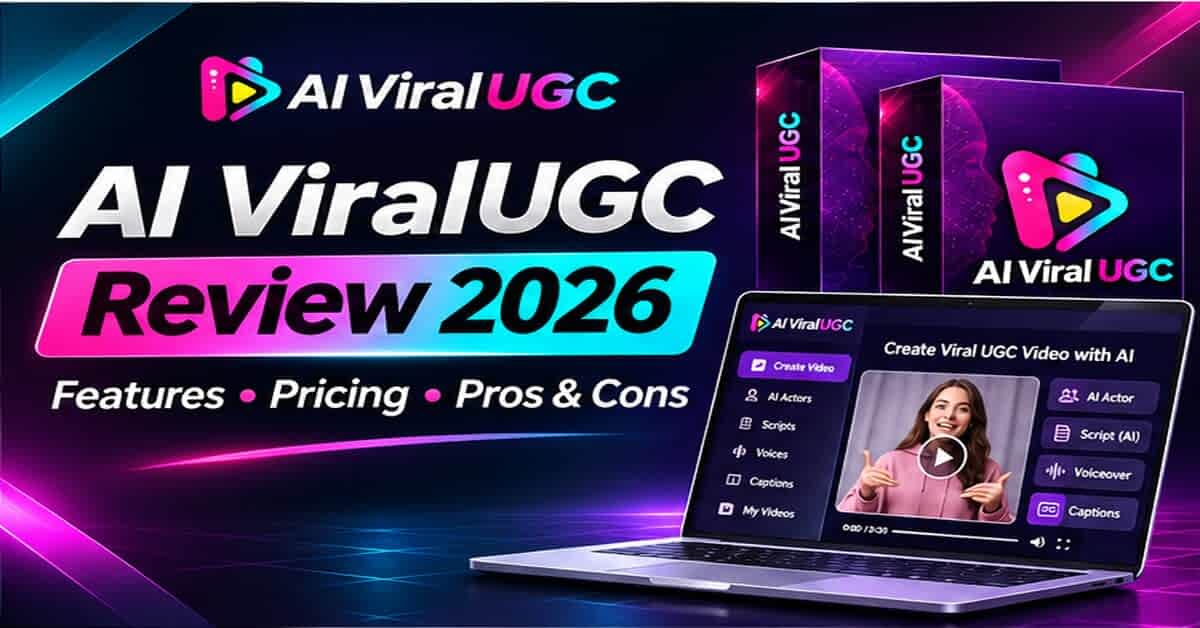
AI ViralUGC Review 2026: Features, Pricing, Pros & Cons (Worth It?)
Scroll through TikTok or Reels for five minutes and you’ll notice something. The ads that stop you aren’t the glossy ones. They’re the ones where a regular-looking person holds up a product and talks to the camera like a friend. That’s UGC, and brands pay a lot for it. This AI ViralUGC review looks at a tool that says you can make that kind of video without a camera, a creator or any editing skills.
The promise is simple. You paste a product link or type an idea. The software writes a script, picks an AI actor, adds a natural voice, syncs the lips, adds captions and exports a vertical video that’s ready to post. And the license lets you sell those videos to clients.
In this review I’ll cover what AI ViralUGC is, how it works, what you get, what it costs (including the upgrades), where I’d be careful, and who it really suits. I read the full sales page and the launch details, so you get the useful parts without the hype.
AI ViralUGC Review: Quick Overview
- Product: AI ViralUGC
- Creator: Akshat Gupta
- Type: Cloud-based AI app that creates UGC-style videos and ads
- Launch date: Wednesday, November 25, 2026 at 11 AM EST (launch runs to November 29)
- Launch price: About $14.95 one-time on the sales page (the JV page lists the front end as $17)
- After launch: The page says it becomes $97 per month
- Commercial license: Included, so you can sell the videos you make
- Guarantee: 30-day money-back
- Skill level: Beginner-friendly, no camera or editing skills needed
- Installation: None, it works in your browser on any device
What Is AI ViralUGC?
AI ViralUGC is a web app for creating short, human-style videos without hiring anyone. UGC stands for user-generated content, meaning videos that look like they were filmed by an ordinary customer: a quick review, an unboxing, a demo, a before-and-after or a short testimonial-style clip.
The tool is built around a library of 100+ AI actors, covering a range of ages and ethnicities. It combines script writing, AI voices, lip-sync, captions and export in one dashboard. You don’t need a separate subscription for the voice, another for captions and a third for editing.
The page is aimed at a wide group: eCommerce and Shopify owners, affiliate marketers, dropshippers, freelancers on Fiverr and Upwork, local businesses, faceless content creators and small agencies. The common thread is that they all need lots of short videos and don’t want to pay $500 to $2,000 each for creators.
The sales page is signed by Akshat Gupta, who tells a familiar story: a friend paid a creator $1,400 for one 30-second video that took two weeks and flopped. That’s what the tool is meant to fix.
How Does AI ViralUGC Work?
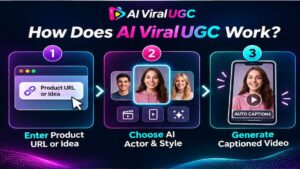
The process is short. The sales page describes it as paste, pick, generate.
Step 1: Getting Started
You log in to the cloud dashboard. There’s nothing to install, and the page says it works on a laptop, tablet or phone. Then you either paste a product URL or type your idea.
The tool reads what you give it and writes a script. The page says it uses proven copywriting frameworks such as PAS (problem, agitate, solve), AIDA (attention, interest, desire, action) and problem-solution. If you’ve ever stared at a blank page trying to write a 30-second ad script, you’ll see why that matters.
Step 2: Setting Up the Product
Next you pick your style. You choose an AI actor from the library, pick a language and accent, and select the type of video: testimonial-style, unboxing, demo, before-and-after, review or storytelling.
There’s also a Trending Hooks generator for the first two seconds of your video, and a Smart CTA creator for the ending. You can adjust the script before rendering, which I’d recommend. Even good AI copy gets better with a human touch.
Step 3: Using the Main Features
When you click generate, the app produces a finished video with the AI actor, a natural-sounding voice, lip-sync and auto captions. It exports as a Full HD MP4 in 9:16 vertical format, sized for TikTok, Reels, YouTube Shorts and Facebook.
The page says the whole thing takes a few minutes. You can also batch-create several videos in one sitting, which is handy for testing different hooks and angles on a single product.
👉 Curious what the finished videos actually look like?
The sales page has sample UGC videos, 3D ads, product reviews and avatar images. Take a look at the AI ViralUGC samples here and judge the quality for yourself before you decide anything.
AI ViralUGC Features and Benefits
The page lists 12 main features. These are the three that matter most to me.

Feature 1: URL-to-Video Engine and AI Script Writer
This is the time saver. Instead of researching a product, writing a script and planning a shot list, you paste a link and the tool builds the video around it. For store owners with dozens of products, that could turn a week of work into an afternoon.
The script engine, hooks generator and CTA creator all work together here. The idea is that every video starts with a strong opening and ends with a clear next step, rather than just rambling about features.
Feature 2: 100+ AI Actors, Natural Voices and Lip-Sync
This is the part that decides whether the videos look good or look fake. The library has more than 100 AI actors, and there are hundreds of voices with different accents and tones. The page says the lip-sync is smooth and “virtually undetectable.”
I’d treat that last claim carefully. AI video has improved a lot, but quality varies from clip to clip. The sensible approach is to test a few videos before you build a whole content plan around them. The sample section on the sales page is the best place to judge the realism.
Feature 3: Commercial License and Multi-Language Support
A lot of AI video tools make it hard to use the results commercially. Here, the commercial license is included, so you can sell videos to clients and keep what you charge. The page suggests packages for local restaurants, gyms, salons and dentists at $300 to $800 each.
Multi-language and accent support means one video idea can be redone for different markets without hiring translators or voice artists. If you work with international brands or run stores in several countries, that’s a real benefit.
Other features include batch creation, one-click auto captions, background music, logo insertion, text overlays and multi-platform templates. The page says there are no caps on how many videos you can create, though it’s always worth checking the fair-use terms once you’re inside.
Who Is AI ViralUGC Best For?
I think it’s a good fit for:
- eCommerce and Shopify sellers who need fresh ad creatives often
- Affiliate marketers who want short product videos without being on camera
- Faceless content creators posting daily on TikTok, Reels or Shorts
- Freelancers and small agencies who want to offer UGC-style video services
- Local business owners who need simple promo videos
- Coaches and course sellers who want quick explainer or promo clips
It’s probably not for you if you want videos with a very specific brand look, if you need long-form cinematic content, or if you expect to earn money with no effort. The tool makes videos. You still need to find clients or traffic.
AI ViralUGC Pros and Cons
Pros
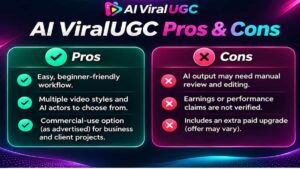
- Very low launch price, with no monthly fee at launch
- Covers script, actor, voice, lip-sync, captions and export in one place
- 100+ AI actors with multiple languages and accents
- Commercial license included, so you can sell the videos
- Batch creation helps with testing lots of ad angles
- Cloud-based, nothing to install
- Beginner-friendly, with no camera, editing or tech skills needed
- 30-day money-back guarantee
Cons
- The income claims (“up to $500 a day on autopilot”) are marketing, not typical results
- The price is a launch price, and the page says it becomes $97 a month afterwards
- The upgrade offer suggests the base version has limits on clip length and render quality
- AI actors can still look slightly artificial in some clips, so test before you commit
- Testimonials are unverified, and the page’s own disclaimers say results vary
- Fake-looking testimonials made with AI actors can break ad-platform rules and consumer protection law
- The sales page has some inconsistencies (prices, bonus lists and a stray mention of another product), so confirm details at checkout
AI ViralUGC Pricing and OTOs
Here’s what the launch pages show.
Front end: about $14.95 one-time. The sales page shows a crossed-out $197 per month and says the one-time price is for early buyers only. The JV page lists the front end as $17, so the exact figure may vary by link or time. There’s also a pop-up coupon, VUGC3, that takes $3 off. After the launch window the page says the price becomes $97 per month.
Order bump: Business Edition, $9.97. This is a limited add-on (first 25 buyers) that offers more UGC-style ad output, longer video clips, premium avatar and product-video templates, 4K rendering, lifetime updates and priority support. The page says it’s normally $97.
OTOs: The JV page lists five upsells at $47, $97, $67, $197 and $297. The pages I reviewed don’t say what each one contains, so read each offer carefully at checkout and don’t buy anything you can’t clearly explain.
My view: the front end alone is a low-risk way to test the tool. The fact that the bump mentions longer clips and 4K suggests the basic version is more limited. If you plan to sell videos to clients, the Business Edition may be worth considering. If you’re only experimenting, try the basic version first.
🔥 Wondering if the launch price is still available?
The page says the one-time price ends when the timer hits zero. Check the current AI ViralUGC price and what’s included before it changes.
AI ViralUGC Bonuses
The sales page lists five fast-action bonuses near the top:
- “Winning Hooks” Swipe File: 200+ scroll-stopping hooks
- UGC Agency Starter Kit: Client contracts, pricing sheets and cold-outreach scripts
- Viral Video Formula Cheat Sheet: A 7-part structure for UGC videos
- 100 Done-For-You Niche Video Ideas: Plug-and-play angles for profitable niches
- Commercial License Upgrade: The right to sell what you create
Further down, the page shows a different list of five launch bonuses, including a live mastermind, a library of 100 viral UGC niches and scripts, an agency builder kit, a traffic blueprint and a monetization vault. The two lists don’t match, so I’d check which bonuses are actually delivered when you buy.
The dollar values, including the $12,929+ total, are the seller’s estimates, not what these things sell for elsewhere. Of everything listed, I’d call the hooks file and the agency starter kit the most useful. If you plan to sell video services, the contracts and outreach scripts save you from starting from scratch.
My AI ViralUGC Evaluation
Here’s my honest scorecard:
- Ease of use: 9/10. Paste, pick and generate is about as simple as it gets.
- Value for money: 9/10. At around $15, the toolset is very hard to match.
- Beginner friendliness: 9/10. No camera, mic or editing software needed.
- Income potential: 6/10. The commercial license opens real opportunities, but you still have to find buyers.
- Transparency: 5/10. The core tool is clear, but the income claims, prices and bonus lists are inconsistent.
Overall, I’d give it 7.5 out of 10.
Here’s the way I’d use it. I’d start with a product I already understand, generate three or four videos with different hooks, and compare them. Then I’d edit the scripts to sound more like a real person, because that’s what makes UGC feel authentic. I’d post one or two and see how they perform before making dozens.
I’d also keep one thing in mind about honesty. Using an AI actor for a product demo or explainer is straightforward. Using an AI actor to present a made-up customer testimonial is a different matter. Ad platforms ask for AI-generated content to be labeled, and fake reviews can cause real problems. If you offer this to clients, build demos, tips and explainers around the tool and be open about what’s AI.
The page also leans hard on claims like “up to $500 a day on complete autopilot.” Nothing earns money on autopilot. The tool creates videos, and the money comes from clients, sales or traffic that you bring.
AI ViralUGC vs. Alternatives
Hiring UGC creators. Real creators bring genuine personality and trust, but the page puts the cost at $500 to $2,000 per video, with delivery times of a week or two. That’s tough if you need volume.
Doing it yourself with a camera. It’s free in money terms, but you need equipment, time, editing skills and the willingness to be on camera. Many people never get past the first video.
Stitching together separate AI tools. You can combine a script tool, a voice tool, an avatar tool and a caption tool. It works, but the subscriptions add up quickly (the page estimates $449+ a month) and the workflow gets messy.
Other AI avatar video platforms. There are several, and many charge monthly fees. AI ViralUGC’s main selling points are the one-time launch price and the included commercial license.
If you’d like to compare options, browse our independent software reviews and our AI Video Tools section. Related reads include our AI Video Editing Studio review, our ClipCash Engine review, our eBook2Video AI review and our Faceless YouTube Income review. You can also explore our Make Money Online category.
Is AI ViralUGC Legit?
From what I can see, yes, it’s a real product with a named creator, a clear description, sample videos, a refund policy, a privacy policy and terms. The workflow it describes (script, AI actor, voice, lip-sync, captions, export) is realistic for the AI video tools available today.
What “legit” doesn’t mean is guaranteed income. The JV page itself includes a disclaimer saying testimonials are exceptional results that don’t apply to the average buyer, and that there’s no guarantee you’ll earn anything. That’s the honest part, and it’s worth reading.
I’d also take the urgency messaging with a pinch of salt. Timers that say “no second chances” are standard in launch funnels. If the tool looks useful, a low price and a refund window mean you don’t need to rush a decision.
AI ViralUGC Refund Policy
AI ViralUGC comes with a 30-day money-back guarantee. The page says that if you’re not happy, you email the support team and they’ll refund your money, with no questions asked. There’s also a separate refund policy page linked from the site.
That’s enough time to put it through a proper test. Make several videos, try different actors and styles, and see whether the quality works for your needs. If you’re planning to sell to clients, show a sample to a friend or a local business owner first and see how they react.
Frequently Asked Questions
Do I need video or editing skills?
No. You paste a link or type an idea, choose an actor and style, and the app builds the video.
Do I need a camera or microphone?
No. The actors, voices and lip-sync are built in.
Is it really a one-time payment?
During launch, yes. The page says it becomes $97 per month afterwards.
How much does it cost?
The sales page shows about $14.95 one-time, while the JV page lists $17. A $3-off coupon, VUGC3, also appears on the page. Check the checkout for the current price.
Can I sell the videos I make?
Yes. The commercial license is included, so you can sell videos to clients.
What formats does it export?
Full HD MP4 in 9:16 vertical, suited to TikTok, Reels, Shorts and Facebook.
Can it make videos in other languages?
Yes. Multiple languages and accents are supported.
Are there upgrades?
Yes. There’s a $9.97 Business Edition bump and five OTOs priced from $47 to $297. Read each carefully.
Will the AI actors look real?
The page says they’re ultra-realistic. Quality varies, so check the samples and test a few videos yourself.
What if I don’t like it?
You have 30 days to ask for a refund.
Final Verdict: Is AI ViralUGC Worth Buying?
If you need a steady stream of short, human-style videos and don’t want to pay creators or learn editing software, AI ViralUGC is worth a look. For around $15 you get script writing, 100+ AI actors, voices, lip-sync, captions, batch creation and a commercial license. That’s a lot of toolkit for the price, and the 30-day refund keeps the risk small.
It won’t make money on its own. You still have to pick products, write good scripts, post consistently or find clients. The big daily income figures on the page are best-case marketing, and the fine print says as much.
My recommendation: grab the launch-price version, make a few test videos for a product you know, and judge the quality honestly. If it works for you, you’ve found a cheap way to produce content at volume. If not, you’ve got a refund.
🚀 Ready to turn a product link into your first AI video?
The launch price is the lowest this will be. Get AI ViralUGC at the launch price here and try it for yourself.
Affiliate disclaimer: This post contains affiliate links. If you buy through them, I may earn a small commission at no extra cost to you. It doesn’t change my opinion, and I only recommend tools I think are worth a look. Please do your own research before you buy, because results vary from person to person and nothing here is a promise of income.