
Profit Guard Review 2026: Etsy Profit Tool, Pricing, Pros & Cons
Picture this. Your Etsy shop has a few hundred listings, a handful of reliable best sellers, and a steady trickle of orders. Then you notice that your bank balance doesn’t quite match the sales you’re seeing. If that sounds familiar, this Profit Guard Review might save you some money.
Profit Guard is a web app that reads your whole Etsy shop and works out the real profit on every listing, after Etsy’s fees and your own costs. Then it gives each listing a simple verdict: Renew, Fix or Kill. It does all this for a one-time $37.
Here’s what I’ll cover: what it is, how it works, who it’s for, the pros and cons, the pricing and upgrades, the refund policy and whether I think it’s worth your money.
Profit Guard Review: Quick Overview
Here’s the snapshot before we dig in:
- Product: Profit Guard
- Vendor: Sunmesa Labs
- What it does: Scans your Etsy shop through Etsy’s official API and shows profit per listing after all fees
- Verdicts: Renew, Fix then renew, Kill, Hold for season, Needs cost
- Other tools: Price Solver, 120-day renewal radar, bundle finder, PDF report and CSV checklist
- Scan size: Up to 2,000 listings and 12 months of orders
- Safety: The audit only reads. Nothing changes in your shop unless you approve it
- Price: $37 one-time for one Etsy shop, no subscription
- Guarantee: 30 days
- Launch date: November 19th, 2026
- Best for: Etsy sellers with 20 or more listings
- My rating: 4.5 out of 5
The short version: it’s a focused tool built to answer one question Etsy doesn’t. Which of my listings actually make money? Let’s see how well it does that.
What Is Profit Guard?
Profit Guard is a profit audit for Etsy sellers.
Etsy’s Shop Manager shows you revenue. It doesn’t show profit per listing. That’s a big gap, because Etsy takes fees at multiple points, and your own costs (materials, postage, packaging) sit on top of that.
Profit Guard fills the gap. You connect your shop using Etsy’s own login page (it never sees your password). It reads your listings, your last 12 months of orders and your shipping profiles. Then it applies Etsy’s fees, adds the costs you enter, and tells you where each listing stands.
The vendor says it’s built on the official Etsy API with Commercial Access approved by Etsy, though it’s not endorsed by Etsy. It works for handmade sellers and print-on-demand shops, and for physical products especially.
I like that it’s honest about its scope. The sales page says clearly that it won’t bring you traffic and won’t sell anything for you. It protects your margin. That’s it. And that focus is exactly why it’s easy to understand.
How Does Profit Guard Work?
The vendor describes it as connect, scan, approve. Here’s how that plays out in practice.
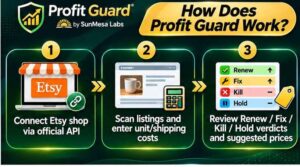
Step 1: Getting Started
You log in to Etsy and allow access. Profit Guard reads your shop’s country and currency and fills in your fee rates for you to check. You can also set your target margin, your preferred price ending (.99, .95 or whole numbers) and your price limits.
You can revoke access at any time from your Etsy account settings, which is a nice safety net if you’re cautious about connecting tools.
Step 2: Setting Up the Product
Next, the app scans every listing (active, expired, sold out and inactive), your shipping profiles and 12 months of orders. Then you add what each item costs you.
You don’t have to do every listing at once. The costs table is sorted by sales, so your best sellers come first. The vendor says about 20 minutes covers most of your revenue. You can type costs in one by one or upload a CSV from Excel or Google Sheets.
If you leave a cost empty, the listing says “Needs cost” instead of guessing. I like that. A tool that invents numbers is worse than no tool at all.
Step 3: Using the Main Features
Now you read the verdicts. Each listing gets a label and the reason in numbers, plus a suggested price where your margin is short. You can sort by money at stake so the biggest leaks come first. Then work through the PDF report and CSV checklist and make the changes in Etsy yourself.
One practical tip: do the scan again before each four-month renewal cycle. Prices change, costs change and your best seller from spring can become a dud by winter.
👉 Want to see what a full set of verdicts looks like before you decide? Check out the Profit Guard demo here.
Profit Guard Features and Benefits
There’s a lot packed in, but three features do most of the heavy lifting.
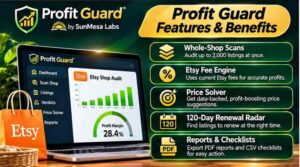
Feature 1: Real Profit After Every Etsy Fee
This is the heart of the tool. Etsy’s fee structure has several layers. According to the sales page’s worked example, there’s a $0.20 listing fee that repeats every four months, a transaction fee charged on the price plus shipping, payment processing, optional Offsite Ads fees, and currency conversion if your bank currency differs.
Here’s the example from the page: an $18 item with $4.50 shipping, with $12.90 in the seller’s own costs. On a normal order, that leaves about $7.21 profit (32.1% margin). If the order came through Offsite Ads, it drops to about $3.84. Add currency conversion on top and you’re at roughly $3.28.
Same product, same sale, very different outcomes. Profit Guard shows every fee line by line for every listing, so you can check the math yourself. Always confirm current rates on Etsy’s own fees page, since fees can change.
Feature 2: Renew / Fix / Kill Verdicts With Reasons
This is the feature I’d use first. Every listing gets one of five verdicts:
- Renew: It sells and makes money, so keep paying the $0.20.
- Fix, then renew: People buy it, but the price is wrong.
- Kill: It isn’t selling or being seen, so stop renewing it. It gets switched off, not deleted.
- Hold for season: It sells in one window a year, so don’t kill it in July.
- Needs cost: It sells, but profit is unknown until you add your costs.
Each verdict comes with the reason in plain numbers, not a mysterious score. And a listing is only marked Kill when three conditions are met: no sales for two renewal cycles, old enough to judge and among the least-viewed in your shop. Listings with favorites or views get Fix instead.
That seasonal protection matters. If you sell Christmas ornaments, you don’t want a tool that kills them in July.
Feature 3: Price Solver and Renewal Radar
The Price Solver suggests the lowest price that reaches your target margin after all fees, rounded to your price ending and kept inside your limits. There’s also a “what if the price were…” box so you can test ideas.
The 120-day renewal radar shows how many listings renew soon, what it will cost, and how many of those are Kill listings. That turns a vague, rolling expense into a clear budget.
There’s also a bundle finder for cheap items where shipping eats a big share of the order, plus a PDF report and a CSV action checklist so you know exactly what to do in what order.
Who Is Profit Guard Best For?
Here’s who I think gets the most from it.
Etsy sellers with 20+ listings. The more listings you have, the more places margin can hide. The vendor says it’s built for shops of 20 or more, and especially for shops with hundreds.
Sellers with free shipping on cheap items. The page calls it the “free-shipping trap.” A popular item with free postage can sell all day and still lose money on each order. This is where the tool tends to shine.
Print-on-demand and handmade sellers. Both fit, as long as you’re willing to enter what your products cost.
Sellers who’ve never worked out profit per listing. If you’ve been going on gut feeling, this gives you real numbers.
Seasonal sellers. If your shop swings around holidays, the Hold for season verdict keeps you from cutting winners at the wrong time. My SaleSeason AI review covers a seasonal promotion tool that pairs well with this kind of planning.
Who should skip it? The vendor is refreshingly direct about this. If you have fewer than 20 listings, you can probably do the math by hand in an evening. If you won’t enter your costs, most listings will just say “Needs cost.” And if you want more traffic, this isn’t that kind of tool.
Profit Guard Pros and Cons
Let me be straight with both sides.
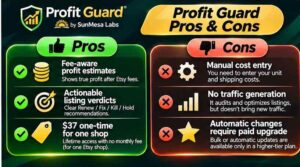
Pros
- Shows real profit per listing after Etsy fees and your own costs
- Clear Renew / Fix / Kill verdicts with the reason in numbers
- Protects seasonal sellers with a Hold for season verdict
- Official Etsy login, and you can revoke access any time
- The audit only reads, and nothing changes without your approval
- Kill means switch off, never delete
- Price Solver and “what if” pricing checks
- 120-day renewal radar for budgeting
- PDF report and CSV checklist
- Unlimited rescans of your shop
- One-time $37, no subscription
- 30-day money-back guarantee
- Honest about what it won’t do
Cons
- You need to enter your costs for the profit numbers to be accurate
- It doesn’t bring traffic or boost sales on its own
- Offsite Ads figures depend on the share of orders you enter, since Etsy’s API doesn’t flag them
- Profit figures are estimates, and refunds, discounts or gift wrap can move real numbers
- One license covers one Etsy shop
- Not worth it for very small shops
- Several optional upgrades are offered after checkout
Nothing there bothers me. They’re the honest limits of any estimating tool, and the vendor states most of them on the sales page.
Profit Guard Pricing and OTOs
Here’s the part most people want to jump to.
Front end: $37 one-time. That covers the Profit Guard web app for one Etsy shop you own. You get unlimited scans (up to 2,000 listings and 12 months of orders each), real profit per listing, all five verdicts, suggested prices, the bundle finder, the 120-day renewal radar, the PDF report and CSV checklist, a step-by-step in-app guide, free updates for the life of the product and email support. Checkout runs through WarriorPlus.
For context, the sales page compares this to agency audits that cost $97 to $197 per shop. I can’t verify that range, but it’s a fair point: one blind renewal cycle on a 500-listing shop is already $100 in fees.
Order bump: Exact Profit Data Pack, $17. Bulk cost entry by supplier and real shipping cost per shipping profile. Handy if you have lots of listings and want faster, more accurate cost data.
OTO 1: Profit Fix Autopilot, $67. Instead of making changes by hand, you approve fixes and Profit Guard sends them to Etsy in batches. It includes AI rewrites and an Undo button for every change. Every change waits in a queue showing before and after, and only the batch you approve gets sent. If you skip it, there’s a Fix Pack Lite downsell at $27 with 50 AI rewrites and a repricing file you apply yourself.
OTO 2: Always-On Profit Guard, $97 per year. Scheduled re-scans (monthly or weekly), email alerts when a listing slips into a loss, and a monthly report. This is the one subscription in the funnel, billed yearly.
OTO 3: Agency Lite, $97. Audit up to 10 client shops through invite links and hand clients reports with your own branding. The page is clear that it includes no clients, just the tool.
My take: you don’t need any of these to get real value. The $37 audit is the product. If you hate making changes by hand, Autopilot is tempting. If you’d rather not remember to rescan, Always-On is convenient. Agency Lite only makes sense if you help other Etsy sellers.
👉 Curious whether a scan would turn up a few leaky listings in your shop? See Profit Guard and the current offer here.
Profit Guard Bonuses
I’ll be honest here. The vendor’s pages don’t list a pile of extra bonus products, and I’d rather tell you that than invent some.
What’s included with the $37 is solid on its own:
- A step-by-step guide inside the app
- A PDF profit report and CSV action checklist you keep even if you refund
- A 240-listing sample shop you can explore before connecting your own
- Free updates for the life of the product
- Email support from the vendor
If you’re buying through my link and I’ve added a bonus of my own, you’ll see it on the offer page or in your order confirmation. Otherwise, treat the included reports and guide as your starter kit.
The most valuable “bonus” is really the PDF and checklist. They turn a pile of data into a plan for your afternoon, which is the thing most sellers never get around to building themselves.
My Profit Guard Evaluation
Here’s how I’d score it, based on a careful read of the sales page, the launch material, the funnel, the guarantee and the safety details.
- Usefulness: 5/5. It answers a question Etsy’s own dashboard doesn’t.
- Ease of use: 4.5/5. Connect, scan, add costs, read verdicts. The cost entry takes effort, but it’s sorted by best sellers first.
- Value for money: 5/5. $37 once is small compared with a single renewal cycle on a big shop.
- Safety and control: 5/5. Read-only audit, approval-first changes, Undo logs and Kill meaning switch-off, not delete.
- Realistic expectations: 4/5. The page uses made-up sample numbers and says so, which I appreciate.
Overall: 4.5 out of 5.
What I like most is the tone. Plenty of launches shout about “doubling your income.” This one says plainly that it won’t promise a number. It shows you where fees and costs leave you with less than you think, and what to do about it.
One thing to keep in mind: the dramatic figures on the sales page (like $1,845 a year recoverable) come from a demo shop of 240 made-up listings. Your numbers will differ. The value is in running it on your own data.
Profit Guard vs. Alternatives
Let’s see how it compares to the usual options.
A free spreadsheet or fee calculator. Free and flexible, but it works one product at a time, and you type everything in. You also have to remember every fee, including Offsite Ads and currency conversion. Fine for a few listings, painful for hundreds.
Reviewing by hand in Shop Manager. Shop Manager shows revenue, not profit, so you’d copy numbers listing by listing. The vendor estimates 10+ hours for 250 listings. That’s their estimate, but it matches how slow manual checking tends to be.
Hiring an agency or consultant. The page says audits run $97 to $197 per shop, and you don’t keep a tool afterward. Good if you want someone else to do it. Costly if you want to repeat it every renewal cycle.
Other Etsy tools. Plenty of tools focus on SEO, keywords or promotion. Those help you get seen. Profit Guard helps you decide what’s worth keeping, which is a different job. If you want more ideas on pinning and promoting your listings, my PinMyListings review covers a tool in that space.
Where Profit Guard stands out is the combination: whole-shop scan, every fee, verdicts with reasons and a price that hits your margin, for a one-time $37. Where alternatives win is simplicity for tiny shops, or hands-on service if you’d rather outsource. For more on selling online, browse my e-commerce guides.
Is Profit Guard Legit?
Fair question, especially when you’re handing a tool access to your shop.
From what I reviewed, yes, it looks legitimate. The vendor is named (Sunmesa Labs LLC, with a physical business address listed), support goes to a real email address, and the privacy policy, terms and earnings disclaimer are all published. It connects through Etsy’s official login, which means it never sees your password. And it’s sold through WarriorPlus, a long-running marketplace.
The sales page also does something I wish more pages did. It tells you who shouldn’t buy it, includes a clear results disclaimer and says it won’t promise savings or earnings. That kind of candor builds trust.
One fair caution: Etsy fee rates can change. The page shows rates as published at the time of writing, and says to check Etsy’s fees page for your own shop. Always confirm in your fee settings inside the app.
So yes, it looks legit. Just remember it estimates profit, and your results depend on your products, prices and the costs you enter.
Profit Guard Refund Policy
You’re covered by a 30-day “find the leak” guarantee.
Here’s how the sales page describes it. Connect your shop, add your costs and run the scan. If Profit Guard doesn’t show you at least one listing you’d stop renewing, or one price you’d change, ask for a refund within 30 days and you get your money back. You can request it through WarriorPlus or by email, and the report you downloaded is yours to keep.
That’s a more specific promise than most. It’s not “if you don’t like it.” It’s “if it finds nothing useful, you’re covered.” For a $37 tool, that takes nearly all the risk off the table.
My advice: use that window on purpose. Add costs for your top 20 or so best sellers first, run the scan and look at the verdicts. If you find even one listing losing money on every order, you’ll know quickly whether the tool is earning its price.
Frequently Asked Questions
Do I need to enter costs for every listing?
No. The costs page lists your best sellers first, so you can start there. Listings without a cost are still judged on sales and views, they just can’t show a profit figure.
Is it safe to connect my Etsy shop?
You log in on Etsy’s own page, so Profit Guard never sees your password. The audit only reads your data, and you can remove access any time in your Etsy account settings.
Will it change or delete my listings?
The audit changes nothing. With the optional Autopilot upgrade, changes only go to Etsy in batches you approve, each one logged with an Undo. A Kill listing is switched off, not deleted.
How accurate are the profit numbers?
The fee side is calculated from your real orders and your country’s rates, and every listing shows the math line by line. The cost side is only as accurate as the costs you enter. Treat the results as estimates.
How does it handle Offsite Ads?
Etsy’s API doesn’t flag which orders came from Offsite Ads, so you enter your rate and the share of orders affected. You can set it to 100% to see your worst case.
Does it work outside the US?
Yes. It reads your shop’s country and currency and fills in fee presets for many countries. If your country has no preset, the app tells you and you can enter the fee yourself.
How many shops does one license cover?
One Etsy shop that you own. Auditing client shops requires the Agency Lite upgrade.
How many times can I scan?
As often as you like. Scan again after changing prices or costs, and before each renewal cycle.
Is there a monthly fee?
No. It’s $37 once. Continuous monitoring is an optional yearly upgrade.
What if I only have a small shop?
If you have fewer than 20 listings, you may be able to do this by hand. The vendor says as much on the sales page.
Final Verdict: Is Profit Guard Worth Buying?
So, is it worth it?
If you run an Etsy shop with 20 or more listings, I think yes. For $37 once, you get a clear picture of which listings earn their renewal fee, which ones are quietly losing money after Etsy’s fees, and what price would fix them. Those are decisions most sellers make on gut feeling, and gut feeling gets expensive when fees stack up.
It won’t bring you traffic, and it won’t change your shop on its own unless you choose that. It protects your margin, and it does that job with clear numbers and a 30-day guarantee behind it.
If you’ve ever wondered why your busiest listings don’t seem to leave much money behind, a single scan can answer that. And with Etsy renewing listings every four months, the next renewal is always coming.
👉 Ready to see which of your listings earn their next $0.20? Try Profit Guard here with the 30-day guarantee.
Affiliate Disclaimer: Quick heads-up: this post contains affiliate links. If you buy through them, I may earn a small commission at no extra cost to you. It helps me keep creating free content. I only share things I think are worth your time, and my opinions are my own. Results vary from person to person, and Profit Guard’s figures are estimates, so please do your own research before buying.