Coupon Book Studio Review 2026: Features, Pricing, Pros & Cons (Worth It?)
You’ve probably seen them. Little books of “love coupons” with things like “one free back massage” or “breakfast in bed.” People give them for anniversaries, birthdays and Valentine’s Day, and they sell all year on Etsy and Amazon. Making one sounds simple, until you try. That’s where this Coupon Book Studio Review comes in.
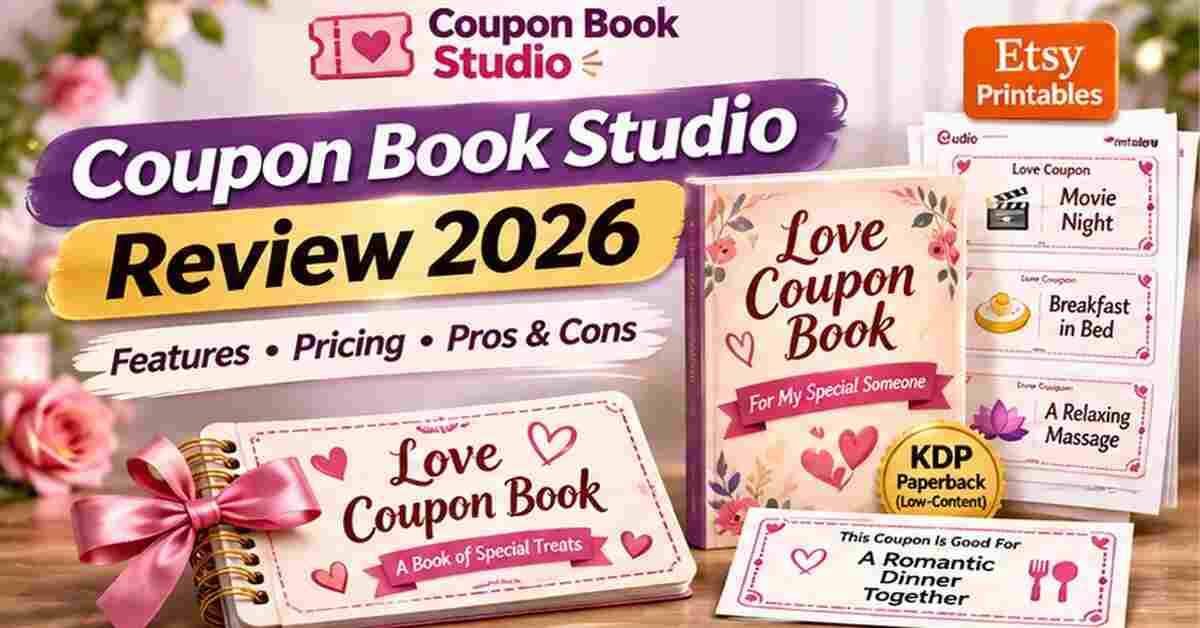
Coupon Book Studio is a web app that builds print-ready coupon books for Amazon KDP and Etsy. It writes the prompts, lays out every page inside KDP’s margins, builds a full-wrap cover with the right spine, and packs a print-at-home version for Etsy. It costs a one-time $17.
I’ll cover what it is, how it works, who it’s for, the pros and cons, pricing and upgrades, bonuses, and the refund policy, including one detail you should know before buying.
Coupon Book Studio Review: Quick Overview
Here’s the quick snapshot:
- Product: Coupon Book Studio (Love & Life package)
- What it does: Builds print-ready coupon books for KDP paperbacks and Etsy printables
- Outputs: KDP interior PDF, full-wrap cover PDF, Etsy print-at-home ZIP, listing prompt
- Book types: 10, from For Him and For Her to Anniversary, Valentine’s Day, Best Friends, Self-Care and more
- Heat levels: Sweet, Flirty and Spicy (suggestive, never explicit)
- Design options: 23 ticket designs, 21 color palettes, 20 fonts, 20 cover layouts, 7 back cover styles
- Done-for-you books: 20 included, 40 coupons each
- Bonuses: 4 inside the app
- Price: $17 one-time, no monthly fee
- Refund window: 7 days, for genuine technical problems only
- Launch window: November 19th to November 24th, 2026
- My rating: 4.4 out of 5
The short version: it’s a focused, low-priced tool that handles the boring formatting work of coupon books. Let’s see whether it’s the right fit for you.
What Is Coupon Book Studio?
Coupon Book Studio is a browser-based app made for one job: turning coupon ideas into books you can actually sell.
Here’s the problem it solves. Making a coupon book isn’t hard because of the ideas. It’s hard because of the formatting. KDP wants exact trim sizes, bleed, safe margins and a gutter that changes with page count. The cover needs a spine width that depends on your pages and paper. Etsy buyers want a printable on Letter paper with cut lines. So you end up building the same book twice.
Coupon Book Studio handles all of that. You bring the ideas. The app gives you prompts for your own ChatGPT, lays out every page, builds the cover and exports the files.
One important thing to know: the app doesn’t write or draw by itself. It gives you ready-made prompts for your own ChatGPT (the free version works for the coupon text) and, if you want pictures, for an image tool you choose. The app does the layout, cover and files. The vendor is very clear about this, and so am I.
How Does Coupon Book Studio Work?
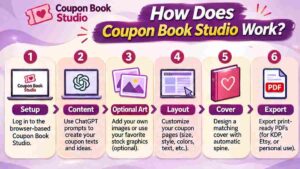
The app walks you through six guided steps. Here’s the process in three stages.
Step 1: Getting Started
You start with Setup. You tell the app your book type, who it’s for, tone, heat level, number of coupons, trim size and paper. The page count updates as you go.
Supported KDP trim sizes include 8.25 × 6, 6 × 9 and 5.5 × 8.5 inches, on white, cream or color paper, with 1 or 2 coupons per page. If you’re brand new, you can skip the blank page entirely and start from one of the 20 done-for-you books in the library.
Step 2: Setting Up the Product
Next is Content. The app writes one prompt for you to copy into ChatGPT, asking for exactly the coupons you need. You paste the answer back, and the app reads every coupon, flags near-duplicates and lets you edit or reorder.
Then there’s an optional Art step. Many coupon books use no pictures at all, which keeps things clean. If you want art, you can add built-in icons or use the picture prompt the app writes for each coupon.
Step 3: Using the Main Features
Now the fun part. In Layout, you mix ticket designs, choose colors and fonts, and add pattern backs and cut lines. Every page gets checked against KDP margins, and the check turns green when it passes.
In Cover, you pick from 20 front layouts and 7 back styles that show your real coupons. The spine is calculated automatically, and there’s a clear barcode area. Or you can upload a cover you made yourself.
Finally, Export gives you the KDP interior PDF, cover PDF, Etsy print-at-home ZIP, a listing prompt for titles, tags and descriptions, and a checklist to run before you upload.
👉 Want to see what the finished covers and pages look like? Check out Coupon Book Studio and the sample designs here.
Coupon Book Studio Features and Benefits
There’s a lot inside, but three features matter most.
Feature 1: KDP-Ready Formatting and Automatic Spine
This is the feature that saves the most headaches. If you’ve ever had KDP reject a file for margins or a cover that doesn’t fit, you know how frustrating it is.
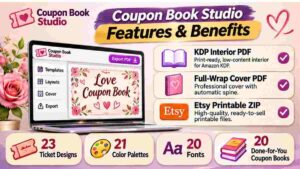
Coupon Book Studio works out bleed, margins, gutter and page count from your settings, and checks every page. The spine updates live when your page count or paper changes. That means you aren’t rebuilding the cover every time you add or remove a coupon.
A word of caution: the vendor says the files follow KDP’s published paperback specs, but KDP reviews every book itself. Always check the KDP previewer and order a proof copy before you publish. That’s good advice for any paperback.
Feature 2: One Book, Two Shops
This one is smart. From the same coupons and design, you get both a KDP paperback and an Etsy print-at-home pack. The Etsy version has four coupons per sheet on Letter paper, cut lines and printing instructions, plus a cover image for your listing.
Selling a printable on Etsy and a paperback on Amazon from the same work doubles your options without doubling your effort. If you already sell on Etsy, my PinMyListings review covers a tool for getting those listings more visibility.
Feature 3: Designs That Don’t Look Copy-Pasted
Nobody wants a book that looks like one template repeated 40 times. The app mixes 23 ticket designs, 21 palettes and 20 fonts across the book, so pages feel varied but still consistent.
There’s also a safe cover check that warns about words that can get a listing flagged, and spicy books stay suggestive but tasteful, never explicit. You can save a look as a template and reuse it, so a series of books looks like a series.
And there’s one more thing worth mentioning: 10 book niches, each with its own ChatGPT prompt, recipient ideas and matching cover text. That gives you a starting point for every gift occasion.
Who Is Coupon Book Studio Best For?
Here’s who I think gets the most from it.
KDP low-content publishers. If you publish journals, planners or similar books, coupon books are an easy addition, and the formatting is handled for you.
Etsy printable sellers. A ready-to-list print-at-home ZIP with cut lines is exactly what buyers want. If you also run seasonal products, my SaleSeason AI review looks at a tool for timing promotions around holidays.
Gift makers. If you just want to make a personal coupon book for a partner or friend, you can do it without any design skills.
Beginners looking for a simple product idea. If you want to try digital products without learning design software, this is an approachable starting point. Browse my digital products guides for more ideas.
Print-on-demand dabblers. If you’ve published books before (my AzonFlow review covers another KDP-related tool), this slots into a similar workflow.
Who might not like it? Anyone expecting the app to generate the coupons and pictures on its own, or anyone looking for a guaranteed income. It’s a design and formatting tool, not a sales machine.
Coupon Book Studio Pros and Cons
Let me give you both sides plainly.
Pros
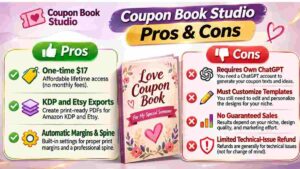
- Handles KDP sizes, bleed, margins, gutter and spine automatically
- A KDP check on every page
- Builds a KDP paperback and an Etsy printable from the same book
- 23 ticket designs, 21 palettes, 20 fonts, 20 cover layouts
- 10 gift niches with prompts and cover text
- 20 done-for-you books included
- 4 bonuses included inside the app
- Safe cover check for risky words
- Works in your browser, nothing to install
- One-time $17, no monthly fee
- You can sell the books you make on KDP, Etsy or your own store
Cons
- It doesn’t write coupons or draw pictures itself, so you need your own ChatGPT
- Other buyers start from the same done-for-you books, so you must customize them
- Coupon books are a competitive niche, so your listings and covers need to stand out
- KDP and Etsy review books themselves, so acceptance isn’t guaranteed
- The refund policy is narrow (more on that below)
- Spicy books need care to stay platform-safe
- Several upgrades are offered after checkout
- Best on a computer, since phones are only good for small edits
None of these are deal-breakers at $17. But a couple of them, especially the refund terms and the “customize your books” point, are worth taking seriously.
Coupon Book Studio Pricing and OTOs
The pricing is simple.
Front end: Love & Life package, $17 one-time. You get the full web app with all six steps, 10 book types, heat levels 1 to 3, 23 ticket designs, 20 cover layouts, KDP PDFs, the Etsy print-at-home ZIP, the listing prompt, templates, 20 done-for-you books and 4 bonuses. Checkout runs through WarriorPlus, and your license key appears right after payment.
The upgrades. Each one unlocks inside the same app with the same login:
- Kids & Family, $27: 13 family book types (kids rewards, chores, parents, grandparents and more), always family-safe, with 20 done-for-you family books.
- Seasonal & Holiday, $27: 9 holiday book types (Christmas, Easter, Mother’s Day, Father’s Day, Halloween and others), a seasonal calendar with publish-by dates and 18 done-for-you holiday books.
- After Dark Pack, $27: Heat level 4 (extra spicy, still tasteful), 6 couple book types, 2 art styles and 10 done-for-you books.
- Work & Classroom, $37: Teacher rewards, student gifts, coworker and boss coupons, bridal party books and promo books for small shops, with 10 done-for-you books.
- Global Edition, $37: 24 book languages, printed words and covers in the book’s language, bilingual books and A4 print-at-home PDFs.
The vendor says the full funnel is worth $172 in total. That’s their number, and I’d treat it as a marketing figure rather than a street price.
My honest take: you don’t need any upgrades to make and sell coupon books. The front end covers love, friendship, birthday and self-care books, which are the core of the niche. If you later want to expand into holidays, kids or other languages, you can add those then. The Seasonal & Holiday pack is the most natural next step if you plan around Christmas and Mother’s Day.
👉 Curious what the full Love & Life package includes at $17? See the current Coupon Book Studio offer here.
Coupon Book Studio Bonuses
Four bonuses come with the front end, and they’re waiting on a Bonuses page inside the app the moment you log in.
- Coupon Idea Vault: 520+ ready coupon ideas across the Love & Life book types and heat levels, with titles, descriptions and fine print. They paste straight into the Content step, so you can build a book even without ChatGPT.
- Etsy & KDP Listing Kit: 13 Etsy tags and 7 KDP keywords per book type, title formulas, fill-in descriptions and upload checklists, including what tends to get listings flagged.
- Mockup Pack: A Mockup Maker that builds 7 listing scenes from your own cover, plus 10 photo prompts for ChatGPT or Gemini.
- Printable Add-ons: Gift tags, a coupon envelope, “Open when” cards and redeem stickers in three colors, to print at home or add to Etsy bundles.
The Listing Kit and Mockup Pack are the two I’d use first. Honestly, a decent book with a weak listing and flat photos won’t sell, and these two bonuses go straight at that problem. The Idea Vault is also handy as a backup if you want to skip ChatGPT.
My Coupon Book Studio Evaluation
I’ll be upfront about how I judged it. My evaluation is based on a careful read of the sales page and the launch material: the features, the six-step process, the done-for-you library, the pricing, the bonuses and the refund terms. I compared them against how KDP and Etsy sellers really work.
Here’s my scorecard:
- Ease of use: 4.5/5. Six guided steps, tips on every screen and ready-made designs.
- Value for money: 5/5. $17 for a layout, cover and export tool is hard to argue with.
- Features: 4.5/5. The automatic spine, KDP checks and Etsy ZIP are real time-savers.
- Originality of output: 3.5/5. The done-for-you books are shared among buyers, so you have to put in the work to make yours different.
- Refund protection: 3/5. Only 7 days, and only for technical problems.
Overall: 4.4 out of 5.
What I like most is the honesty. The sales page says plainly that the app doesn’t write or draw by itself, that results depend on your own books and listings, and that no sales are promised. It even tells you to change at least 30% of a done-for-you book before publishing, and the app shows you how much you’ve changed. That’s the kind of straight talk that builds trust.
What I’d gently flag: the Etsy numbers on the sales page (1,000+ results for “love coupon book,” a shop with 19.3k sales) show demand exists. They don’t show what you’ll earn. Treat them as proof of a market, not a forecast.
Coupon Book Studio vs. Alternatives
Here’s how it compares with the usual options.
Doing it yourself in Canva or Photoshop. You get total control, but you handle sizes, margins, bleed, spine math and a second Etsy version by hand. Every page count change means rework. Coupon Book Studio automates those parts.
Generic KDP templates. Templates can help, but they usually don’t calculate your spine, check each page or give you an Etsy printable. And a template used by hundreds of people looks like it.
Hiring a designer. You’ll get polished results, but costs add up quickly per book, especially if you want a series.
Plain ChatGPT. Great for coupon text, but it can’t format a KDP-ready PDF or build a cover with a correct spine. In fact, Coupon Book Studio uses your own ChatGPT for the writing and handles the rest.
Where Coupon Book Studio wins is formatting, speed and the two-shop output at a very low price. Where alternatives win is complete creative freedom, or a fully custom look. If you’d like to explore more tools for selling products online, check my e-commerce guides.
Is Coupon Book Studio Legit?
It’s a fair question, especially for a low-priced launch.
From what I reviewed, it looks legitimate. The pages include a privacy policy, terms and refund terms, and an earnings disclaimer. Support goes to a real email address with a stated reply time of about two business days. Checkout runs through WarriorPlus, and the license key arrives right after payment.
I also like that the vendor spells out what the product is not. It doesn’t include ChatGPT, doesn’t draw pictures, and doesn’t guarantee that KDP or Etsy will accept or sell your books. It also says Amazon, Etsy and ChatGPT are trademarks of their owners and that the product isn’t endorsed by them.
So yes, it’s a legitimate tool. Just go in understanding that it’s a design and formatting helper. Whether your books sell depends on your ideas, your listings and your marketing.
Coupon Book Studio Refund Policy
Here’s the part I want you to read carefully.
Coupon Book Studio has a 7-day guarantee, and it’s narrower than most. According to the sales page, you can ask for a refund within 7 days if there’s a genuine technical issue with the app and the support team can’t fix it. For example, the app won’t open or won’t export your files even after they’ve tried to help.
Reasons like “I changed my mind,” “this isn’t for me,” “I didn’t use it” or “I haven’t made sales yet” aren’t eligible. To ask, you email the support address from your purchase email and describe the problem.
Is that a dealbreaker? Not at $17. But it means this isn’t a “try it and return it if you don’t like it” purchase. My suggestion: buy it only when you’re ready to use it, and test the full flow in your first week. Make one book start to finish, check the exports and make sure everything opens correctly.
Frequently Asked Questions
Do I need design or tech skills?
No. You choose ready-made designs, and the app handles sizes, margins, bleed and the spine. If you can copy and paste into ChatGPT, you can make a book.
Do I need ChatGPT Plus?
No. The free version works for the coupon text and the listing prompt. Pictures are optional and need an image tool of your choice.
Will KDP accept my files?
The files follow KDP’s published paperback specs, but KDP reviews every book itself. Always check the previewer and order a proof copy before publishing.
Is there a monthly fee?
No. You pay once and log in with your purchase email and license key.
Can I sell the books I make?
Yes, on Amazon KDP, Etsy or your own store. You can’t resell or share the app or your license key.
Can I publish the done-for-you books as they are?
The vendor says not to. Other buyers start from the same books, so change at least 30% before publishing. The app shows how much you’ve changed and gives you a ChatGPT prompt to rewrite coupons.
What devices does it work on?
Any modern browser on a computer (Chrome, Edge, Safari or Firefox). A computer is best for making PDFs.
Are spicy books allowed?
The spicy level stays suggestive and tasteful, never explicit, to stay platform-safe. Always read KDP’s and Etsy’s current rules.
Do I need the upgrades?
No. The $17 Love & Life package covers the core book types. Upgrades add families, holidays, extra-spicy, work and classroom, and other languages.
When does the launch end?
It ends on Tuesday, November 24th at 11:00pm US Central.
Final Verdict: Is Coupon Book Studio Worth Buying?
So, is it worth it?
For KDP and Etsy sellers who want a simple, repeatable product without wrestling with margins and spine math, I think yes. At $17 once, you get the layout, covers, KDP files, Etsy printable, a listing prompt, 20 done-for-you books and four useful bonuses. That’s a lot of finished work for the price.
It won’t write your coupons by itself, and it won’t make your books sell. You’ll still need to customize your designs, write good listings and put in the work on your own marketing. And with a narrow 7-day refund policy, it’s best to buy when you’re ready to dive in.
But if you’ve ever looked at a love coupon book on Etsy and thought, “I could make that,” this removes the part that usually stops people: the formatting. With the launch ending November 24th, the gifting season is a natural time to give it a try.
👉 Ready to make your first coupon book? Grab Coupon Book Studio here before the launch ends.
Affiliate Disclaimer: Quick heads-up: this post contains affiliate links. If you buy through them, I may earn a small commission at no extra cost to you. It helps me keep creating free content. I only share things I think are worth your time, and my opinions are my own. Results vary from person to person, and no sales or income are guaranteed, so please do your own research before buying.