EtsyDynasty AI Review 2026: Features, Pricing, Pros & Cons (Worth It?)
If you sell printables on Etsy, you already know the feeling. The product is done, the files are tidy, and then you hit the listing page and stall. This EtsyDynasty AI review is for anyone stuck at that exact point. EtsyDynasty AI is a browser-based tool that writes your Etsy title, description and 13 tags from a few details about your product, so you start with a draft instead of a blank box.
Here’s the part nobody warns you about. Making the product is often the easy part. Writing a keyword-friendly title that still reads like English, a description that answers buyer questions, and 13 tags that don’t repeat each other can eat an hour per listing. Do that ten times and your weekend is gone.
Before writing this, I read the whole sales page, including the FAQ and the fine print near the bottom. I haven’t used the software myself, so everything here comes from what the vendor publishes. I’ll also point out one thing the headline gets wrong, because it affects what you’re really buying. By the end you’ll know what’s included, what isn’t, what it costs and whether it makes sense for your shop.
EtsyDynasty AI Review: Quick Overview
| Product | EtsyDynasty AI (Commercial edition) |
| What it is | Browser-based AI assistant for writing Etsy listing copy |
| What it creates | Keyword-focused titles, descriptions, 13 tag suggestions, SEO feedback, pricing suggestions |
| Credits | 60 AI credits included (not 60 finished listings) |
| Price | $12.95 one-time (page says normally $27) |
| Bonuses | 6 printable and guide-style bonuses included |
| Refund | 30-day money-back guarantee |
| Subscription? | No recurring charge for this offer |
| Best for | Etsy sellers, especially printable sellers, who struggle with listing copy |
| Affiliated with Etsy? | No, it’s independent |
In one line: it’s an inexpensive writing assistant for Etsy listings. It isn’t a niche finder, a design maker or an auto-publisher, even though the headline hints at all three. More on that shortly.
What Is EtsyDynasty AI?
EtsyDynasty AI is a cloud-based tool built to help you write better Etsy listings, faster. You tell it what you sell, who it’s for and what the buyer receives. It then drafts a title built around likely search words, a structured description and a set of 13 tag suggestions, which is the maximum number of tags Etsy allows per listing.
The sales page says it’s aimed at printable sellers, think planners, journals, worksheets, wall art and invitations, though the same approach works for any digital download. It also includes SEO health feedback on your draft, pricing suggestions as a starting point, saved and editable drafts, and a dashboard that shows your remaining credits.
Now the honest part. The page headline calls it the “World’s #1 Etsy Empire Builder” and says it finds profitable niches, creates printable designs and automatically publishes listings. But further down, the page makes it clear that the $12.95 Commercial edition doesn’t do those things. Niche research, design generation and automated publishing are listed as separate upgrades. So what you’re buying today is a listing copy assistant, and a useful one, but the headline sets a bigger expectation than the product delivers.
I’d rather tell you that up front than have you find out after checkout. Once you know it, the product is easier to judge fairly. Also read: MysteryMint AI Review 2026: Features, Pricing, Pros & Cons (Worth It?)
How Does EtsyDynasty AI Work?
The workflow is four quick actions, which I’ve grouped into the three steps below.
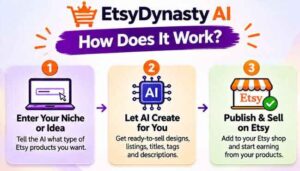
Step 1: Getting Started
You buy access, log in through a compatible browser and you’re in. There’s nothing to download or install. You can even prepare drafts before you open an Etsy shop, which is handy if you’re still in the “thinking about it” stage. To actually publish and sell, you’ll need an Etsy seller account, and of course Etsy’s own fees apply.
Step 2: Setting Up the Product
This is where you enter the basics: what you’re selling, who it’s for and what the buyer gets. A budget planner for stay-at-home parents, a set of nursery wall prints, a wedding invitation template. The clearer you are here, the better the draft. Garbage in, garbage out still applies, and the page itself reminds you to give accurate product information.
Step 3: Using the Main Features
Hit generate and the tool gives you title ideas, a structured description and 13 tags. Now comes the part you shouldn’t skip: review and edit. The page says AI content needs human checking, and I agree. Read the draft, fix anything that’s inaccurate, tune the wording to sound like your shop and use the SEO health feedback as a guide. Then save the draft, copy the approved text into your Etsy listing and upload your files yourself.
Nothing is published automatically in this edition. You stay in control, which some sellers will prefer anyway, since you see exactly what goes live.
If a draft isn’t quite right, you can adjust your inputs or regenerate, though regenerating uses credits. Speaking of which, the page is careful to say that 60 credits do not equal 60 finished listings, because usage varies by task. So plan on getting a fair number of drafts, but don’t assume exactly one per credit.
EtsyDynasty AI Features and Benefits

Feature 1: Keyword-Focused Titles and Structured Descriptions
The title is the most important line in any Etsy listing, and it’s the one people get wrong most often. Either it’s stuffed with keywords and reads like spam, or it’s pretty and nobody can find it. EtsyDynasty AI aims for the middle: titles built around search terms that still make sense to a human.
The description feature gives you a structured layout that covers what the product is, what’s included, how it works and who it’s for. For digital downloads, that last bit matters a lot, because buyers often have questions about file formats, printing and what they’ll receive. A good description cuts down on messages and on those “I didn’t realize it was digital” complaints.
Feature 2: 13 Tag Suggestions and SEO Health Feedback
Etsy gives you 13 tag slots, and many sellers leave some empty or fill them with near-duplicates. The tool suggests a full set of 13, which saves you from staring at the tag box wondering what else to type.
There’s also SEO health feedback on your draft. The vendor is upfront that this is guidance and not a guarantee of ranking. I appreciate that, because nobody can promise a search position on Etsy. Treat the feedback as a second pair of eyes that catches obvious gaps, like a missing keyword in the title or a thin description.
Feature 3: Pricing Suggestions, Saved Drafts and a Seller Workspace
The tool also offers pricing suggestions, which the page calls a starting point. That’s the right way to see it. Price depends on your niche, your quality and your competition, so use the suggestion as a sanity check, not a rule.
Drafts are saved in an organized workspace, so you can build a batch of listings in one sitting and come back to polish them later. A dashboard shows your credit balance, so you always know how much is left. It’s a small thing, but anyone who has worked with credit-based tools knows how annoying it is when you don’t know where you stand.
The Commercial edition also includes commercial use, subject to the license terms. You’re responsible for having the rights to the content and materials you use, which is standard, but do read the license.
👉 Wondering what a finished draft actually looks like? You can watch the EtsyDynasty AI demo videos and check today’s price here.
Who Is EtsyDynasty AI Best For?
Printable sellers who dread writing. If you love making planners or wall art but hate the listing page, this is the sweet spot. It turns a product idea into a first draft in minutes.
Etsy beginners. The page says it’s suitable for beginners, and that you can prepare drafts before opening a shop. It’s honest that you still need to learn how to run an Etsy business. A tool can write words, but it can’t teach you product research, photography or customer service.
Busy sellers with a backlog. If you’ve got a folder of finished products waiting to be listed, a faster way to produce drafts means more products live sooner.
Less tech-confident sellers. The page speaks directly to people newer to technology, including older sellers, and promises a simple, browser-based workflow. That matches what’s described: no installation, no complicated settings.
Who it’s probably not for: anyone expecting guaranteed sales or rankings, anyone who wants a fully hands-off shop, and anyone hoping this one purchase will find niches, create designs and publish listings on its own. The page says outright that those aren’t included. If you need real keyword search volume data, you’ll want a dedicated research tool alongside it.
EtsyDynasty AI Pros and Cons
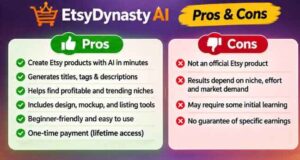
Pros
- Low one-time price, with no recurring charge for this offer
- Writes titles, descriptions and 13 tags in one go
- Easy for beginners, nothing to install
- SEO health feedback and pricing suggestions give you a sanity check
- Saved drafts and a credit dashboard keep your work organized
- You review everything before it goes live
- Six bonuses included with the purchase
- 30-day money-back guarantee
- Clear statements that results and rankings aren’t guaranteed
- Independent of Etsy, and says so
Cons
- The headline promises more than the base edition delivers (niche research, designs and auto-publishing are separate)
- 60 credits is a limit, and it doesn’t equal 60 finished listings
- No niche research in this edition, so you’ll need another tool for that
- Upgrades are mentioned but not named or priced on the page
- License terms and the vendor’s company details aren’t shown on the page
- “World’s #1” is a claim with no source behind it
- Output always needs human review and editing
For the price, none of these are dealbreakers. They’re mostly reasons to set realistic expectations before you buy.
EtsyDynasty AI Pricing and OTOs
Front-end price: $12.95 one-time. The page lists the regular price as $27, so the early-bird price saves $14.05, or about 52%. Treat “regular price” claims on any sales page with a bit of caution, but even at $27 this is a small purchase. It includes the Commercial edition, 60 AI credits, the six bonuses and the 30-day guarantee.
Upgrades and OTOs. The page mentions several separate upgrades but doesn’t name or price them in the sections I could read. They include advanced research (Trend Radar Pro is mentioned as one example), printable design generation, multi-platform publishing, agency tools, automated Etsy publishing and unlimited-tier features. Since the headline talks about finding niches, creating designs and auto-publishing, these upgrades are where those promises actually live.
Do you need them? Not to get started. The base tool does what it says: it writes listing copy. My suggestion is to use your first batch of credits, see how the drafts perform for your products and only then think about upgrades. If any upsell appears during checkout, read the description carefully and confirm exactly what you’re getting and what it costs.
EtsyDynasty AI Bonuses
The sales page lists six bonuses included with the purchase. The vendor attaches a value to each one, totaling $126. I wouldn’t read much into those dollar figures, since they’re the vendor’s own numbers, but the bonuses themselves are practical.
- First-Listing Quick-Start Guide: a walkthrough for getting your first listing live.
- Product Details Workbook: a worksheet to gather your product information before you generate copy.
- Listing Quality Checklist: a checklist to review each listing before publishing.
- Printable Product Idea Planner: a planner for mapping out product ideas.
- Shop Content Organizer: a way to keep your listing content in order.
- Buyer FAQ Writing Kit: a kit for writing answers to common buyer questions.
If I were starting out, I’d use the Product Details Workbook and the Listing Quality Checklist first. Better input gives you better AI drafts, and a checklist catches the small mistakes that cost sales. They work well together with the tool, because they cover the parts the AI can’t do for you.
My EtsyDynasty AI Evaluation
I’m scoring this on what’s published and what I could verify, so please treat these as informed estimates and not test results.
- Ease of use: 4.5 / 5. Enter product details, generate, edit, copy. Very simple.
- Value for money: 4.5 / 5. $12.95 one-time, plus bonuses and a refund window, is a small risk.
- Features: 3.5 / 5. It does listing copy well on paper, but there’s no niche research, design or publishing in the base edition.
- Transparency: 3.5 / 5. The disclaimers are clear, but the headline overpromises and the upgrades aren’t priced.
- Beginner friendliness: 4.5 / 5. Built for people who feel stuck at the listing stage.
Overall: 4.1 / 5.
Here’s a way to picture the value. Say you spend 45 minutes on each listing. Ten listings is a full working day of just writing. If a decent first draft takes you five minutes to generate and ten to polish, you’ve got most of that day back. Even if the AI only gets you 70 percent of the way there, that’s a big saving. The catch is that you still need good products, decent mockup images and a bit of patience.
The page offers a simple income illustration: a $5 product with 5 to 100 sales gives $25 to $500 in gross revenue. The vendor labels that as arithmetic, not an expected result, and notes it excludes Etsy fees, refunds, taxes and advertising. That’s fair, and it’s a good reminder that the tool helps you present a product, not sell it for you.
👉 Curious whether it fits the way you list products? See what’s included in EtsyDynasty AI here and try it with one of your own listings.
EtsyDynasty AI vs. Alternatives
| EtsyDynasty AI | Writing it yourself | General AI chat tools | Etsy keyword research tools | |
|---|---|---|---|---|
| Titles, descriptions, 13 tags | Generated in one place | All by hand | Possible with your own prompts | Usually not generated |
| Keyword search data | Not in this edition | No | No real data | Yes, that’s their job |
| Etsy-specific structure | Built in | You decide | You must explain it | Varies |
| Cost | One-time, low | Free, but slow | Free or monthly | Usually monthly |
| Best for | Fast, organized listing drafts | Full control | Flexible brainstorming | Finding what buyers search for |
You can absolutely write listings with a general AI chat tool like ChatGPT or Claude. They’re flexible and often free. The difference is that you have to supply the structure, remember Etsy’s limits and keep reminding it what a good listing looks like each time. EtsyDynasty AI packages that into a repeatable workflow built for Etsy.
Dedicated Etsy keyword research tools, such as eRank or Marmalead, answer a different question: what are buyers actually searching for? EtsyDynasty AI’s base edition doesn’t do that, so the two types of tool can work side by side. Research tells you which words to use, and the writing assistant helps you turn them into a clean listing.
And if you enjoy writing and have the time, doing it yourself still gives you full control. This tool is for the sellers who’d rather spend that time creating products.
Is EtsyDynasty AI Legit?
From what the sales page shows, it looks like a real, narrowly focused product with a mostly honest set of disclaimers. The price is small, the purchase is one-time, there’s a 30-day guarantee, and checkout runs through the Launchpad platform. The page clearly says it’s not affiliated with or endorsed by Etsy. It also says results, rankings and sales aren’t guaranteed, and that you need to review all AI output. There’s a full earnings disclaimer linked in the footer and a contact page too.
There are a few things I’d keep an eye on. First, the headline. “World’s #1 Etsy Empire Builder,” niche finding, design creation and automatic publishing are bigger claims than the base edition supports. The page does correct itself further down, but a skimming reader could miss it. Second, the vendor’s company name and contact details aren’t shown in the content I read, and the license terms aren’t spelled out. Third, the upgrades aren’t named or priced up front.
My advice is simple. Go in knowing it’s a listing writer. Read the license before you rely on commercial use. Keep your order number handy, and test it on a few real listings in the first week. If it doesn’t help, you have 30 days to ask for your money back.
EtsyDynasty AI Refund Policy
The product comes with a 30-day money-back guarantee. According to the page, you request a refund within 30 days of purchase, using the support details on your receipt and including your order number. The guarantee covers the purchase price only. It doesn’t cover sales, rankings or earnings, which makes sense, since nobody can guarantee those.
A few practical tips. Don’t wait until day 29. Use a few of your credits on real products and judge the drafts honestly. Save your receipt and order number somewhere safe. And read the full refund policy before buying, since that’s the version that applies.
Frequently Asked Questions
Is EtsyDynasty AI a subscription?
No. The Commercial edition is a one-time payment, and the page states there’s no recurring charge for this offer.
Do 60 credits mean 60 listings?
Not exactly. Credits are used for eligible generation tasks, and how many you use depends on the task. The page says 60 credits don’t represent 60 guaranteed finished listings.
Does it create printable designs?
No. The Commercial edition doesn’t generate designs. Design generation is listed as a separate upgrade.
Does it find profitable niches?
Not in this edition. Niche research is a separate upgrade, so you’d need another way to research what to sell.
Does it publish listings to Etsy automatically?
No. You copy the approved text into Etsy and upload your files yourself. Automated publishing is a separate upgrade.
Do I need an Etsy account?
You need one to publish and sell, but you can prepare drafts before opening a shop.
Is it good for beginners?
Yes, it’s designed for beginners, though the page is honest that you still need to learn how to run an Etsy shop.
Can I edit what it writes?
Yes. You can edit the output, adjust your inputs or regenerate using credits. You can also save drafts and return to them later.
Is it affiliated with Etsy?
No. EtsyDynasty AI is independent and not endorsed by Etsy.
Final Verdict: Is EtsyDynasty AI Worth Buying?
Let’s go back to where we started: a finished product and a blank listing page. That’s the moment where a lot of Etsy sellers lose momentum, and it’s exactly the problem EtsyDynasty AI is built for.
For $12.95, you get a tool that drafts a title, a structured description and 13 tags, gives feedback on your SEO and suggests a price, plus six bonuses and a 30-day guarantee. If listing copy slows you down, that’s a good trade. The interface is simple, the drafts are editable and you stay in control of what gets published.
But go in with your eyes open. It’s not a niche finder, a design maker or an auto-publisher, whatever the headline suggests, and 60 credits is a finite amount. You’ll still need good products, clear mockups and some marketing effort, and nothing here can promise sales. Read the license too, since the details aren’t on the page.
My take: if you sell printables or digital downloads and the writing part holds you back, EtsyDynasty AI is a low-risk way to speed things up. If you expect it to build an entire shop for you, adjust your expectations first, or look at the upgrades and a research tool alongside it.
👉 If listing copy is your bottleneck, the easiest way to know is to try it. Get EtsyDynasty AI here, run one of your real products through it and see how the draft compares to what you’d write. If it’s not for you, you have 30 days to get a refund.
Affiliate disclosure: Some links in this post are affiliate links. If you buy through them, I may earn a small commission at no extra cost to you. I only recommend products I’ve looked into carefully, and my opinions are my own. Please read the vendor’s terms and refund policy before you buy.