TripDoodle Review 2026: Features, Pricing, Pros & Cons (Worth It?)
This TripDoodle review is for anyone who has stared at the Amazon KDP dashboard and thought, “I want to publish kids’ activity books, but I don’t want to spend my weekends drawing mazes.” TripDoodle is a browser tool that turns the real street maps of 20 cities into kids’ travel activity books, with the answer pages already done. It costs $17 one time. In this review I’ll show you what you actually get, what’s missing, what the upgrades add, and whether the price makes sense.
Here’s the problem it tries to solve. Activity books are one of the most crowded corners of KDP. Open any search result for “kids puzzle book” and you’ll see the same word searches, the same plain mazes, the same grids. The only thing that changes is the cover. If your book looks and feels like the other 500 on the page, a parent has no reason to pick yours.
TripDoodle takes a different route. The puzzles are drawn on real city maps. The maze runs through the actual old town of Rome. The sightseeing tour stops at the actual cathedral. I’ll cover how that works, who it suits, and where it falls short, so you can decide with a clear head.
I went through the sales page, the demo video details, the sample pages with their answer sides, and the JV documentation to put this together. Everything below is based on what the vendor publishes, and I’ll flag anything that’s a limit rather than a perk.
TripDoodle Review: Quick Overview
Here’s the short version before we get into details.
- Product: TripDoodle
- What it does: Builds kids’ travel activity books on real city street maps, with answer pages, as print-ready PDFs
- Made for: Amazon KDP publishers and low-content publishers
- Starter price: $17, one payment, no subscription
- Cities in Starter: 20 (Amsterdam to Vienna)
- Page types in Starter: 8, including street maze, sightseeing tour, secret message and word scramble
- Export: 300 dpi PDF, 8.5 × 11 in, with KDP margins
- Where it runs: In your browser (best in Chrome or Edge)
- Refund: 30 days
- Launch date: Tuesday, 24 November 2026
The one-line verdict: it’s a focused, honest tool that does one job well, and the price is low enough that the risk is small.
What Is TripDoodle?
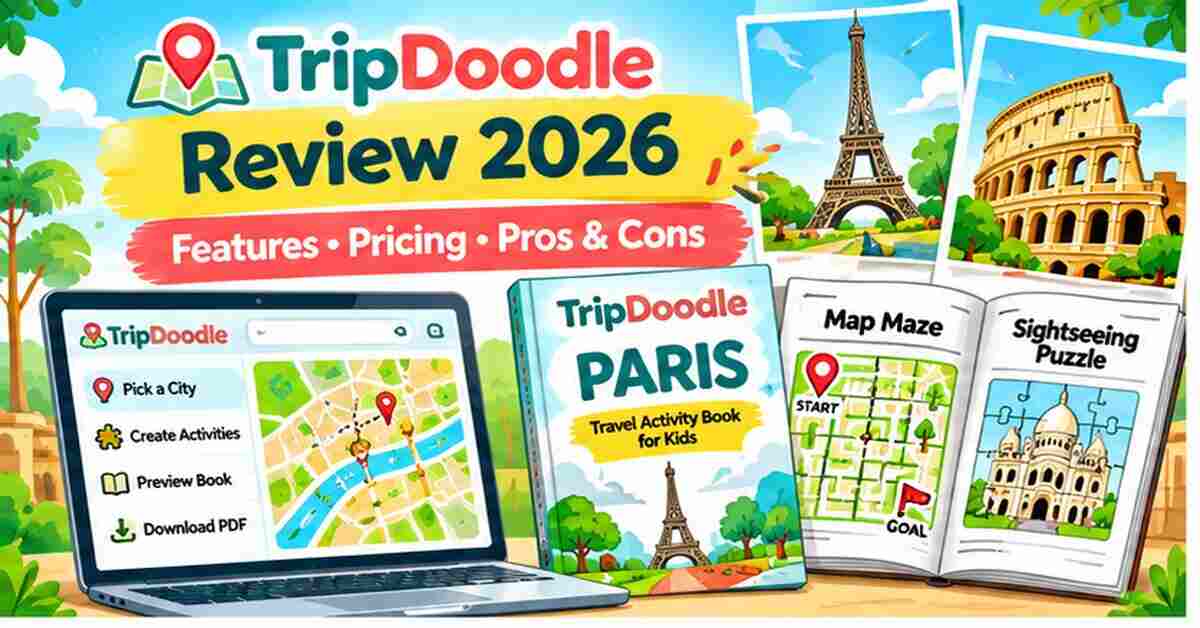
TripDoodle is a web-based tool that makes kids’ travel activity books from real map data. You pick a city, press one button, and it builds a finished interior: a name page, a packing list, twelve puzzles, an explorer award, and an answer page for every puzzle.
The streets, rivers, parks and buildings come from OpenStreetMap, the open map project. OpenStreetMap allows commercial use as long as it’s credited, and TripDoodle prints the credit line inside the book for you. Just leave it in.
What sets it apart is that the city is inside the puzzle, not only in the title. A child solves a maze that follows the real streets of Paris. The next morning, on an actual trip, that same child can walk those streets. That’s a strong reason for a parent to choose your book before a family holiday.
Two more things worth knowing:
- It doesn’t use any AI service. The puzzles are worked out on your own computer, so there are no credits to buy and no waiting on a server.
- Every account gets different puzzles. Puzzles are drawn from a number worked out from your account, and each account starts with its own mix of colors, character and page frame. Two people who both make a Rome book start with different pages.
That second point matters on KDP, where sameness is the enemy.
How Does TripDoodle Work?
The workflow is simple. If you can use a website, you can use this. There are three steps.
Step 1: Getting Started
After purchase, your account is created automatically and your login details arrive by email. If nothing shows up in a few minutes, check spam. Then you log in through your browser. There’s nothing to install.
A small tip: use Chrome or Edge on a laptop or desktop. TripDoodle is built and tested there. Other browsers and tablets can open it, but they’re less tested, and building a whole book is simply more comfortable on a bigger screen.
Step 2: Setting Up the Product
You pick a place. Starter opens 20 well-known cities, and each one is already built and tested, so you aren’t waiting on anything to load or generate. Pick Rome, Lisbon, Prague, whichever city you think parents would buy a travel book for.
Then you choose how to build. You can press one button for a finished book, or choose every page yourself.
Step 3: Using the Main Features
The one-press book gives you 29 PDF pages in all: a title page, 15 activity pages, an Answers page and 12 answer pages. If you want more control, build page by page and grow the book to 40 activity pages. You can even mix cities in one book.
When you’re happy, you download the interior as a 300 dpi PDF at 8.5 × 11 inches with the margins KDP asks for. You also get a title, subtitle, description and keywords written from what’s actually inside your book. That saves the part of publishing most people procrastinate on.
Then you upload to KDP yourself. TripDoodle makes the book. It doesn’t publish it for you.
👉 Curious what a finished TripDoodle page looks like? You can flip a maze over to its answer page and turn through a whole 29-page Rome book on the official page before you decide anything: See the TripDoodle sample pages here
TripDoodle Features and Benefits
Let me walk through the features that matter most, and what each one means for you in plain terms.
Feature 1: Puzzles Drawn on Real Street Maps
This is the heart of the product. Starter includes five puzzle types:
- Street maze: one open way through the real streets
- Sightseeing tour: visit the sights in order
- Follow the directions: count the junctions, turn left or right, and see where you end up (London doesn’t have this one)
- Secret message: collect letters along a route
- Word scramble: untangle the names of the sights
On top of those, you get three keepsake pages: a name page (“This book belongs to…”), a packing list and an explorer award.
The benefit is simple. A normal puzzle book could be about anywhere. This one is about a specific place, which makes it feel like a travel companion and not just a pile of grids.
Feature 2: Answer Pages Drawn for You
Anyone who has made puzzle books knows the pain here. Every puzzle needs a solution page, and drawing those by hand is slow. One street closed in the wrong spot and the maze has no exit. TripDoodle draws an answer page for every puzzle automatically. That alone can save hours per book.
Feature 3: Print-Ready Export and Listing Text
The PDF is built for KDP: 300 dpi, 8.5 × 11 inches, proper margins. And the listing text (title, subtitle, description and keywords) comes written from the book’s contents. You’ll still want to read it over and make it yours, but a starting draft beats a blank box.
A Few Extra Benefits Worth Mentioning
- No monthly fee: one payment, no per-page cost, no limit on how many books you make
- The right to publish and sell the books you create
- Works in the browser, so no software to install
- Series potential: once you’ve made one city, the next takes minutes, not days
Who Is TripDoodle Best For?
I’d put it in front of these people.
KDP and low-content publishers. If you already make puzzle or activity books, this gives you a fresh angle your competitors probably aren’t using.
People who own a maze or word-search generator. If you’re tired of the same grids as everyone else, map-based puzzles stand out on a search page.
Travel and family-travel bloggers. If you write about Rome or Lisbon already, a companion activity book for kids is a natural product to offer your readers.
Beginners who hate design software. There’s no drawing, no layout work and no software to learn. You pick, press and download.
Series builders. The upgrade called Series Studio exists for people who want to publish a whole set of city books in one run.
Who should probably skip it? If you want colouring pages, Starter doesn’t make them. If you want a cover included in the base version, that’s a Pro feature. And if you’re hoping for money to appear without any publishing effort, no tool will do that, and the vendor says so too.
TripDoodle Pros and Cons
I like lists like this because they force honesty. Here’s mine.
Pros
- Puzzles on real maps make books feel different from generic grids
- Answer pages are drawn automatically
- One-press finished book, 29 pages, ready fast
- Only $17, one time, with no subscription or credits
- No AI service involved, so no usage bills
- Print-ready PDF made for KDP
- Listing text included
- Each account gets its own mix of puzzles and looks
- 30-day money-back guarantee
- Clear, upfront wording about what it doesn’t do
Cons
- Starter doesn’t make a cover (use KDP’s free Cover Creator or the Pro upgrade)
- Starter puzzles are medium level only, made for ages 7 to 9
- Pages are drawn in color, so on black-and-white paper they print in grey
- Starter is limited to 20 cities (the full library of 322 places needs Pro)
- You need your own KDP account and you do the publishing and marketing
- It’s not a colouring-page tool
- Works best on a computer in Chrome or Edge
None of these cons are dealbreakers for the right buyer, but you should know them going in. I’d rather you read them here than discover them after checkout.
TripDoodle Pricing and OTOs
Let’s talk money, because that’s what most people scroll down for.
Front End: TripDoodle Starter, $17 one-time. Includes the 20 cities, 8 page types, one-press books, page-by-page builds up to 40 activity pages, the 300 dpi PDF, listing text and the right to publish and sell your books. No subscription, no credits.
After checkout, you’ll see three optional upgrades. Each appears once, each has a “No thanks” link, and none is needed to publish a Starter book.
OTO 1: TripDoodle Pro, $47. Opens the whole library of 322 places in 78 countries and territories. Adds fifteen more page types (word search, spot the difference, picture sudoku, secret code and more), three levels (ages 5 to 7, 7 to 9, and 9 and up), six kinds of finished book, the full-wrap cover for KDP paperbacks, five book sizes, five languages and the ability to set your own look.
OTO 2: TripDoodle My Places, $67. Lets you bring in a map file of a town or neighbourhood, about 1 km across, and turn it into a TripDoodle place. Handy if you want a book for a small town nobody has made a children’s book for. The map file is read on your own computer and isn’t uploaded anywhere.
OTO 3: TripDoodle Series Studio, $37. Plan a series once and export every book in one run, with matching titles, a series page and a CSV upload sheet. It doesn’t upload to KDP for you.
The full funnel comes to $168 if you take everything. There’s no order bump and no downsells, which I appreciate.
My honest take: start with Starter. Make a book or two. If you find yourself wanting more cities, a cover or a whole series, the upgrades will make sense then. Don’t buy all four on day one unless you already know your plan.
Launch-week discount: From Tuesday 24 November 2026, 8:00 AM US Central until Sunday 29 November 2026, 8:00 AM US Central, you can use the code TRIP3 at the WarriorPlus checkout to take $3 off Starter. That makes it $14 instead of $17. It’s for Starter only, and after the deadline it stops working.
🔥 Want to see exactly what Starter includes and grab the launch-week price while it lasts? Check the current TripDoodle offer here
TripDoodle Bonuses
The vendor doesn’t list a special bonus bundle on the sales page, and I’d rather tell you that than invent one. What you do get is worth noting: the launch code TRIP3 for the first week, the 30-day money-back guarantee, and the listing text that comes with every book.
If you’re building a KDP publishing routine, our Digital Products guides at Brightrs can help you plan what to publish next.
My TripDoodle Evaluation
Here’s how I’d score it, based on everything the vendor shows and says.
- Idea and originality: 9/10. Puzzles on real street maps is a fresh angle in a crowded niche.
- Ease of use: 9/10. Pick, press, download. No design skills needed.
- Value for money: 9/10. $17 one time is hard to argue with.
- Completeness in Starter: 7/10. No cover and only one difficulty level, but that’s clearly stated.
- Honesty of the offer: 10/10. The sales page tells you what it doesn’t do, doesn’t promise sales, and doesn’t pretend to be AI.
Overall: 8.8/10.
What I like most is the restraint. The page literally says no sales are promised, and that whether a book sells depends on your niche, your listing and your patience. That’s the kind of straight talk I want from a vendor. It makes me trust the rest of what they say.
One honest caution: a tool makes the book, not the business. You’ll still need to choose cities wisely, write a good listing, and give it time. If you go in expecting a shortcut to riches, you’ll be disappointed. If you go in expecting a faster way to make a good book, you’ll probably be happy.
TripDoodle vs. Alternatives
How does it compare with other ways of making activity books? Here are the usual routes.
Drawing maps by hand. You get full control, but one page can take hours, and then you need an answer page on top. A second city means starting from scratch. TripDoodle wins on speed by a wide margin.
Design tools like Canva. Great for flexibility, and you can make almost anything. But you build every page yourself, and a real map-based maze is a lot of work to design manually. Better for custom covers than for puzzles.
Plain puzzle makers. These produce word searches and grids quickly, but the place name is in the title, not in the puzzle. That’s the gap TripDoodle fills.
Hiring a freelancer. You can get custom work, but the cost adds up quickly, especially if you want a whole series.
The honest summary: TripDoodle doesn’t replace every tool. It does one specific thing, map-based travel puzzles with answer pages, quickly and cheaply. If that’s your niche, it’s hard to beat at this price.
Looking at other publishing-style tools? Check our review of StoryMaze Studio or our Prepper Book Builder review for a different take on book creation. You can also browse all our software reviews.
Is TripDoodle Legit?
Yes, and here’s why I say that with some confidence.
- It’s sold through WarriorPlus, a well-known marketplace with its own refund process and receipts.
- The sales page shows real output: six sample pages with their answer pages, a full 29-page book you can flip through, and all 20 city pages.
- It states its limits openly (no cover in Starter, grey printing on black-and-white paper, no promised sales).
- The map data source is named (OpenStreetMap), with the credit line handled for you.
- There’s a real support email, a refund policy page, terms, privacy and disclaimer pages.
- There’s a 30-day money-back guarantee.
Is it a magic button for passive income? No, and it doesn’t claim to be. Is it a real tool that does what it says? From everything published, yes.
TripDoodle Refund Policy
Every step of the funnel carries a 30-day money-back guarantee. If TripDoodle isn’t right for you, ask for a refund within 30 days of purchase. You can write to the support email on the sales page or use your WarriorPlus receipt. The full terms are on the refund policy page.
My suggestion: don’t wait until day 29. Build a book in your first sitting, print a few pages, and hand them to a child. You’ll know quickly whether the pages are what you wanted.
Frequently Asked Questions
Is TripDoodle a subscription?
No. Starter is a single $17 payment, and the three upgrades are one-time payments too.
Can I sell the books I make?
Yes, that’s the whole point. You can publish them on Amazon KDP or anywhere that prints from a PDF. You can’t resell or share TripDoodle itself or your login.
Am I allowed to print these maps?
The map data comes from OpenStreetMap, which allows commercial use with credit. TripDoodle prints the credit line in the book. Leave it in.
Do I need design skills or AI credits?
No. You pick a place and pages, and TripDoodle draws and solves them on your computer. There are no credits to buy.
What age group are the books for?
Starter’s medium puzzles are made for ages 7 to 9. Pro adds an easy level (5 to 7) and a hard level (9 and up).
Does Starter make a cover?
No. Use KDP’s free Cover Creator, or upgrade to Pro for the full-wrap cover.
Does it work on a Mac, Chromebook or tablet?
It’s built and tested in Chrome and Edge on Mac or Windows computers. Other current browsers and tablets can open it, but they’re less tested.
Will it guarantee sales?
No. TripDoodle makes the book. Sales depend on your niche, your listing and your patience.
Do I need all the upgrades?
No. You can publish a Starter book without any of them.
Final Verdict: Is TripDoodle Worth Buying?
Let me bring it all together.
TripDoodle is not trying to be everything. It’s a clear tool for a clear job: turn real city maps into kids’ travel activity books with answer pages, ready for KDP. At $17 one time, with a 30-day refund window, the risk is low and the idea is genuinely different from the usual puzzle-book fare.
It’s worth buying if you want a fresh angle in the activity book niche, you like the idea of a travel companion for kids, and you’re happy to do the publishing yourself. It’s probably not for you if you want colouring pages, an all-in-one cover maker in the base version, or a promise of instant income.
If I were starting out, I’d grab Starter, make one book for a city I thought parents would want, and see how the process felt. If it clicked, I’d look at Pro for the cover and extra cities. That’s a sensible, low-pressure path.
✅ If a puzzle book where a child can solve the maze and then walk the real streets sounds like your kind of project, here’s where to take a look: Get TripDoodle Starter here
Thanks for reading. If you have questions about TripDoodle, leave a comment and I’ll answer as best I can. For more honest software reviews, browse the rest of Brightrs or explore our Affiliate Marketing guides.
Affiliate disclaimer: Some of the links in this post are affiliate links. If you buy through them, I may earn a small commission at no extra cost to you. I only write about products I’ve looked into properly, and my opinions stay my own. Please do your own research before buying, and remember that results depend on your own effort, niche and marketing.