My AI Scripts & Slides Generator Review 2026: Is It Worth It?
This My AI Scripts & Slides Generator Review is for anyone who has stared at a blank page trying to turn a video idea into something real. You know what you want to say. You might even have a product to promote or a lesson to teach. But then come the questions. What opens the video? What should be on screen during each line? How do you get words and pictures to line up without spending a whole weekend on it?
That’s the part that quietly kills a lot of video projects. The idea is fine. The planning is what drags. And if you’ve tried asking an AI tool for help, you’ve probably noticed that a vague request gets you a vague script, with no pictures that actually fit.
My AI Scripts & Slides Generator is built around that problem. It’s a browser-based tool that helps you build a detailed “super prompt” for ChatGPT, Grok or Gemini, so your AI can write the script and create matching image slides. It also comes with a Private Label Rights (PLR) license, which means you can rebrand it and sell your own version. In this review I’ll show you what it does, what it costs, where it shines and where I’d slow down. I’m Golam, and I review online business tools here at Brightrs. I went through the sales page, the launch page, the pricing, the upgrades and the terms, line by line.
My AI Scripts & Slides Generator Review: Quick Overview
| Detail | What You Need to Know |
|---|---|
| Product | My AI Scripts & Slides Generator |
| Creator | Michel Sirois, Scalable PLR Products |
| Type | Browser-based prompt builder for video scripts and matching AI image slides, with PLR rights |
| Works with | ChatGPT, Grok or Gemini (you supply the AI account) |
| What you get | The tool, a user guide in Word and PDF, and a PLR license |
| Needs | No API key, no tool login, no monthly tool fee, works in any browser |
| Price | Dimesale starting at $7.95 and rising with every sale up to $47 |
| Optional add-on | PLR Marketing Pack for $9 at checkout |
| Launch | November 21, 2026 at 8 AM Eastern |
| Refund | Not stated on the sales page, so check at checkout |
In one line: this tool doesn’t make the video for you. It builds the instructions that help your AI create the script and slides, and it gives you the rights to sell your own branded version. That distinction matters, and I’ll explain it as we go.
What Is My AI Scripts & Slides Generator?
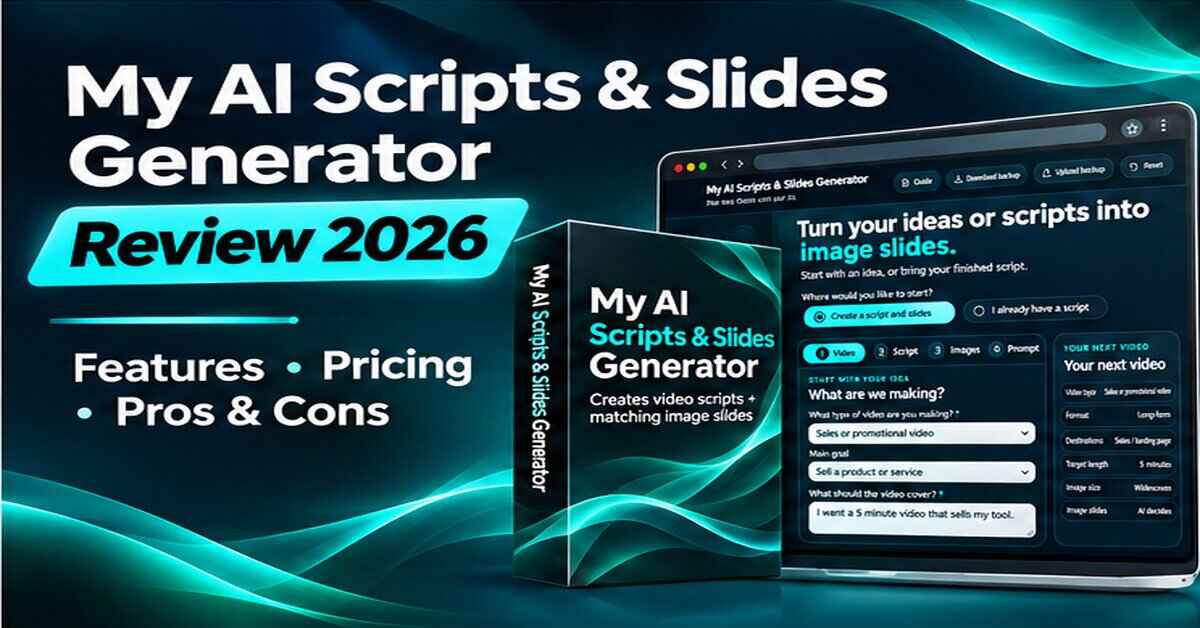
My AI Scripts & Slides Generator is a guided tool that runs in your browser. You answer a series of questions about your video, and the tool turns your answers into one long, detailed prompt. You then copy that prompt into ChatGPT, Grok or Gemini. Your chosen AI uses it to write the script and create matching image slides.
The key word is “prompt.” The generator itself doesn’t call any AI while you use it. The sales page says the browser tool makes no AI calls while you choose settings, revise answers or build your starting prompt. All the actual writing and image creation happens in your own AI conversation.
You can start in three ways. You can describe a fresh idea, you can give the AI content you already own (like sales copy, blog articles or teaching notes), or you can paste a finished script and keep your own words while the AI builds the matching images around it.
The package includes three things: the browser tool, a user guide in Word and PDF, and a PLR license. The license lets you rebrand the tool and the guide and sell your own edition, or add it to a bonus, bundle or membership. The exact limits of what you can do are in the license that comes with the product, so read it before you plan around it.
How Does My AI Scripts & Slides Generator Work?
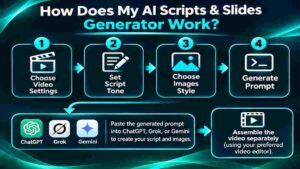
The tool follows a short, guided path. Here’s how it plays out in practice.
Step 1: Getting Started
You open the tool in your browser. There’s no software to install, and the page says there’s no login and no API key. You choose whether you’re creating a new script or building slides around a script you already have.
If you’re starting fresh, the tool asks for the basics: the video type (sales video, tutorial, presentation, lesson, explainer, story, review, interview, webinar or something else), the audience, the goal, the length and where the video will be published.
Step 2: Setting Up the Product
Next come the script and image choices. For the script, you set the tone, the opening style, the narration and the speaking pace. You can also ask for titles, descriptions and caption text.
For the visuals, you pick a style, such as photography, cinematic realism, illustration, 3D artwork or collage, or describe one yourself. You can add your brand colors and notes about reference images, and you can choose the number of slides or let the AI suggest one. Then the tool generates your finished prompt, which you can copy or download as a Word or TXT file.
Step 3: Using the Main Features
Now you take that prompt to ChatGPT, Grok or Gemini and supply any source materials it asks for. The prompt tells the AI to show you the script and numbered slide previews first, before making full-size images. You review the sequence, ask for changes by naming the slide number, and approve the final version.
After that, you bring in your own voiceover. The sales page describes an assembly step where ChatGPT Work combines the slides with the narration, adds crossfades and subtle zooms, and exports an MP4. The creator says this is the workflow he used himself, and he’s clear he hasn’t tested that assembly step in Grok or Gemini. You can also use your own video editor.
👉 Curious what the four guided screens and the finished prompt actually look like? Take a look inside My AI Scripts & Slides Generator here.
My AI Scripts & Slides Generator Features and Benefits
There’s a lot packed into the page, so I’ll focus on the three features that I think matter most.
Feature 1: A Guided Super Prompt Builder
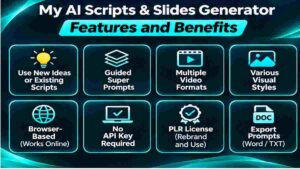
This is the heart of the product. Instead of writing a long prompt from scratch, you work through four guided screens: Video, Script, Images and Prompt. Each one collects the details an AI needs to give you something useful.
The benefit is consistency. A vague prompt gets vague results, and most people don’t know what to include. The tool makes sure you’ve covered the audience, goal, tone, pacing, visual style and format before you ever open your AI. You can also change your answers as often as you like, since nothing is sent to an AI until you’re ready.
Feature 2: Scripts and Slides That Belong Together
Most AI tools write the words and leave the pictures for later. This one asks your AI to plan both at the same time, so every passage of the script has a matching visual.
The prompt also asks the AI to preview the script and numbered slide sketches before making the full-size images. That’s a smart touch. It means you catch problems early, instead of discovering after twenty finished images that slide six doesn’t fit. You can request targeted revisions and leave the approved slides alone.
Feature 3: Multiple Versions and Supporting Files
One idea can need more than one video. A long YouTube explanation and a short vertical clip have different jobs. The tool lets you pick several destinations, such as YouTube, Shorts, TikTok, Instagram, Facebook, LinkedIn, Pinterest, web pages, sales pages and courses, and asks the AI for separate versions.
The prompt also requests useful extras: a Word plan with the script, slide numbers, visual descriptions, on-screen wording, timing estimates and assembly notes; separate numbered image files; a spoken-script TXT file for narration; and optional titles, descriptions and captions. All of that keeps your project organized when you move on to editing.
A Few More Things Worth Mentioning
- Use your own materials. You can bring real screenshots, logos, covers and product photos into the visuals
- Existing-script mode. Keep your exact wording and have the AI create images around it
- Works in your browser. No API key, no tool login and no monthly tool fee
- A user guide in both Word and PDF
- PLR rights so you can rebrand and sell your own edition
Who Is My AI Scripts & Slides Generator Best For?
Based on the sales page and how the tool works, here’s who I think gets the most out of it:
- Video creators and marketers who want scripts and visuals planned together instead of separately
- Affiliate marketers who want promo videos for the products they recommend
- Teachers, coaches and course creators turning notes into lessons with matching images
- Bloggers who want to turn existing articles into video content
- PLR and digital product sellers who want a ready-made tool to rebrand and sell or use as a bonus
Here’s a simple example. Say you have a blog post that explains how to set up a home workout space. You choose “tutorial,” describe your audience, pick a friendly tone and an illustrated style, and let the tool build the prompt. Your AI writes a script and plans a slide for each step. You review the previews, record your voiceover and put it all together. One blog post becomes a video without a blank-page struggle.
It’s probably not for you if you want a one-click button that outputs a finished video. It’s also not ideal if you don’t already have access to an AI tool that can create images and files, since the generator depends on that.
My AI Scripts & Slides Generator Pros and Cons
No product is perfect, and this review of My AI Scripts & Slides Generator wouldn’t be useful if I only gave you the good half.
Pros
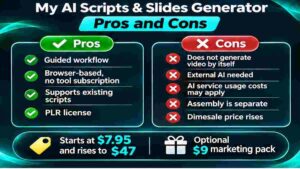
- Very low dimesale entry price, starting at $7.95
- Guided steps build a detailed prompt so you don’t need prompt-writing skills
- Plans the script and slides together, with previews before full-size images
- Works with ChatGPT, Grok or Gemini
- Lets you keep an existing script and build visuals around it
- Supports multiple destinations and video lengths
- No API key, no tool login, no monthly tool fee
- Includes a user guide and PLR rights
- The page is honest about what the tool does and doesn’t do
Cons
- It builds prompts, not finished videos. You still do the AI creation, the voiceover and the assembly
- You need your own AI access, and image creation and file tools may depend on your plan
- The video assembly workflow is described only for ChatGPT Work, and the creator hasn’t tested it in Grok or Gemini
- The price rises with every sale, so the cheapest window is short
- PLR products can be widely sold, so a rebranded edition needs a clear angle to stand out
- The sales page doesn’t state a refund policy
- Many upgrades are offered, so it’s easy to overspend
👉 Wondering where the dimesale price is right now? Check the current price of My AI Scripts & Slides Generator here.
My AI Scripts & Slides Generator Pricing and OTOs
This is a dimesale, which means the price rises with every sale. It starts at $7.95 and climbs until it reaches $47. So the earlier you buy, the less you pay, and the exact number depends on how many people have bought before you. Launch day is November 21 at 8 AM Eastern, according to the launch page, so check the live price when you read this.
The front-end purchase includes the browser tool, the user guide in Word and PDF, and the PLR license.
At checkout there’s one optional add-on:
- PLR Marketing Pack ($9): a sales letter in Word and PDF, an HTML sales page, an HTML download page, the video sales letter and demo shown on the sales page, two video scripts, two voiceover MP3s, 6 promotional emails, 25 social media posts, 5 short-video scripts, cover graphics, 4 tool screenshot excerpts and an AI rebranding guide
Then the launch funnel lists four optional upgrades, each with a cheaper downsell if you decline:
- Revenue Launch Kit (PLR), $17 (downsell $12)
- White Label edition of the Generator, $27 (downsell $17)
- My AI Super Prompt Generator (PLR), $37 (downsell $18.50)
- My AI Free Traffic Generator (PLR), $47 (downsell $37)
The launch page doesn’t describe what each upgrade contains in detail, so I’d read each offer page before saying yes. You don’t need any of them to use the generator yourself.
My honest advice: if you only want the tool for your own videos, the front-end alone is plenty. The Marketing Pack makes sense only if you plan to sell your own branded edition and want ready-made pages and emails. And remember that the upgrades are separate purchases, so decide what you’ll actually use before you click.
If you’re looking at ways to build income with digital products, my Digital Products category has more ideas.
My AI Scripts & Slides Generator Bonuses
Here I want to be straight with you. The sales page doesn’t list a separate bonus stack for the front-end purchase. What you get is the core package: the tool, the user guide and the PLR license.
The closest thing to a bonus is the optional PLR Marketing Pack, but that’s a paid add-on at $9, not a free extra. It’s a decent value if you plan to sell your own edition, since it saves you from writing a sales page, emails and social posts from scratch. Just don’t mistake it for something included.
If extra bonuses show up at checkout, you’ll see them there. Until then, I’d judge the product on what the page actually promises.
If you like the idea of video-based projects, you might enjoy my Faceless YouTube Income review, which looks at a related approach to making videos without being on camera.
My Evaluation of My AI Scripts & Slides Generator
My test for any tool is simple: does it solve a real problem better than what you could put together yourself? Here’s how I’d score it.
| Category | Score |
|---|---|
| Ease of use | 8.5/10 |
| Usefulness of the guided prompts | 9/10 |
| Value at dimesale pricing | 9/10 |
| Clarity about what you still do yourself | 8/10 |
| Detail on refund and license terms | 6.5/10 |
| Overall | 8.5/10 |
The prompt builder is where the value is. Anyone can type “write me a video script” into an AI. Getting a strong script and a consistent set of images takes a lot more detail, and this tool collects that detail for you. At a starting price under $8, that’s easy to justify.
Where I’d be careful is expectations. The page is honest that the generator builds the prompt and that your chosen AI does the creating. That means your results depend on the AI you use, the plan you’re on and how much you review. The lower score on terms is because the sales page doesn’t spell out a refund policy or the details of the PLR license, and I’d want to see both before relying on them.
If you want more tools for creating content with AI, browse my AI Tools category and the AI Audio & Voice Tools category, which is handy for the voiceover stage.
My AI Scripts & Slides Generator vs. Alternatives
This tool isn’t competing with one specific product. It’s competing with the usual ways people create video content.
| Approach | What You Get | The Catch |
|---|---|---|
| Writing prompts yourself in ChatGPT, Grok or Gemini | Total flexibility and no extra cost | You have to know what to include, and results are often generic |
| All-in-one AI video generators | Finished videos with less manual work | Usually monthly fees, credits and limits |
| Hiring a scriptwriter and designer | Human quality | Costs add up fast for every video |
| Making slides manually in a design tool | Full control | Slow, and you do the writing and design |
| My AI Scripts & Slides Generator | Guided prompts for scripts and matching slides, plus PLR rights | You still create, voice and assemble the video yourself |
To be fair, an experienced prompt writer could build something similar on their own. But most people don’t, and a guided tool saves a lot of trial and error. If you prefer something that outputs finished videos automatically, an all-in-one video generator may suit you better, though you’ll likely pay monthly for it.
For another example of a ready-made digital product, my Prepper Book Builder review looks at a different kind of tool, and the Passive Income category has more ideas.
Is My AI Scripts & Slides Generator Legit?
From what I could see, yes. It’s sold through WarriorPlus, a long-running marketplace for digital products, and it comes from a named vendor, Michel Sirois of Scalable PLR Products. The website has terms, a privacy policy, a DMCA notice, an FTC statement, an income disclosure and a contact page.
What I like most is the honesty of the sales copy. It says clearly that the tool builds the prompt, that your chosen AI creates the script and slides, and that video assembly depends on ChatGPT Work with video tools available. The creator even says he hasn’t tested that assembly in Grok or Gemini. That kind of plain language is a good sign.
It also doesn’t make wild income promises. It’s a practical tool with a PLR license attached. Whether you earn money from the PLR side depends on how well you brand, position and promote your edition, and PLR products are often available to many sellers at once. So treat it as a useful tool first and a business opportunity second.
My AI Scripts & Slides Generator Refund Policy
I looked for a refund policy on the sales page and the terms page, and I couldn’t find one stated. The sales page doesn’t mention a money-back guarantee, and the terms page covers website use, product licenses and applicable law, but not refunds.
So I won’t claim there’s one. Since the product is sold through WarriorPlus, the refund details are usually shown on the checkout page or in the vendor’s support information. Before you pay, read the checkout details. If you can’t find a clear answer, contact the vendor and ask. With a starting price this low the risk is small either way, but it’s better to know.
Frequently Asked Questions
Does the tool create a finished video?
No. The tool builds your super prompt. Your chosen AI creates the script and slides. For assembly, the page suggests ChatGPT Work with video processing available, or your own video editor.
Do I need to know how to write prompts?
No. You choose your options and describe the project in plain language, and the generator builds the detailed instructions for you.
Can I use a script I already have?
Yes. There’s a dedicated workflow for existing scripts. The instructions tell the AI to keep your wording and order and create matching slides around it.
Can I use my own images and screenshots?
Yes. Describe their purpose in the tool, then attach the actual files in your AI conversation.
Will preparing my prompt use my AI allowance?
No. The browser tool makes no AI calls. Your AI service handles the writing, images and file creation afterward.
Can I rebrand and sell the tool?
Yes. The PLR license lets you rebrand and sell your own edition. Check the license that comes with the product for the exact permissions.
What AI tools does it work with?
ChatGPT, Grok and Gemini. You supply your own account, and you’ll want one that supports the image and file tools your project needs.
Is there a refund?
The sales page doesn’t state one, so check the checkout page or ask the vendor before buying.
Final Verdict: Is My AI Scripts & Slides Generator Worth Buying?
Let’s wrap up this My AI Scripts & Slides Generator Review honestly.
The problem it solves is real. Turning a video idea into a script and a matching set of visuals takes a lot of small decisions, and a vague prompt wastes your time and your AI allowance. This tool gives you a guided way to make those decisions up front, build a detailed prompt, and let your AI do the creative work. At a dimesale price that starts under $8, with no monthly tool fee, it’s a low-risk way to improve how you make video content.
The cautions are small but worth knowing. It builds prompts, not finished videos, so you’ll still handle the voiceover and assembly. You need your own AI access. The refund policy isn’t stated, and the price climbs with every sale. And if you’re thinking about selling a rebranded version, plan your angle carefully, since PLR products are rarely exclusive.
My honest take: if you make videos, run promotions or teach online, and you want a faster, more organized way to plan scripts and slides with AI, this is worth a look while the price is still low. If you want a one-click finished video, you’ll likely be happier with a different type of tool.
👉 Ready to see how much easier your next video can be? Grab My AI Scripts & Slides Generator at the current dimesale price before the next increase.
Quick disclosure: this post contains affiliate links, which means I may earn a small commission if you buy through them, at no extra cost to you. I only recommend tools I think are worth your attention, and my opinions are my own. Results from any product depend on your own effort and situation, and nothing here is a promise of income.