Embroidery Design Vault Review: 680 Design Ideas, Five Handmade Styles and a Puzzle Book Maker for $17
Handmade-looking art sells. Anyone who has browsed Etsy for five minutes has seen it: stitched birthday bunnies, yarn-textured golden retrievers, little patchwork cowgirl boots, lacy witch’s cats. It feels warm, personal, and a bit nostalgic, and that’s exactly why people buy it. This Embroidery Design Vault review is for anyone who loves that look and wants a faster way to create it, without a sewing machine, a drawing tablet, or years of design experience.
I went through the whole sales page: what’s included, how the workflow runs, what you’ll still need to bring yourself, and what the fine print says. I’ll give you the good parts and the limits, because both matter when you’re deciding where to spend your money.
The Idea Is Easy. The Starting Point Isn’t.
Here’s a story you may recognize.
A friend of mine, I’ll call her Nadia, loves crafts. She’d been telling herself for months that she’d start a small shop selling printable gift art. Greeting cards, wall prints, maybe a few mugs. She even had a list of ideas in her phone.
Then she sat down to begin, and nothing happened.
What subject should she pick? What style would look consistent across a collection? How would she describe the design to an AI tool so it came out the way she imagined? And once she had a picture she liked, how would she get it to the right size for printing? Every question led to three more.
She spent two weekends experimenting with prompts, getting results that looked nothing alike, and ended up with a folder of random images that didn’t belong together. The shop never opened.
Nadia isn’t unusual. Most people don’t give up because they lack creativity. They give up because the setup around the creativity is messy.
Why Handmade-Look Art Is Harder Than It Looks
Let me break down what trips people up, because it explains what this product is trying to fix.
Inconsistent style. If you generate artwork with a general AI tool, one image might look like thread embroidery and the next like a flat cartoon. A collection needs a consistent feel to look professional.
Prompt guesswork. Getting the right texture, the right palette, and the right background takes trial and error. Every attempt costs time.
Scattered files. Images end up in downloads, chat histories, and random folders. Finding the one you liked last week becomes a chore.
Sizing and print prep. A pretty image isn’t a printable product. You need exact dimensions and the right resolution, or the result looks soft and blurry on paper.
Turning art into products. Even with good images, you still have to arrange them into cards, printable sets, PDFs, or books.
Each step is small on its own. Together, they’re enough to stop a project before it begins.
So What Is the Embroidery Design Vault?
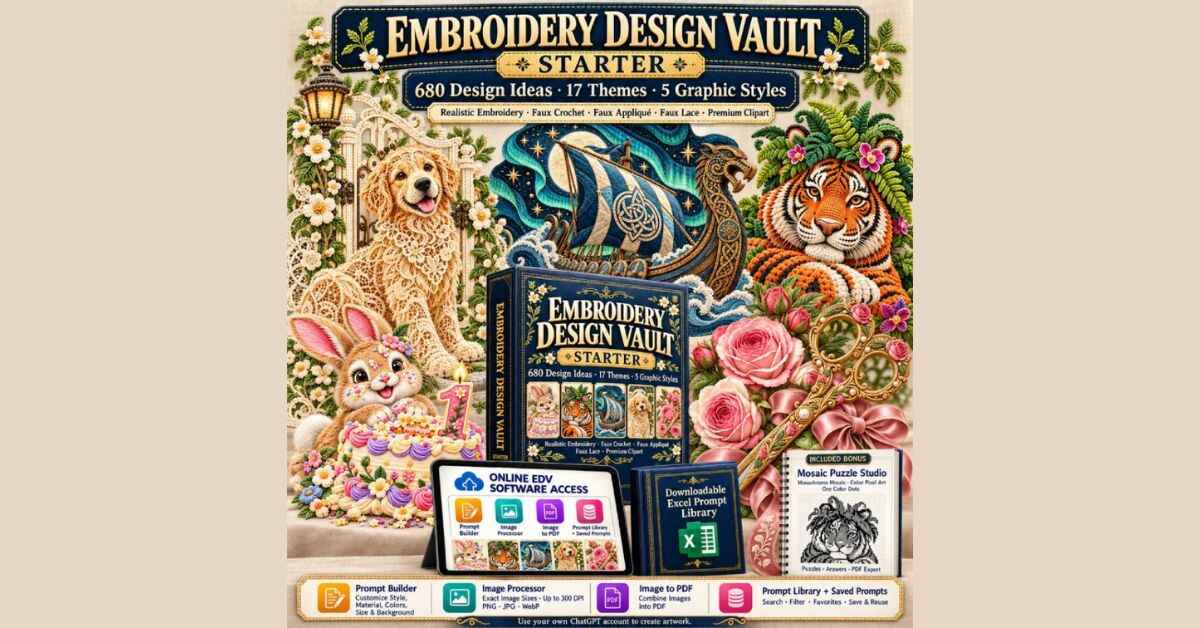
The Embroidery Design Vault, or EDV, is a creative toolkit from PromptoriaKit, created by Ethan Truong. The Starter version is a one-time $17 purchase, and it combines three things:
- A library of 680 design ideas, each with a ready-to-use AI prompt
- An online software workspace with tools to customize, prepare, and package your images
- A matching Excel library of all 680 ideas and prompts
The workflow is simple. You pick a design idea. You use its prompt, either as it is or customized, in your own ChatGPT account to generate the artwork. Then you return to EDV to size the image, build a PDF, or turn your images into puzzle pages.
One thing to be clear about right away: EDV doesn’t create the artwork itself. It prepares the prompts and the tools around them. You generate the images with your own ChatGPT account that supports image generation. I’ll say more about that in the honest section below, because it matters.
The Five Graphic Styles
The consistency problem I mentioned earlier is where I think EDV earns its keep. Every design idea can be rendered in five distinct looks:
Realistic Thread Embroidery. Silky fibers and directional stitches, with that richly embroidered finish.
Faux Crochet and Yarn. Soft loops and cozy, amigurumi-style dimension.
Faux Appliqué and Patchwork. Layered fabric pieces, decorative seams, and tactile detail.
Faux Lace and Ornamental Stitch. Delicate openwork with an heirloom feel.
Premium Isolated Clipart. A semi-realistic look on a clean, isolated background, handy for layouts and product mockups.
Because the same subject can appear in any of these styles, you can keep a collection visually consistent, or explore the same idea in a different material. The page shows one birthday bunny done in both crochet and thread embroidery, and the difference is easy to see.
Curious What the Art Looks Like?
I’d rather you judge the look with your own eyes than rely on my description. The sales page has a gallery of example artwork for all five styles, plus a nearly three-minute software walkthrough showing the real workflow, from choosing a design to building a PDF. A few minutes there will tell you whether the style fits what you want to make.
👉 Take a look at the Embroidery Design Vault and browse the example artwork
17 Themed Collections to Build Around
The 680 ideas are organized into 17 collections, with 40 ideas in each. The subjects are specific, which helps. Here’s a sample from the page:
- Golden Retriever Family Companions
- Baby Elephant Parade Nursery
- Bunny Cake-Smash Milestones
- English Rose Garden Romance
- Grandma’s Garden Family Keepsakes
- Vintage Red Truck Christmas
- Halloween Witch’s Black Cat
- Kindergarten Teacher Classroom Gifts
- American Football Tailgate Traditions
- Engagement Ring Proposal Keepsakes
- Viking Longship Ocean Voyages
- Bengal Tiger Jungle Royalty
- Cowboy Boot Wildflower Art
- Cozy Mystery Book Club Art
- Highland Cow Meadow Picnic
- Christian Cross Wildflower Devotion
- Dog Adoption Gotcha-Day Keepsakes
Look at that list for a second. It’s a mix of seasonal, sentimental, and hobby-driven subjects, the kinds of things people buy for birthdays, holidays, weddings, new babies, teachers, and pet lovers. With Christmas close, the vintage red truck and holiday-leaning ideas feel especially timely.
Inside the software, you can search, filter, and save favorites, so finding the right idea doesn’t mean scrolling through a giant spreadsheet.
The Tools Inside EDV
This is the part that moves it past “just a list of prompts.” Here’s what the workspace includes.
Prompt Builder
Every one of the 680 ideas comes with a ready-to-use prompt. You can use the original straight away, or open the Customize option to adjust things like the graphic style, palette, canvas size, and whether you want a transparent or white background. The subject and scene stay the same, so you’re changing the look, not the idea. You can save your customized prompts for later projects.
The page also does the math for you: 680 ideas times five styles gives up to 3,400 idea-and-style combinations. It adds, fairly, that some of those can share themes or look similar, so don’t read it as 3,400 completely different products.
Image Processor
This one is practical. You set exact pixel dimensions and export at up to 300 DPI in PNG, JPG, or WebP. The page gives an example: 3,000 by 4,200 pixels equals 10 by 14 inches at 300 DPI. You can import several common formats, preview, and download.
The page is also honest about a common misunderstanding: raising the DPI doesn’t add detail that wasn’t in the original image. It’s about getting your file into the right size for your project, not magically sharpening it.
Image to PDF
You can add up to 40 images, put them in order, preview the document, and download one PDF with one image per page. For printable art sets, portfolios, or digital collections, that’s a handy shortcut.
Mosaic Puzzle Studio (Included Bonus)
This was the surprise for me. Mosaic Puzzle Studio takes your own images and turns them into printable puzzle pages, with matching answer pages. There are three puzzle styles:
- Monochrome Mosaic, with square cells, dots, and a black-and-white solution
- Color Pixel Art, with numbered cells, a color key, and a color solution
- One Color Dots, where a picture is revealed through circles
You can work with up to 40 source images, which means up to 40 puzzles and 40 matching answers, and export puzzles only, answers only, or a combined book. Paper options include US Letter, A4, and 8.5-inch square, and you can preview the pages first.
For anyone interested in activity books, puzzle pages, or printable packs, that’s a whole extra product category from a bonus tool.
The Excel Library
Prefer a spreadsheet? You also get an Excel file with all 680 ideas and their prompts, so you can browse, organize, and copy them on your own device without logging in.
A Note on Privacy
One detail I liked: the Image Processor, Image to PDF, and Mosaic Puzzle Studio all process your images in your browser, and the page says your uploads aren’t sent to EDV’s hosting for processing. If you’re working with personal photos or client images, that’s reassuring.
Embroidery Design Vault Review: What You Could Actually Make
Here are some realistic ideas for how different people might use this. These are illustrations, not promises or testimonials.
The Etsy beginner. Nadia, from my story, picks the Bunny Cake-Smash collection. She generates a set of birthday designs in thread embroidery style, uses the Image Processor to size them for print, and bundles them into a printable art set for first-birthday parties. A consistent set looks far more professional than a handful of random images.
The gift-and-merch maker. Dan loves dogs. He uses the Golden Retriever collection to create one design in a crochet style, then places the same image on a T-shirt, a mug, and a tote bag through a print provider’s templates. The page shows this exact idea: one image, three product ideas. Physical products aren’t included, but the artwork is the starting point.
The puzzle-book publisher. Priya has been curious about activity books. She generates a batch of cozy mystery or highland cow images, uploads them to Mosaic Puzzle Studio, and builds a puzzle book with matching answers, ready for a print-on-demand workflow.
The card and keepsake seller. Marcus makes personalized cards. He uses the engagement, grandmother, and teacher collections to design greeting cards, framed prints, and gift sets for specific moments.
The creator who wants a niche. Sofia likes the idea of focusing on one collection, like the book club theme, and building a full set of printables around it.
The common thread is the same. Each of these people starts with a clear subject and a consistent look, which removes the usual guesswork.
Ready to See the Whole Package?
If you’d like to see every collection, the tools, the walkthrough videos, and the usage terms in one place, the official page has everything laid out. It’s worth a read before you decide anything.
👉 See everything included in the Embroidery Design Vault Starter
Usage Rights, in Plain English
One question people always ask is: what can I do with this?
According to the page, you have flexibility to use the prompts for personal and commercial purposes, create digital printables for Etsy or other marketplaces, develop print-ready books for Amazon KDP, and edit, customize, combine, repackage, or resell the prompts under your own brand.
Notice the wording, though. These permissions apply to the prompt content. The EDV software access belongs to your purchased account, and it isn’t a source-code or software-resale license. You also need to follow the rules of whatever marketplace or tool you use for your finished work. That’s a normal and sensible boundary.
The Price
The Starter version costs $17, one time, with no subscription. The page says your own ChatGPT account and any charges from third-party tools or marketplaces are separate.
There’s also an All Access option for $197, listed as a savings from $255 if you bought the five collections separately. It includes 35,760 design ideas across 894 themed collections, plus the same tools. Starter is the entry point, and All Access is there if you outgrow it. For most people trying this out, I’d start with Starter and see how the workflow feels before thinking bigger.
The Guarantee
The purchase comes with a 30-day money-back guarantee. The page explains it clearly: if the product doesn’t work as described, or you hit a technical issue that support can’t resolve, you’re eligible for a refund. It also says to contact support first so they can try to fix any problem.
Creator support is available for access and product questions, and the creator, Ethan Truong, lists email and Facebook contact options on the page. Also read: Fresh Start Author Vault Review 2026: Five Full-Book Bots for a Timely January Catalog
The Honest Part: What You Should Know First
I promised to be straight with you, so here’s the other side.
It’s not finished artwork. You aren’t buying 680 ready-made images. You’re buying 680 design ideas with prompts. You generate the artwork yourself, so the quality of what you get depends on the tool and on a little patience.
You need your own ChatGPT account. The page says an account that supports image generation is required, and a subscription or credits aren’t included. If you don’t already have one, factor that cost in.
These aren’t machine embroidery files. This is a big one for actual stitchers. EDV does not export PES, DST, JEF, or any other stitch files. The artwork is a faux-embroidery look made with AI. The page says suitable artwork might be used as a reference for a separate digitizing process, but that’s a separate job.
AI results vary. Edges, transparency, colors, and fine details can differ from one generation to the next. The page itself tells you to review each image before printing or publishing, including checking transparent backgrounds.
Sales aren’t guaranteed. The page’s own disclaimer says the product is a creative workflow resource and doesn’t guarantee sales, rankings, or income. Results depend on your product quality, pricing, competition, listing, and effort.
Check marketplace rules. Platforms like Etsy and Amazon KDP have their own policies, including rules about AI-generated content. Read the current guidelines for any platform before you list something.
None of this makes the product a bad choice. It just means EDV is best treated as a creative head start and a tidy toolkit, not a button that produces a finished business.
Who Should Think About It
I think EDV makes sense for you if you:
- Love the handmade, stitched, or crocheted look
- Want to sell printables, cards, prints, or gift designs
- Are curious about creating puzzle or activity books
- Already use ChatGPT and want better, more organized prompts
- Prefer a consistent style across a collection
- Want a low-cost way to test a creative niche
Who Might Want to Skip It
You might pass if you:
- Need actual machine embroidery stitch files
- Don’t want to use an AI image tool at all
- Expect finished artwork delivered with no work
- Are looking for guaranteed income
My Final Thoughts
When I step back from the feature list, what I like most about the Embroidery Design Vault is how it removes the early friction. The subjects are chosen. The prompts are written. The styles are consistent. The sizing, PDF, and puzzle tools are in one place. You aren’t starting from a blank chat and a vague idea.
And the pricing is gentle. For $17, one time, plus a 30-day guarantee, you can test the workflow properly, make a few designs, size them, and see whether it suits you. If it does, you have 680 starting points and a whole set of tools. If it doesn’t, you have a way out.
It won’t create a business on its own, and it can’t promise a single sale. But if you’ve been sitting on a handmade-art idea and never got past the first step, this removes a lot of the reasons not to start.
Have a look at the examples, watch the walkthroughs, and see whether the style feels like yours.
👉 Check out the Embroidery Design Vault and see if it’s the right creative starting point for you
Pricing, included tools, and the guarantee are as shown on the official page at the time of writing and can change, so please confirm the details there before you buy.
Affiliate Disclaimer: This post contains an affiliate link. If you buy through it, I may earn a small commission at no extra cost to you. I only write about products I think are worth a look, and the opinions here are my own. Please do your own research before buying, and keep in mind that results are different for everyone and aren’t guaranteed.