Marblism for Business Automation (2026): What You Can Automate, What You Can’t, and What It Costs
Think about the last time you did the same task for the fifth week in a row. Maybe it was pulling invoices for your accountant. Maybe it was writing a welcome email to a new lead, or posting the same kind of update on social media, or logging a failed payment somewhere so you wouldn’t forget to follow up. None of it is hard. It’s just repetitive, and repetitive work is exactly what automation is meant to take off your plate. That’s the idea behind Marblism for business automation: instead of building rigid workflows, you hand routines to AI employees that can think, write and use your tools. In this guide I’ll show you what that actually looks like, what you can set up today, where the limits are and what it costs.
I’ve gone through Marblism’s own product updates, its employee pages, its pricing and independent reviews. I’ll tell you what’s genuinely useful and what to be careful about.
The Problem: You’ve Automated Nothing, Even Though Everything Is Repetitive
Here’s a confession many business owners would make: they know what should be automated, and still don’t do it.
Why? Because traditional automation asks for a lot upfront. You pick a tool, learn how its triggers and actions work, map fields from one app to another, test the flow, fix it when it breaks, and then maintain it forever. If you’re a solo owner or a small team, that’s a part-time job on top of your real job. So the repetitive work stays manual, week after week, month after month.
And manual repetitive work has a sneaky cost. It’s not only the time. It’s the dropped balls.
A new lead comes in and nobody sends a reply for two days. A payment fails and nobody notices until the customer is annoyed. The monthly invoices don’t get collected until your accountant chases you. The blog goes quiet. The social feed goes quiet. A follow-up that should have gone out on Tuesday goes out never. Each one is small. Together they leak revenue and trust.
There’s a second problem with classic automation, too. It’s rigid. A rule-based workflow can move data from A to B, but it can’t write a thoughtful reply, decide that an email needs your attention, or research a lead before reaching out. The moment a task needs a little judgment, a simple automation hands it back to you.
That’s the gap AI employees are trying to fill. They’re not a replacement for every automation tool, but they can handle the kind of work that needs words and judgment, which is most of what small businesses actually do all day.
The Solution: Automation With Employees, Not Wires
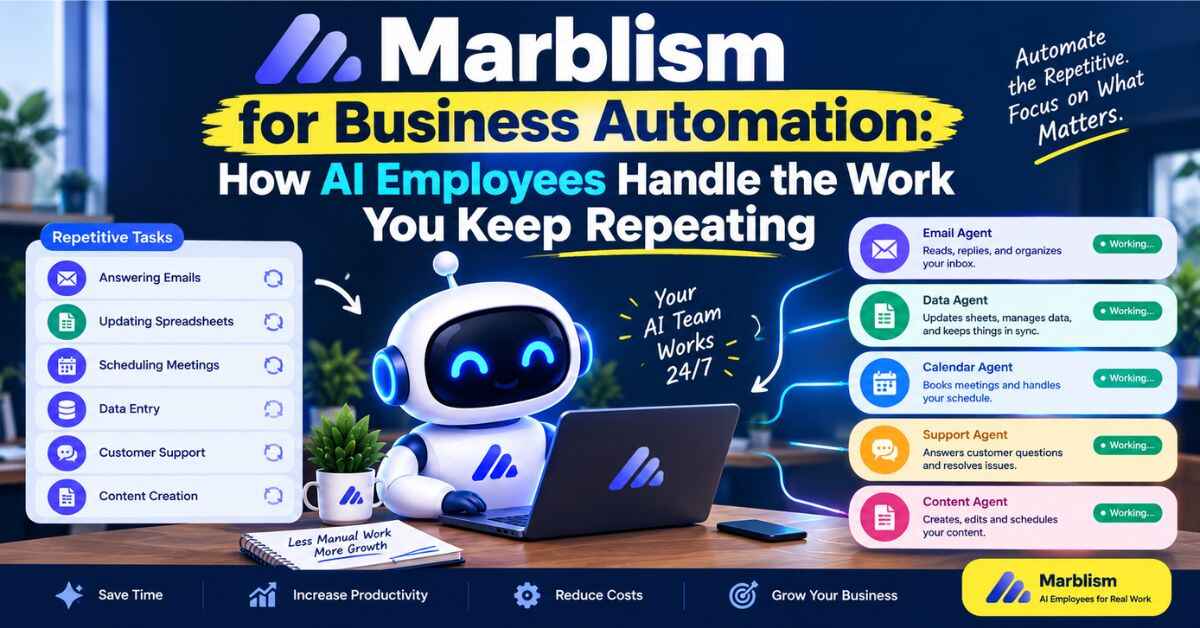
Marblism gives you seven AI employees, each with a defined job. Eva handles your inbox and calendar. Sonny runs social media. Stan does outreach. Penny writes SEO content. Rachel answers your phone. Walter builds your website. Linda reviews contracts. They connect to the tools you already use, and they check in with you for approval where it matters.
The founder, Ulric Musset, started it after years of running a larger company, where he says hiring an assistant, a ghostwriter and an SEO expert multiplied his time. Marblism turns each of those roles into an AI employee. The company says more than 40,000 businesses use it, and it’s backed by Y Combinator.
The pricing is simple: $24 a month on the yearly plan or $44 a month if you pay monthly, with all seven employees, unlimited businesses, unlimited team members, 50 hours of AI work per month and a 7-day money-back guarantee.
If you want to see the team before reading further, here’s the official Marblism page. Looking costs nothing.
Marblism for Business Automation: What You Can Actually Automate
Marblism has been adding automation features at a fast pace this year. Based on the company’s own update log, here’s what’s possible as of October 2026.
1. Tasks That Run When Something Happens in Your Apps
This one’s the headline. On August 5, Marblism announced that your AI employees can connect to thousands of business tools, including Salesforce, Stripe, HubSpot, QuickBooks, Notion, Airtable and Mailchimp. Alongside that, you can create tasks that trigger automatically on events in those apps.
Marblism’s own examples:
- A new lead is added in Salesforce, and Eva drafts a welcome email.
- A payment fails in Stripe, and Eva logs it in Airtable and drafts a follow-up to the customer.
- A deal closes in HubSpot, and Sonny drafts a celebration post for LinkedIn.
- A new row lands in Airtable, and Stan researches the lead and adds them to outreach.
You can set these up from an “Add task” screen or just describe them in chat, like “Every time a payment fails in Stripe, add a row in Airtable with the details.” There’s no field mapping and no flow builder. You explain it the way you’d explain it to a new hire.
2. Scheduled, Always-On Work
Some automation isn’t triggered by an event at all. It’s just supposed to happen every day or every week. That’s how the content employees work.
Penny can publish blog posts to your site on a schedule, like every Tuesday and Friday, and she connects to WordPress, Webflow, Shopify and Wix. Sonny can post up to three times a day to Instagram, LinkedIn, X and Facebook, can publish one post across several platforms at once, and also posts to Pinterest and Threads. Since September, he can also generate videos, including ones that use a clone of your voice and your own picture.
In both cases, you choose how hands-on to be. You can let them publish on their own, or have every draft come to you for approval first. Marblism says plenty of people start with review turned on and relax it once they trust the voice.
3. The Phone, Handled Around the Clock
Rachel is automation for the one channel most tools ignore: calls. She gets her own phone number (in the US, Canada, the UK, Mexico or Australia), answers 24/7, books appointments into your Google or Outlook calendar and transfers urgent calls to your cell. Since April she can also search the documents you’ve uploaded during a call, so she can quote a price or check an allergen guide instead of saying someone will call back. Every call comes with a transcript and summary.
4. Outreach and Follow-Up on Autopilot
Stan finds leads, writes personalized outreach, sends it from your own inbox and runs multi-step follow-up sequences across email and LinkedIn. Since July he can run several campaigns side by side, so you can target different audiences or test two hooks. When someone replies, he can answer the easy questions and get the meeting on your calendar. You can approve messages before they go out or let him run once you trust his style.
5. Meetings That Turn Into Action
Eva joins your Google Meet, Zoom or Teams calls, takes notes and sorts them into categories you choose. Since July, every summary has an “Ask Eva” button that makes her draft the follow-up emails, set reminders and close the loop on action items. Since May she can also create and edit Word documents, PowerPoint decks and PDFs using your brand voice and whatever you’ve saved in the Brain, which is Marblism’s shared knowledge area.
6. Tasks on Websites With No Integration
The newest addition, from October 12, is browser use. Your AI employees can open a browser and use websites the way you do, including supplier portals, admin dashboards, booking sites and government forms. Marblism’s example is Eva collecting the monthly invoices from several WeWork accounts for an accountant. She logged into each, downloaded the PDFs and replied in the same email thread, all from one message. When a site needs a sign-in, the employee doesn’t ask for your password. A card with a live view of the browser appears, you log in yourself, click done and they continue.
7. Talk Instead of Type
You can now speak to your AI employees. Since October 2 you can have a spoken conversation, and since June you can dictate requests with a keyboard shortcut. Calls are saved with a transcript, and the employees remember them. It’s a small thing, but when your hands are full, it makes handing off work much easier.
How the Controls Work (This Matters More Than the Features)
Automation without brakes is how people end up with an embarrassing email sent to a client. So the control system is worth understanding.
According to Marblism, every integration action has a permission level, and you choose for each tool whether to always allow it, ask every time or never allow it. Anything risky shows an approval card in chat before it runs, and Marblism says nothing destructive happens without your OK.
There are a few more built-in safety choices:
- Eva prepares email drafts, but she can’t send them for you. You review and send.
- Sonny and Penny can wait for your approval before anything goes live.
- Stan’s outreach can be reviewed before it goes out.
- Browser logins are done by you, not handed over as passwords.
My take: start strict, then loosen up. Give each employee the “ask every time” setting for the first two weeks, watch what they do, and only switch the low-risk routines to “always allow” once you’ve seen consistent results.
Seven Routines I’d Automate First
Here’s a practical starting list. They’re based on Marblism’s own examples and the way the employees work, and you don’t need to do all seven.
1. Morning inbox triage. Eva sorts your email into To reply, FYI and Marketing, filters junk and drafts replies in your voice. You review a clean list instead of a pile.
2. New lead, instant welcome. When a lead appears in your CRM, Eva drafts a welcome email within minutes. Speed matters here, and speed is exactly what people lose when they’re busy.
3. Failed payment follow-up. When a payment fails in Stripe, Eva logs the details and drafts a polite note to the customer. It’s the sort of task that quietly protects revenue.
4. Weekly content calendar. Penny publishes one or two blog posts a week and Sonny posts every day, with your approval at first.
5. Missed-call coverage. Rachel answers every call, books the appointment and texts you a summary. If your business lives on phone enquiries, this one can pay for the plan alone.
6. Meeting follow-ups. After every call, Eva summarizes it and drafts the follow-up emails.
7. Monthly paperwork. Invoices, receipts and downloads from supplier portals, using browser use, so they’re ready before your accountant asks.
Pick two. Run them for two weeks. Then add more. Marblism Review 2026: Pricing, Honest Pros and Cons, and Who Should Actually Use It
Real-World Examples
Let’s make it concrete with a few people.
The consultant who forgets to follow up. She meets with prospects all week, and the follow-up emails stay half-written. Eva summarizes each call and drafts the follow-up while the conversation is fresh. She reviews and sends in a minute.
The online store owner with failed payments. He used to find out about failed payments when a customer complained. Now Eva logs each one and drafts a follow-up so he can send it the same day.
The home-service owner. He’s on a job when the phone rings. Rachel answers, books the visit and sends him a summary with a transcript. The rule he used to follow, “call back when I can,” turns into a booked job.
The coach with a quiet feed. Sonny posts several times a week and Penny publishes a weekly article. She reviews drafts from her phone in a few minutes a day.
The small team with a messy admin day. The owner asks Eva to collect September’s invoices from several accounts and reply to the accountant. One message instead of an hour of logging in.
Marblism also publishes customer stories on its site. They’re written with the company’s help, and each person’s results are their own, but they show a common pattern: owners set up the team quickly, keep the approval step, and use the time they get back on the work only they can do.
Marblism vs Traditional Automation Tools
I don’t think this is an either-or choice, so let’s be clear about the difference.
Traditional workflow tools, like Zapier or Make, are excellent at predictable, rule-based jobs: when this happens, do exactly that. They’re cheap for simple flows and very reliable when the logic is fixed. But they need you to build and maintain the workflow, and they can’t write, research or judge.
AI employees like Marblism’s are better when the work involves language and judgment: drafting a reply, researching a lead, writing a blog post, answering a caller’s question. You describe what you want in plain language instead of building a flow.
The trade-off is predictability. An AI employee can occasionally get something wrong or lose context on a long instruction, which is why the approval controls matter. A rule-based workflow will do exactly what you told it to, every time.
So a sensible split looks like this: use classic automation for fixed, mechanical data moves, and use AI employees for the work that needs words. Some businesses use both.
The Honest Limits
A guide that only listed features wouldn’t be worth reading. Here’s the other side.
It’s not set-and-forget. Independent reviewers consistently say Marblism needs daily review. Estimates range from about 10 to 45 minutes a day, plus a few days of tone adjusting. Automation here means fewer repeated tasks, not zero involvement.
The 50 hours are shared. Only advanced actions use them, and they reset monthly, with top-ups available. Marblism doesn’t publish a simple price list for each action, and third-party conversions don’t agree. Event-triggered tasks run AI work, so it’s sensible to assume they use hours too, and to check how fast your allowance drops in the first few weeks.
Results vary by employee. Reviewers are happiest with email, social, phone and websites. Lead generation is the one with the most mixed results, and if you run cold outreach you’re responsible for email laws like CAN-SPAM and GDPR.
Older reviews may be out of date. Some reviews from earlier this year say Marblism lacked CRM and business-tool integrations. The August update added thousands of tools, so check the current integrations page for the apps you use.
Support has limits. Many reviewers praise the human team, but Marblism has said its around-the-clock support is an AI bot and its people work business hours.
Watch the billing details. There’s no free trial. It’s a 7-day money-back guarantee, and yearly is $240 cheaper than monthly. Read the checkout page carefully.
For sensitive work, keep a human in the loop. For anything legal, financial or high stakes, treat the output as a first draft.
Who It Fits (and Who Should Skip It)
It tends to suit:
- Solo owners and small teams who do lots of repetitive communication work
- Service businesses that lose customers to missed calls and slow replies
- Marketers and coaches who need consistent content
- Owners who want help without learning a workflow builder
You might skip it if you:
- Need strict, fully deterministic workflows with no variation
- Work in a company with heavy compliance and approval requirements
- Only want one narrow automation, where a simple workflow tool is cheaper
How to Start Without Wasting a Week
Here’s the plan I’d follow.
- Pick two routines. Choose the two repetitive jobs that annoy you most.
- Connect only what you need. Link the accounts those routines require.
- Set permissions to “ask every time.” Watch for two weeks.
- Put your business details into the Brain. Prices, policies, tone, FAQs. This is what makes the output feel like yours.
- Check your hours. See how fast the 50 hours drop before adding more routines.
- Use the refund window. You have 7 days. Test your most important routine and decide with real results.
- Loosen up gradually. Move reliable, low-risk tasks to “always allow.”
If it works, add another routine. If it doesn’t, you’ve lost a week, not a year.
When you’re ready, you can start with Marblism here and set up your first routine.
The Bottom Line
Here’s where I land.
Marblism for business automation is a different animal from the workflow builders most people think of. You’re not wiring apps together. You’re handing routines to employees that can write, research, answer calls and use your tools, with approvals you control. This year’s updates, including event-triggered tasks, thousands of connected tools and browser use, make it far more capable than earlier reviews suggest.
It isn’t magic. You’ll review the work, watch your hours and keep a human in the loop for anything sensitive. But if your week is full of repetitive communication tasks, the price is low and the 7-day guarantee keeps the risk small.
The best way to know is to hand off one routine you really dislike and see what comes back. Take a look at Marblism and pick the first routine you’d automate. It could give you back some hours every week.
Quick FAQ
Can Marblism automate tasks automatically when something happens in another app? Yes. Since August 2026 you can create tasks that trigger on events in connected apps, such as a new lead in Salesforce or a failed payment in Stripe, and an AI employee handles the response.
Do I have to approve everything? Not necessarily. You can set permissions per tool to always allow, ask every time or never allow, and risky actions show an approval card first. Eva also never sends emails for you.
Is Marblism a replacement for Zapier? Not exactly. Zapier-style tools are best for fixed, rule-based data moves. Marblism is better for work that needs writing and judgment. Some businesses use both.
How much does it cost? $24 a month on the yearly plan or $44 a month if you pay monthly, with all seven employees and 50 hours of AI work included.
Is there a free trial? No. There’s a 7-day money-back guarantee instead.
Affiliate disclosure: Some links in this post are affiliate links. If you click one and decide to buy, I may earn a small commission at no extra cost to you. I only recommend things I think can genuinely help, and I’ve tried to be honest about the downsides too. Thanks for supporting the blog.